How to Group Mac App Icons More Prominently in Your Dock - MacRumorsOpen MenuShow RoundupsShow Forums menuVisit ForumsOpen Sidebar
Skip to Content

How to Group Mac App Icons More Prominently in Your Dock

by

In macOS, the Dock provides convenient one-click access to your most frequently used Mac applications. The simplest way to organize docked apps is to click and drag them into your preferred place, but here we're going to show you a lesser-known trick for arranging docked items more clearly.

using spaces to arrange dock apps
To relate certain types of apps and add an extra visual clue to their location in the Dock, try inserting some spaces. Using this method, you could separate out other apps from, say, conversion tools that you frequently drag and drop files onto. Keep reading to learn how it's done.

How to Insert Spaces into the macOS Dock

  1. Launch the Terminal app found in Applications/Utilities. (To quickly open the Utilities folder in Finder, select Go -> Utilities from the menu bar, or use the key shortcut Shift-Command-U.)

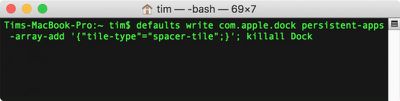
  2. At the Terminal prompt, type the following command and press Enter: defaults write com.apple.dock persistent-apps -array-add '{"tile-type"="spacer-tile";}'; killall Dock
    macos terminal dock spaces

  3. Your Dock will reboot with a single space added to it. Click and drag the space to your desired location, just like a regular app icon.
    Screen Shot

  4. Repeat the Terminal command above to insert additional spaces and arrange them in your Dock to suit.

macos dock spacers
To remove a space from your Dock simply right-click (or Ctrl-click) it and select Remove from Dock. Alternatively, click and drag the space out of the Dock then let go of the mouse button to delete it.


Top Rated Comments

109 months ago
To insert a small spacer, you specify "tile-type"="small-spacer-tile" (found on Ask Different ('https://apple.stackexchange.com/a/273540/654')).

An example with both widths:


To add them to the documents side instead of the apps side, use the key persistent-others instead of persistent-apps (found on Lifewire ('https://www.lifewire.com/add-custom-and-standard-doc-spacers-to-mac-2260861')).

Attachment Image
Score: 25 Votes (Like | Disagree)
keysofanxiety Avatar
109 months ago
Great tip, didn’t know this. Big fan of these articles too. Thanks!
Score: 8 Votes (Like | Disagree)
opeter Avatar
109 months ago
My problem with these separators is, that they take to much space (like a whole width of an icon).
Score: 6 Votes (Like | Disagree)
trollied Avatar
109 months ago
Dynamic spacer:

defaults write com.apple.dock persistent-apps -array-add '{"tile-type"="flex-spacer-tile";}'
Score: 5 Votes (Like | Disagree)
RightMACatU Avatar
109 months ago
Too bad I can't do this with my office cube neighbor :D
Score: 4 Votes (Like | Disagree)
109 months ago
I like this. Is there a way to group the icons together in a Stack, like the folders can do?
It's not as fancy, but I put aliases to grouped applications in a folder, then put those folders in the dock.
Score: 3 Votes (Like | Disagree)

Popular Stories

Apple Event Logo

Apple Working on All-New Operating System

Wednesday July 29, 2026 11:39 am PDT by
Apple is developing an all-new operating system that is essentially a mix of tvOS, watchOS, and iOS, according to Bloomberg's Mark Gurman. In a report this week, he said the operating system will feature a grid of icons, widgets, and apps, along with customizable clock faces. The new software platform is intended for Apple's long-rumored smart home hub. With built-in facial recognition,...
imac video apple feature

Apple Made Its Second-Biggest Acquisition Ever This Year

Wednesday July 29, 2026 12:03 pm PDT by
Apple this year acquired Israeli startup Q.ai for close to $2 billion, according to the Financial Times. That would make this Apple's second-biggest acquisition ever, after it paid $3 billion for the popular headphone maker Beats in 2014. This is also the largest known Apple acquisition since the company purchased Intel's smartphone modem business and patents for $1 billion in 2019. Q.ai...
Dynamic Island iPhone 18 Pro Feature

iPhone 18 Pro: Twelve Changes Coming to Apple's Next Flagship

Thursday July 30, 2026 3:43 am PDT by
We're less than two months out from the launch of Apple's premium next-generation smartphone lineup, and while we're not expecting a dramatic change in terms of functionality, there are still several enhancements rumored to be coming to the iPhone 18 Pro and iPhone 18 Pro Max. One thing worth noting is that Apple is reportedly planning a major change to its iPhone release cycle this year,...

🔗 Related Apple News & Rumors

Stay updated with the latest Apple ecosystem news and verified rumors