Give Your iPhone Screen Recording a Voiceover - MacRumorsOpen MenuShow RoundupsShow Forums menuVisit ForumsOpen Sidebar
Skip to Content

Give Your iPhone Screen Recording a Voiceover

by

On iPhone and iPad, Apple's screen recording feature records a video of what you're doing on your screen, which is great if you want to capture gameplay, walk someone through a tutorial in an app, demonstrate a bug, or anything else. You can also include a voiceover in screen recordings. Keep reading to learn how.
iPhone Home Screen Gradient
If you're making a screen recording to demonstrate something in iOS, chances are it would benefit from some voiceover commentary. Fortunately, Apple enables you to do this by activating your device's microphone for the duration of the recording.

To record your voice along with screen activity, simply follow these steps.

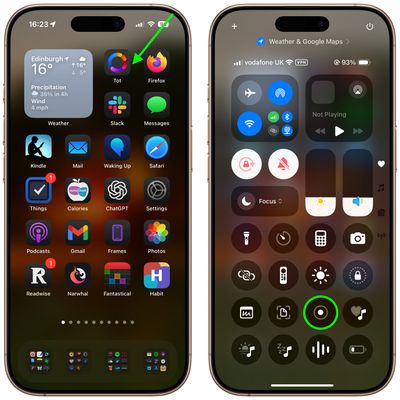
  1. Invoke the Control Center by swiping down diagonally from the top-right corner of the screen.
  2. Long press the Screen Recording button in Control Center (if it isn't there, you can add the function via Settings -> Control Center).
    home screen

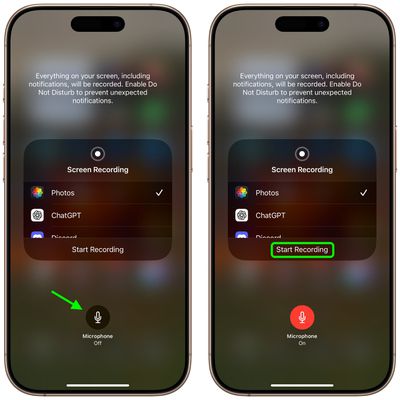
  3. Tap the Microphone button so that it turns red and reads "Microphone On."
  4. Select an app from the list that you want to save the recording to.
  5. When you're ready, tap Start Recording.
    control center

You can end the recording by tapping the Stop button in the top-left corner of the screen (if your iPhone has a Dynamic Island, tap it to reveal the Stop button), and the recording will be automatically saved to the app that you checked in the app list.


Top Rated Comments

mrgraff Avatar
16 months ago

I think it is just showing how to invoke Control Center. The app it is pointing to is irrelevant.

Correct. But it also took me a second to realize that the step had nothing to do with Tot. Also, I've never had to swipe diagonally to invoke Command Center; straight down has always worked. A stubby shorter arrow that stops just below the battery indicator might've been better.

Score: 4 Votes (Like | Disagree)
Starfia Avatar
16 months ago
That is a great tip about a very hidden feature!

And, wow – this is the first time I've ever heard of the gesture to invoke Control Center interpreted as a diagonal swipe from the upper-right corner as opposed to a vertical swipe down from the upper-right status cluster. I wonder what the code is actually detecting.
Score: 4 Votes (Like | Disagree)
UpsetTheAppleCart Avatar
16 months ago
Does anyone know how to reduce the file size of a screen recording on iPhone/iPad? I don’t always need a recording to be super clear, so a slight reduction in quality to keep the file small would be nice.
Score: 3 Votes (Like | Disagree)
MasterControlProgram Avatar
16 months ago

Correct. But it also took me a second to realize that the step had nothing to do with Tot. Also, I've never had to swipe diagonally to invoke Command Center; straight down has always worked. A stubby shorter arrow that stops just below the battery indicator might've been better.
Agreed, doing it diagonally is probably not the best instruction. Doing it that way on my iPad brings in the app I last used with slide over. It has to be a straight down swipe on there or it doesn’t work.
Score: 3 Votes (Like | Disagree)
e-coli Avatar
16 months ago
Love this type of content
Score: 3 Votes (Like | Disagree)
UpsetTheAppleCart Avatar
16 months ago

I have a “Reduce Video Size” shortcut that I don’t know where it came from on the share sheet. If you don’t have it already, try to search online, it uses an iOS built in “Encode Media” function, just like there’s one on macOS.
Oh! I never thought of using a shortcut. Thanks for the info! I found one that works great for me. Here’s the link for anyone who may be interested: https://www.icloud.com/shortcuts/cf7efcf1b47148278044bc240b7d8c99
Score: 2 Votes (Like | Disagree)

Popular Stories

Apple Event Logo

Apple Working on All-New Operating System

Wednesday July 29, 2026 11:39 am PDT by
Apple is developing an all-new operating system that is essentially a mix of tvOS, watchOS, and iOS, according to Bloomberg's Mark Gurman. In a report this week, he said the operating system will feature a grid of icons, widgets, and apps, along with customizable clock faces. The new software platform is intended for Apple's long-rumored smart home hub. With built-in facial recognition,...
imac video apple feature

Apple Made Its Second-Biggest Acquisition Ever This Year

Wednesday July 29, 2026 12:03 pm PDT by
Apple this year acquired Israeli startup Q.ai for close to $2 billion, according to the Financial Times. That would make this Apple's second-biggest acquisition ever, after it paid $3 billion for the popular headphone maker Beats in 2014. This is also the largest known Apple acquisition since the company purchased Intel's smartphone modem business and patents for $1 billion in 2019. Q.ai...
Four iPhone 18 Pro Colors Mock Feature

iPhone 18 Pro and iPhone Ultra: Pre-Orders and Release Date

Thursday July 30, 2026 6:12 am PDT by
Apple has yet to reveal when the iPhone 18 Pro and iPhone Ultra will be announced and released, but the dates usually follow a familiar pattern. Labor Day is September 7 this year. The last time the holiday fell on that day was in 2020, but the iPhone event that year was delayed until October due to the COVID-19 pandemic. So, the last time Labor Day was on September 7 in a normal year was in ...

🔗 Related Apple News & Rumors

Stay updated with the latest Apple ecosystem news and verified rumors