How to Get macOS Sequoia 15.1 Beta With Apple Intelligence - MacRumorsOpen MenuShow RoundupsShow Forums menuVisit ForumsOpen Sidebar
Skip to Content

How to Get macOS Sequoia 15.1 Beta With Apple Intelligence

by

Apple has made available the second developer beta of macOS Sequoia 15.1, which includes the ability to test Apple Intelligence features. If you have an Apple silicon Mac and don't live in China, you can try Apple Intelligence features for yourself, even if you're not a developer. Keep reading to learn how.

macOS Sequoia Night Feature
Apple has split Apple Intelligence into a separate set of betas for Macs because these features will not be available in the initial launch version of ‌macOS Sequoia‌ 15. Apple Intelligence will be available to the public later in the fall with the release of macOS Sequoia 15.1.

This point release will add several of the Apple Intelligence features, such as Writing Tools, an updated Siri design, Safari and Mail summaries, Reduce Interruptions Focus mode, and more. Other features, including Image Playground, Genmoji, and the Siri personal context and onscreen awareness will be coming later and are not in the macOS Sequoia 15.1 beta. You can learn more about what's available and when in our macOS 15 roundup.

The good news is that Apple has already seeded the second developer beta of macOS 15.1, which means you can try some of the AI features out for yourself by signing up for macOS beta access. Signing up to get the macOS Sequoia beta is simple, and can be done by following the steps below. Be sure to back up your Mac using Time Machine before going on to follow the beta software installation steps, otherwise you won't be able to revert back to your previous version of macOS if you need to.

Things to Remember Before You Start

  • Back up Your Mac.
  • Apple Intelligence requires a Mac with an M1 Apple silicon processor or later.
  • Apple Intelligence is only available in US English.
  • Apple Intelligence for Mac is not available in China, but appears to be available in the EU and everywhere else when region and language settings are changed to United States (see below).
  • Apple Intelligence is not available if macOS 15.1 is installed on an external drive.

Register for Developer Beta Access

You can skip this first set of steps if you have previously joined the Apple Developer Program with your Apple ID. Note that registering in this way is free, and does not require paying for an Apple Developer Program membership.

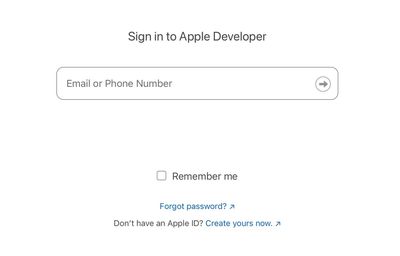
  1. Go to the Apple Developer website (developer.apple.com/account) and sign in with your Apple ID.
  2. Check the box to accept the terms and conditions, then tap the Submit button.
apple developer

That's all there is to it. You can now proceed to the next steps to download and install the macOS Sequoia 15.1 developer beta.

Download macOS 15.1 Beta

To download and install the macOS Sequoia 15.1 Developer beta, follow these steps on your Mac.

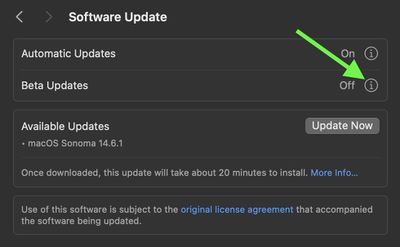
  1. Go to System Settings ➝ General ➝ Software Update.
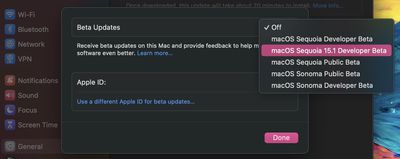
  2. Click the info button ⓘ next to "Beta updates."
    settings

  3. Choose the macOS Sequoia 15.1 Developer Beta option, then click Done.
    settings

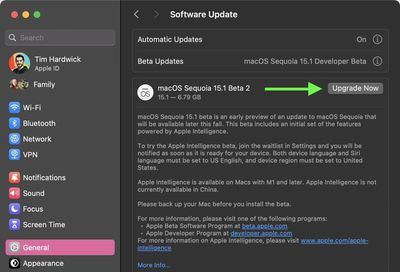
  4. When the macOS 15 Sequoia 15.1 Beta update appears, click the Upgrade Now button to start downloading and installing it on your Mac.
    settings

Activate Apple Intelligence

The following steps explain how to join the Apple Intelligence waitlist, which usually grants you access to the AI features in just a few minutes.

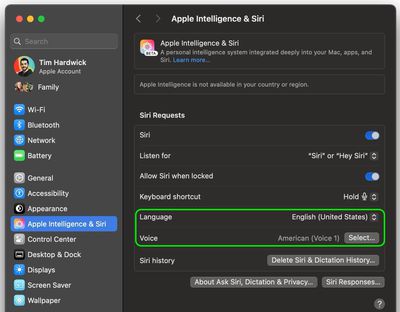
  1. Go to System Settings ➝ Apple Intelligence & Siri.
  2. Set Siri's language to English (United States), and decline to restart your Mac at the prompt for now.
  3. Set Voice to American.
    settings

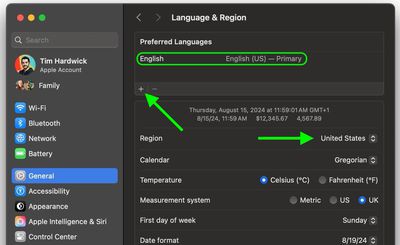
  4. Next, go to System Settings ➝ General ➝ Language & Region.
  5. Click the "Region" selector and choose United States.
  6. Under "Preferred Languages," click + and add English (US), then set English (US) as the Primary language by dragging it above your other language(s).
  7. Restart your Mac when prompted.
    settings

  8. After restarting, go to Settings ➝ Apple Intelligence & Siri.
  9. Click the option to Join the Apple Intelligence waitlist. You will be notified when Apple Intelligence features are available for your Mac. In most cases this should take only a few minutes, but don't rule out waiting a couple of hours.
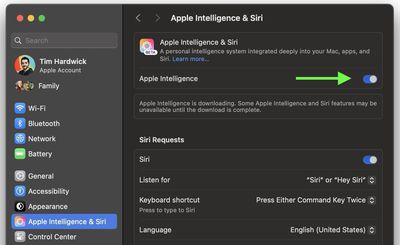
  10. When Apple Intelligence is available, toggle the switch to enable it.
    settings

Note that Apple Intelligence will not be in the initial launch version of iOS 18 that comes out in September alongside new iPhones. It will instead be introduced in a separate iOS 18.1 update that is likely to come out a few weeks after ‌iOS 18‌ debuts. Have you had a chance to try out Apple Intelligence features on Mac? Let us know of your experience in the comments.

Related Forum: macOS Sequoia

Top Rated Comments

GuruZac Avatar
28 months ago

Too bad I can't install it on my MacBook Pro M1, the VPN server I need to connect for work doesn't allow Sequoia at this time.
I have found all the Sequoia releases (currently on 15.1.2) have been extremely stable, both on my M1 MacBook Air and M3 Pro MacBook Pro. Pretty impressed to be honest. No discernible changes to battery life, app stability, etc.
Score: 4 Votes (Like | Disagree)
28 months ago
Good article. But not installing any betas. Waiting to try it out later this year.


Score: 1 Votes (Like | Disagree)
ramileo Avatar
28 months ago
I've been running Sequoia 15.1 since it was released. I soon thereafter was taken off the waitlist and had been using Apple Intelligence until this morning.

My first hint something was wrong was that Writing Tools, which I'd been using extensively, disappeared. I tried in another app, and it wasn't there, either.

I then looked at the Siri icon in my menu bar - which is different under Apple Intelligence - and it had been reverted to the old icon.

I then checked my Apple Intelligence settings and, sure enough, not only was it off, but I'd been returned to the waitlist.

My iOS and iPadOS devices continue working just fine with Apple Intelligence. Only my MacBook Pro is experiencing this issue.

Has anyone else seen this?
Score: 1 Votes (Like | Disagree)
ipedro Avatar
28 months ago

I have found all the Sequoia releases (currently on 15.1.2) have been extremely stable, both on my M1 MacBook Air and M3 Pro MacBook Pro. Pretty impressed to be honest. No discernible changes to battery life, app stability, etc.
Thanks for this. Having started using Apple Intelligence on my iPad Pro, I'm getting eager to extending its use into my MacBookPro. Sounds like it's safe to go ahead with it.

Apple has done a good job of integrating AI seamlessly into practical uses through the OS, not just a chatbot. Siri falls far short of chatGPT (in use, it feels a decade behind to be frank) but the tradeoff is that Apple Intelligence has access to my personal info and acts on it seamlessly. Email subject summaries are one thing I already don't want to go back on.
Score: 1 Votes (Like | Disagree)
28 months ago

Some nice updates to Sequoia. AI doesn't feel that revolutionary at this point but maybe much more function comes in future 15.x updates. My favorite updates are the new Sequoia wallpapers 😀 and iPhone Mirroring.
Yeah, very early on not much of the features touted are going to be available

That being said, aside from those features (of which I will be able to take advantage of with having an M2 machine) I too love the iPhone mirroring feature and use it all the time now

Even with being in beta, it works almost perfectly already
Score: 1 Votes (Like | Disagree)
BigBrotherNowWatching Avatar
28 months ago
Why would I want that on my Mac ?

Smartphones made us not smarter.
What do you think an "artificial intelligence" will do to you?

Exactly 🫡.
Score: 1 Votes (Like | Disagree)

Popular Stories

apple intelligence black

Apple Intelligence Taking Up 30GB+ on Some Macs Running macOS 27

Wednesday September 23, 2026 3:30 am PDT by
After you install macOS 27 Golden Gate, Apple automatically downloads a multi-gigabyte AI model to your Mac the next time it's connected to the internet. Unlike previous versions of macOS, you can't prevent it. Siri AI, and by extension Apple Intelligence, are now a mandatory part of your system. For macOS 27 Golden Gate, Apple says the latest Apple Intelligence features require up to 14GB...
apple ios 27 health app watch

iOS 27.2 Beta Previews New Apple Intelligence Health App

Wednesday September 16, 2026 10:32 am PDT by
The first beta of iOS 27.2 includes Apple's redesigned Health app, giving developers a chance to try out the features ahead of launch later this year. Apple's developer notes for the feature say the Health app is being tested in this beta, but it won't be in the launch version of iOS 27.2. It will instead come later in the year. The Health app will incorporate Apple Intelligence to turn...
apple watch series 12

Three All-New 'Audio Intelligence' Features Arrive With Apple Watch Series 12 and Ultra 4

Wednesday September 9, 2026 2:23 pm PDT by
Apple today announced "Audio Intelligence," a new suite of Apple Intelligence-powered features for the Apple Watch Series 12 and Apple Watch Ultra 4 that use the built-in microphone to help users catch missed moments in conversation and stay aware of important sounds. The Apple Watch's Audio Intelligence comprises four features: Siri Recap: Uses ambient listening to generate high-level...
Latest Stories
AT&T Acknowledges iPhone 18 Pro Max Issues: 'Update Immediately'
10 hours ago
New 'AirFly Drive' Accessory Turns Wired CarPlay Into Wireless CarPlay
16 hours ago
Apple Shares Photos Shot on iPhone Duo
17 hours ago
Apple Says iPhone Duo Has Replaceable 'Cover Layer'
18 hours ago
Apple's Smart Home Camera Will Apparently Have 'No Video Recording'
20 hours ago
Apple TV Just Updated Its Selection of 'Bonus' Movies
22 hours ago
iPhone 18 Pro Colors Buyer's Guide: Which Should You Choose?
22 hours ago
Early Prime Big Deal Days: Best Discounts on Accessories, TVs, and More at Amazon
22 hours ago
MacBook Pro With OLED Touch Screen Rumored to Launch in October or November
23 hours ago
Apple's All-New Home Hub Rumored to Launch in These Four Colors
1 day ago
iPhone 18 Pro Aperture Control Goes Fully Manual in Halide 3.2
1 day ago
Apple Stores Receive 'Do Not Open' Boxes Ahead of Smart Home Products Launch
1 day ago
iPhone 18 Pro Sales Jump in China Ahead of iPhone Duo Launch
1 day ago
Apple TV Still Down for Some Users Following Apple Services Outage
1 day ago
Microsoft 365 Work Accounts May Stop Syncing in Apple Mail
2 hours ago
Apple's Smart Home Hub: Everything We Know So Far
2 days ago
Apple's Home Hub Borrows From the iPhone Duo's StandBy Mode
2 days ago
Apple Invites App Updated With Three New Features
2 days ago
Apple Event on October 13?
2 days ago
Apple Watch SE 3 vs. Series 12 Buyer's Guide: Which Should You Buy?
2 days ago
iPad Mini 8 to Offer These 10 New Features
2 days ago
DoorDash Unveils AI Food Ordering Through Apple's Messages App
2 days ago
Amazon Takes Up to $150 Off Select M5 MacBook Air Models
2 days ago
Apple Still Plans to Release a New Full-Sized HomePod
2 days ago
Apple Working to Expand HomeKit
2 days ago
Apple Smart Home Hub to Feature iMac G4-Style Design
2 days ago
Three New Apple Smart Home Products Coming on October 13
2 days ago
Apple Pay Now Available in India With Axis Bank Cards
3 days ago
OpenAI Launches Always-On 'Dots' Agents to Rival Meta's Muse
3 days ago
AirPods 5 Teardown: Batteries Removable, Case Still Tough
3 days ago

🔗 Related Apple News & Rumors

Stay updated with the latest Apple ecosystem news and verified rumors