

How to Get Your iPhone Ready for Repair - MacRumorsOpen MenuShow RoundupsShow Forums menuVisit ForumsOpen Sidebar
Skip to Content

How to Get Your iPhone Ready for Repair

by

In iOS 17.5, Apple added a "Repair State" feature that's designed to allow an iPhone to be sent in for service without having to deactivate Find My and Activation Lock. Keep reading to learn how it works and why it's worth using the next time you send an iPhone in for repair.
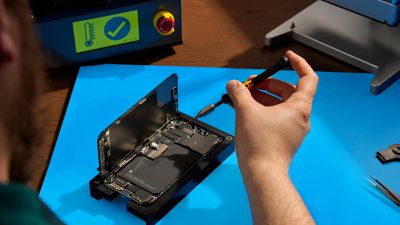
apple self service repair iphone
Before iOS 17.5 was released, sending an iPhone to Apple for repair required disabling ‌Find My‌, since Apple states that it "might not" repair devices with ‌Find My‌ activated. However, disabling ‌Find My‌ also turns off Activation Lock, a crucial security feature that prevents unauthorized use of an iPhone with a different Apple ID.

Apple relies on ‌Find My‌ and Activation Lock to verify device ownership and prevent theft. When ‌Find My‌ is turned off, the iPhone cannot be tracked and is vulnerable to theft during the repair process. Also, if the device is lost or stolen in transit, it cannot be recovered. Worse, turning off ‌Find My‌ involves a one-hour delay, which prolongs the repair process.

To avoid ‌Find My‌ deactivation, Apple in iOS 17.5 introduced a new "Repair State" feature that allows ‌Find My‌ to remain active, keeping Activation Lock enabled and the iPhone trackable through the ‌Find My‌ app during repairs. When the feature is enabled, the device will display a "Ready for Repair" label, indicating that it remains fully functional in this state.

Get Ready for iPhone Repair

Before enabling the Repair State feature on your iPhone, there are also a couple of other recommended steps to perform prior to sending your device to Apple. First and foremost, you should back up your iPhone. You can back up your device either to your computer or via iCloud.

In addition, for security reasons you should remove any cards and passes from Apple Wallet: Open the Wallet app, select a card or pass, tap the More button, then tap Card (or Pass) Details. Lastly, tap Remove Card (or Pass).

When you've performed the above steps, you're ready to enable Repair State:

  1. Open the Find My app on your iPhone.
  2. Select your iPhone in the Devices list.
  3. Tap Remove This Device at the bottom of the card.
  4. Tap Continue at the prompt to enable Repair State.
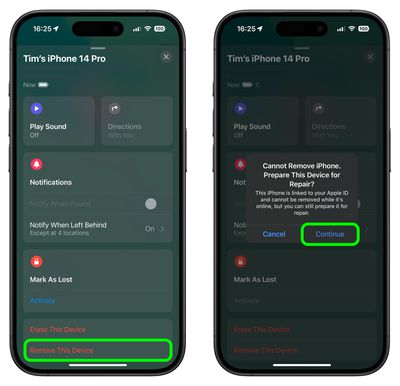
find my

When the feature is enabled in ‌Find My‌, the iPhone shows a stethoscope icon and can still be marked as lost. Note that the iPhone must be online and trackable via ‌Find My‌ for the repair state option to be available. If the iPhone is offline, it will show the standard removal text.


Popular Stories

Home Hub Command Center with Dome Base Feature

Apple Smart Home Hub to Feature iMac G4-Style Design

Wednesday September 30, 2026 4:36 am PDT by
Apple's long-rumored smart home hub will have an iMac G4-style design and a host of unique features, Bloomberg's Mark Gurman reports. The smart home hub is said to feature a square 6-inch display, with variants that can be placed on a countertop or mounted on a wall. It features a single FaceTime camera on the front, with microphones and speakers in its connected base. Gurman described the...

HomePod minis on gradient feature 1 1

Three New Apple Smart Home Products Coming on October 13

Wednesday September 30, 2026 4:04 am PDT by
Apple plans to introduce a series of new smart home products on Tuesday, October 13, according to Bloomberg's Mark Gurman. Apple reportedly plans to debut its long-awaited smart home hub device, a new HomePod mini, and a new Apple TV on the date. The new HomePod mini and Apple TV are set to retain their existing designs, but tout faster chips to support Siri AI. The new HomePod mini will...
Apple TV Sans Remote Feature

New Apple TV 4K Leaked

Friday September 25, 2026 8:16 am PDT by
MacRumors contributor Aaron Perris has uncovered an image file from Apple for an unreleased Apple TV 4K, suggesting that a new model will finally be released soon. The image is specifically for an "Apple TV 4K (4th generation)" model. Apple TV 4K (4th generation) image (on a gradient) The image reveals that the Apple TV will have the same external design as the current model, with all of its...
Latest Stories
Apple's Smart Home Hub: Everything We Know So Far
10 hours ago
Apple's Home Hub Borrows From the iPhone Duo's StandBy Mode
11 hours ago
Apple Invites App Updated With Three New Features
14 hours ago
Apple Event on October 13?
16 hours ago
Apple Watch SE 3 vs. Series 12 Buyer's Guide: Which Should You Buy?
17 hours ago
iPad Mini 8 to Offer These 10 New Features
18 hours ago
DoorDash Unveils AI Food Ordering Through Apple's Messages App
19 hours ago
Amazon Takes Up to $150 Off Select M5 MacBook Air Models
19 hours ago
Apple Still Plans to Release a New Full-Sized HomePod
20 hours ago
Apple Working to Expand HomeKit
22 hours ago
Apple Smart Home Hub to Feature iMac G4-Style Design
22 hours ago
Three New Apple Smart Home Products Coming on October 13
22 hours ago
Apple Pay Now Available in India With Axis Bank Cards
1 day ago
OpenAI Launches Always-On 'Dots' Agents to Rival Meta's Muse
1 day ago
AirPods 5 Teardown: Batteries Removable, Case Still Tough
2 days ago
iPhone 18 Pro Owners Complain of Speaker Crackling or Popping
2 days ago
You Can 'Get Ready' for iPhone Duo Pre-Orders on October 12
2 days ago
Apple Pay Reportedly Launching in India Today
2 days ago
Apple Releases New AirPods Beta Firmware
2 days ago
Apple Shares New Guide for Using iOS 27 Parental Controls
2 days ago
Apple Creator Studio and Final Cut Camera Get New Features
2 days ago
Apple Explains Why It Removed ICE Tracking Apps Last Year
2 days ago
Amazon Expands $779.99 Apple Watch Ultra 4 Deal to More Models
2 days ago
Switch Siri AI for ChatGPT on Your Mac
2 days ago
Apple Says Emergency SOS via Satellite Now Available in Norway
2 days ago
AppleCare Guide: Is it Worth Paying For?
2 days ago
Apple Reportedly Planned to Replace 5,000 Support Employees With AI
2 days ago
Apple Planning to Launch Products Faster and More Often
2 days ago
Amazon Discounting New Mac Mini and Mac Studio Alongside Early Prime Day Deals on Monitors
2 days ago
New Apple TV 4K Hinted at in Support Document
2 days ago

🔗 Related Apple News & Rumors

Stay updated with the latest Apple ecosystem news and verified rumors











































