

Apple Watch Ultra: How to Get Up to 60 Hours of Battery Life - MacRumorsOpen MenuShow RoundupsShow Forums menuVisit ForumsOpen Sidebar
Skip to Content

Apple Watch Ultra: How to Get Up to 60 Hours of Battery Life

by

Apple Watch Ultra models recently gained new low-power settings that can extend battery life up to 60 hours on a single charge, or what Apple calls "multi-day adventure battery life." This article explains how it works and how to set it up.
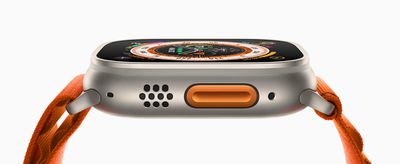
Apple Watch Ultra Orange Alpine Loop Action button 220907 big
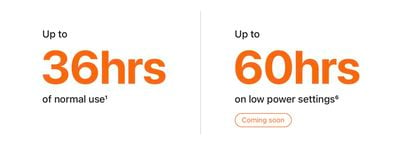
When Apple introduced the ‌Apple Watch Ultra‌ in September, one of the touted features was that it boasts the best battery life of any Apple Watch, capable of reaching up to 36 hours during normal use. Given that successive Apple Watch Series models have only ever officially offered up to 18 hours ("all-day") battery life in normal use, it was pretty big news.

While watchOS 9 brought a new Low Power Mode to Apple Watch Series 4 and later models that also offers up to 36 hours of battery, Apple promised to bring additional low-power settings to Apple Watch Ultra in the fall that would extend battery life even further and make it capable of reaching up to 60 hours.
ultra battery life
Since then, Apple has released watchOS 9.1 and the company has followed through on its promise, allowing Ultra owners to eke even more life out of their timepiece. The steps below explain how to enable it, but before you can make use of the new feature, you'll need to make sure your Apple Watch Ultra is updated to watchOS 9.1 or later.

In the Watch app on your iPhone, go to General -> Software Update. If you're not already up to date, wait for the update to appear, then tap Download and Install. Make sure your Apple Watch has at least 50% charge and is connected to its charger while the update process completes.

Get 60-Hour Battery Life on Apple Watch Ultra

To achieve the extended battery life, Ultra models must first have workout settings enabled for fewer heart rate and GPS readings. Here's how to enable them. (Note that these settings are also available on Apple Watch Series 8 and second-generation Apple Watch SE, but Apple has not stated that they will extend battery life on these models beyond the 36 hours offered by the system-wide Low Power Mode.)

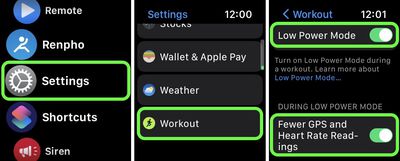
  1. Launch the Settings app on your Apple Watch Ultra.
  2. Scroll to the bottom and tap Workout.
  3. Toggle on the switch next to Low Power Mode.
  4. Below "During Low Power Mode," toggle on the switch next to Fewer GPS and Heart Rate Readings.
settings

Apple says that with the above settings enabled, Low Power Mode preserves battery life only during walking, running, and hiking workouts, by reducing the frequency of GPS and heart rate readings (heart rate readings are reduced to once per minute, while GPS readings are reduced to once every two minutes) and turning off alerts, splits, and segments. In other words, this means that to get the full 60 hours of battery life, you'll need to enable Low Power Mode outside of workouts as well.

When set up in this manner, Ultra users can expect to get "up to" 60 hours of battery life from their smartwatch. This number is calculated based on 15 hours of workout, over 600 time checks, 35 minutes of app use, 3 minutes of talk, and 15 hours of sleep tracking, over the course of 60 hours, according to Apple.


Related Roundup: Apple Watch Ultra 4
Related Forum: Apple Watch

Top Rated Comments

RandomTox Avatar
51 months ago
The average battery life on my Garmin Instinct is 20 days!
Score: 18 Votes (Like | Disagree)
51 months ago
Turn it off it will stay charged for a month. But thats not the point of one, is it.
Score: 17 Votes (Like | Disagree)
TheYayAreaLiving 🎗️ Avatar
51 months ago
Loving my Apple Watch Ultra. Insane battery life.

Score: 17 Votes (Like | Disagree)
NightFox Avatar
51 months ago
This seems more like a way the proving that an advertised spec is achievable ("see, it can do it!"), rather than something that has much real life application. A bit like driving 200 miles on a motorway at 40mph to hit the manufacturer's fuel efficiency figures.

Score: 16 Votes (Like | Disagree)
51 months ago
This makes no sense at all. This Ultra low battery life is basically turning all the features off. It would be something new if we could gain 60 hours without turniing features off.
Score: 14 Votes (Like | Disagree)
gmanist1000 Avatar
51 months ago
Why would you do a workout without all the purposes you bought an Apple Watch for?
Score: 12 Votes (Like | Disagree)

Popular Stories

Surprise and Shine Live Coverage Article

Apple Event Live Blog: iPhone Duo, iPhone 18 Pro, and More

Wednesday September 9, 2026 9:10 am PDT by
Apple's "Surprise and Shine" event kicks off today at 10:00 a.m. Pacific Time, where we're expecting to see the foldable iPhone Duo, the iPhone 18 Pro and Pro Max, Apple Watch Series 12 and Ultra 4 models, new AirPods 5 earphones, and perhaps some other announcements. Apple is providing a live video stream on its website, on YouTube, and in the company's TV app across various platforms. We...
apple surprise and shine event

Apple Event Today: iPhone 18 Pro and iPhone Duo Cheat Sheet

Tuesday September 8, 2026 10:24 am PDT by
Apple's biggest event of the year is almost here, and all eyes are on Cupertino. With the first foldable iPhone expected to headline Apple's "Surprise and Shine" event on Wednesday, September 9, at 10:00 a.m. Pacific Time, the rumor mill has been running full throttle, fuelled by the biggest single design change in the life of the iPhone. To get you up to speed, here's a quick reference...
apple watch series 12

Leak Hints at Four New Features for Apple Watch Series 12 and Ultra 4

Monday September 7, 2026 8:57 am PDT by
Ahead of the announcement of the Apple Watch Series 12 and Ultra 4 later this week, code in the watchOS 27 and iOS 27 betas points to a series of new features for the product line. The information comes from a new post from MacRumors forums member "pdfu." The findings include: New "Readiness" app: An all-new separate Watch app referred to in code as "Readiness," distinct from the...
Latest Stories
New 'AirFly Drive' Accessory Turns Wired CarPlay Into Wireless CarPlay
3 hours ago
Apple Shares Photos Shot on iPhone Duo
4 hours ago
Apple Says iPhone Duo Has Replaceable 'Cover Layer' Above the Display
5 hours ago
Apple's Smart Home Camera Will Apparently Have 'No Video Recording'
7 hours ago
Apple TV Just Updated Its Selection of 'Bonus' Movies
9 hours ago
iPhone 18 Pro Colors Buyer's Guide: Which Should You Choose?
9 hours ago
Early Prime Big Deal Days: Best Discounts on Accessories, TVs, and More at Amazon
9 hours ago
MacBook Pro With OLED Touch Screen Rumored to Launch in October or November
10 hours ago
Apple's All-New Home Hub Rumored to Launch in These Four Colors
11 hours ago
iPhone 18 Pro Aperture Control Goes Fully Manual in Halide 3.2
12 hours ago
Apple Stores Receive 'Do Not Open' Boxes Ahead of Smart Home Products Launch
13 hours ago
iPhone 18 Pro Sales Jump in China Ahead of iPhone Duo Launch
13 hours ago
Apple TV Still Down for Some Users Following Apple Services Outage
14 hours ago
PSA: Apple Mail on Mac May Stop Syncing Microsoft 365 Accounts Today
14 hours ago
Apple's Smart Home Hub: Everything We Know So Far
1 day ago
Apple's Home Hub Borrows From the iPhone Duo's StandBy Mode
1 day ago
Apple Invites App Updated With Three New Features
1 day ago
Apple Event on October 13?
1 day ago
Apple Watch SE 3 vs. Series 12 Buyer's Guide: Which Should You Buy?
1 day ago
iPad Mini 8 to Offer These 10 New Features
1 day ago
DoorDash Unveils AI Food Ordering Through Apple's Messages App
1 day ago
Amazon Takes Up to $150 Off Select M5 MacBook Air Models
1 day ago
Apple Still Plans to Release a New Full-Sized HomePod
2 days ago
Apple Working to Expand HomeKit
2 days ago
Apple Smart Home Hub to Feature iMac G4-Style Design
2 days ago
Three New Apple Smart Home Products Coming on October 13
2 days ago
Apple Pay Now Available in India With Axis Bank Cards
2 days ago
OpenAI Launches Always-On 'Dots' Agents to Rival Meta's Muse
2 days ago
AirPods 5 Teardown: Batteries Removable, Case Still Tough
2 days ago
iPhone 18 Pro Owners Complain of Speaker Crackling or Popping
2 days ago

🔗 Related Apple News & Rumors

Stay updated with the latest Apple ecosystem news and verified rumors






































