Apple Watch: How to Hard Reset or Force Restart - MacRumorsOpen MenuShow RoundupsShow Forums menuVisit ForumsOpen Sidebar
Skip to Content

Apple Watch: How to Hard Reset or Force Restart

by

There are a number of things you can try if your Apple Watch stops responding for whatever reason. This article outlines your options.
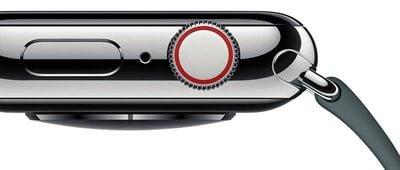
applewatchseries4digitalcrowndesign
The first and most straightforward solution is to reset your Apple Watch, which is basically a way of turning it off and on again. This is useful if, say, an app has crashed and a standard force quit doesn't work, or if the live data transfer between your iPhone and Apple Watch seems inconsistent.

Note that you can't restart an Apple Watch if it is charging, so undock it first before attempting the following steps.

How to Restart an Apple Watch

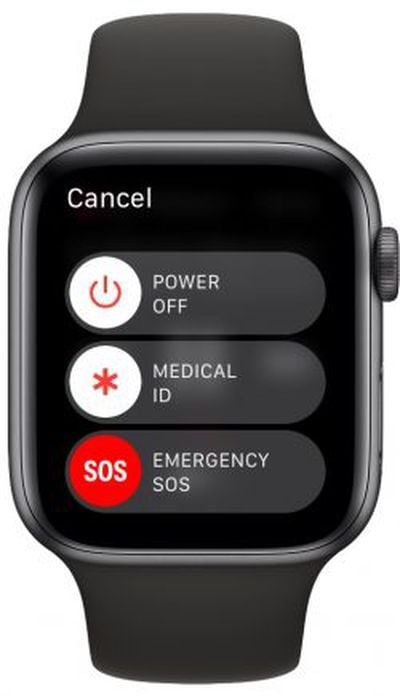
  1. Press and hold the side button until you see the Power Off slider on the screen.
  2. Drag the Power Off slider with your finger.
  3. Once your Apple Watch has turned off, press and hold the side button again until you see the Apple logo.
    apple watch power off

If that didn't solve your issue, you can try a force restart on your Apple Watch. Note that this should only be used as a last resort. And whatever you do, don't perform a force restart if your Apple Watch is in the middle of an OS update.

How to Hard Reset an Apple Watch

  1. Press and hold both the side button and Digital Crown for at least 10 seconds.
  2. Release both buttons when you see the Apple logo.

What to Do if You Forget Your Passcode

If you forget your Apple Watch passcode, you'll need to erase the device and then restore from a backup. You can perform this action by launching the Watch app on your paired iPhone: tap the My Watch tab if it's not already selected, tap General -> Reset, then select Erase Apple Watch Content and Settings .
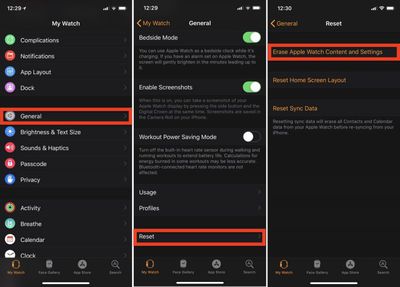
reset apple watch
Alternatively, you can start the erase and restore process on your Apple Watch by connecting the device to its charger and following these steps.

  1. Press and hold the side button until you see the Power Off screen.

  2. Hard press the Power Off slider and then let go.

  3. Tap Erase all content and settings.

  4. You'll be asked to set up your Apple Watch again when the process ends. When you do, be sure to restore from a backup.

Related Roundup: Apple Watch 11
Buyer's Guide: Apple Watch (Caution)

Popular Stories

modular ultra training load

watchOS 27 to Offer New Watch Faces, Including 'Modular Ultra' Variant

Monday May 4, 2026 5:58 am PDT by
For watchOS 27, Apple is testing new Apple Watch faces, and one of them is a simpler version of an existing Apple Watch Ultra watch face that could be coming to standard Series models. Writing in his latest Power On newsletter, Bloomberg's Mark Gurman reports that Apple is testing multiple new faces for watchOS 27, code-named "Orchid." One of them is said to be a "simplified take" on the...
Apple Announces 2026 Pride Band Watch Face and iPhone Wallpaper Feature

Apple Announces 2026 Pride Band, Watch Face, and iPhone Wallpaper

Monday May 4, 2026 6:05 am PDT by
Apple today introduced its 2026 Pride Collection, including a new Apple Watch band, watch face, and a matching wallpaper for the iPhone and iPad. Apple said its Pride Collection celebrates LGBTQ+ communities around the world during Pride Month in June and beyond. In addition, the company noted that it is proud to financially support organizations that serve LGBTQ+ communities. The new Pri...
Apple Watch Ultra 2 Black Titanium

watchOS 26.5 Fixes Two Apple Watch Bugs

Tuesday May 5, 2026 7:56 am PDT by
watchOS 26.5 fixes two Apple Watch bugs, according to Apple's release notes for the update, which is expected to be released next week. Apple fixed bugs in the Messages and Workout apps:• Fixes an issue where Messages on Apple Watch may use SMS instead of iMessage when paired with a dual SIM iPhone • Fixes an issue where Workout app audio alerts could fail to play if the phone was not...

🔗 Related Apple News & Rumors

Stay updated with the latest Apple ecosystem news and verified rumors