

How to Force-Quit Misbehaving Apple Watch Apps - MacRumorsOpen MenuShow RoundupsShow Forums menuVisit ForumsOpen Sidebar
Skip to Content

How to Force-Quit Misbehaving Apple Watch Apps

by

Apple Watch apps rarely misbehave, but if one becomes non-responsive or fails to refresh data, sometimes force-quitting the app and relaunching it can solve the issue.
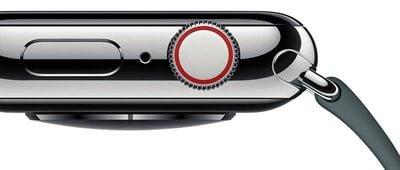
applewatchseries4digitalcrowndesign
Fortunately, it's a simple procedure. The following steps show you how it's done on Apple Watch models running watchOS 4 or later.

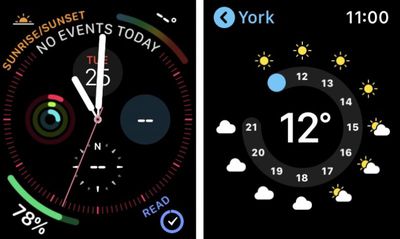
  1. Open the misbehaving app on your Apple Watch, either by tapping its complication or selecting it from the honeycomb-style app menu/list view, so that it takes over the display.
    force quit apple watch apps01

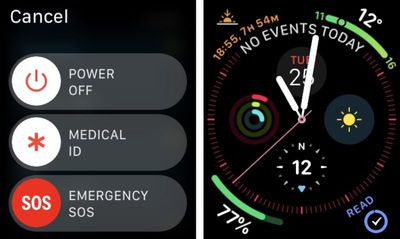
  2. Now, press and hold the Side button.
  3. Release the Side button once the power down menu appears.
    force quit apple watch apps02

  4. Next, press and hold the Digital Crown. You can release it once the app is whisked away from view and you're returned to the watch face.
And that's all there is to it. The next time you launch the app in question, it will load up as if for the first time, and hopefully play nice again.

If the problem you're having still persists, try restarting your Apple Watch from the power down screen, or consider re-installing the related app on your iPhone.

Related Roundup: Apple Watch 12
Buyer's Guide: Apple Watch (Buy Now)
Related Forum: Apple Watch

Top Rated Comments

AZMecha Avatar
104 months ago
S4 using the new info graph face.

Has anyone noticed that the date & weather are not updating??
Score: 7 Votes (Like | Disagree)
skywalkerr69 Avatar
104 months ago
“Apple Watch apps rarely misbehave” hahahahahahahaha I cried reading this.
Score: 5 Votes (Like | Disagree)
OUsooner08 Avatar
104 months ago
Actually you hit the side button and then swipe left and hit the X.
No that removes the app from your dock.
Score: 3 Votes (Like | Disagree)
NufSaid Avatar
104 months ago
Actually you hit the side button and then swipe left and hit the X.
Score: 3 Votes (Like | Disagree)
bingeciren Avatar
104 months ago
I’ve been trying to find a solution for the non responding / slow responding Workout program for a while. Apparently it is a well known widespread problem and no known real cure for it. Apple recommend to reboot the watch, unpair and re-pair it again but the problem comes back after a while.

This info to kick out a misbehaving program from the memory was the remedy I was looking for. It actually works like a charm. I keep the Workout in the Dock but delete it from the memory once I’m done with it. Next time I need to run the Workout, I launch it from the Dock. It spins its icon briefly and loads it. Once it’s loaded no lag, no freeze no misbehaving, it just works immediately. Problem solved.
Score: 1 Votes (Like | Disagree)
104 months ago
“Misbehaving”?! Might as well have said “Naughty” hahah.
2nd defintion at https://www.merriam-webster.com/dictionary/misbehave
Score: 1 Votes (Like | Disagree)

Popular Stories

Surprise and Shine Live Coverage Article

Apple Event Live Blog: iPhone Duo, iPhone 18 Pro, and More

Wednesday September 9, 2026 9:10 am PDT by
Apple's "Surprise and Shine" event kicks off today at 10:00 a.m. Pacific Time, where we're expecting to see the foldable iPhone Duo, the iPhone 18 Pro and Pro Max, Apple Watch Series 12 and Ultra 4 models, new AirPods 5 earphones, and perhaps some other announcements. Apple is providing a live video stream on its website, on YouTube, and in the company's TV app across various platforms. We...

Apple Watch Ultra 2 Black Titanium

New Apple Watch Series 12 and Apple Watch Ultra 4 Features Revealed


Sunday August 30, 2026 7:54 am PDT by
Bloomberg's Mark Gurman today further outlined what to expect from the Apple Watch Series 12 and Apple Watch Ultra 4 set to be unveiled on September 9. While it was initially rumored that Touch ID may be coming to the Apple Watch this year, Gurman reiterated that he does not expect the Series 12 or Ultra 4 to have any major design changes compared to the current Series 11 and Ultra 3 models. ...



apple surprise and shine event

Apple Event Today: iPhone 18 Pro and iPhone Duo Cheat Sheet

Tuesday September 8, 2026 10:24 am PDT by
Apple's biggest event of the year is almost here, and all eyes are on Cupertino. With the first foldable iPhone expected to headline Apple's "Surprise and Shine" event on Wednesday, September 9, at 10:00 a.m. Pacific Time, the rumor mill has been running full throttle, fuelled by the biggest single design change in the life of the iPhone. To get you up to speed, here's a quick reference...

🔗 Related Apple News & Rumors

Stay updated with the latest Apple ecosystem news and verified rumors





































