
How to Flag Emails Using Different Colors on iPhone and iPad - MacRumorsOpen MenuShow RoundupsShow Forums menuVisit ForumsOpen Sidebar
Skip to Content

How to Flag Emails Using Different Colors on iPhone and iPad

by

ios 11 mail icon pn e1543485132148In iOS 13 and iPadOS 13, Apple's Mail app retains the swipe gestures of previous iOS versions that help you reduce the amount of time you spend managing messages in your inbox.

The basic inbox gestures still involve swiping right or left on an email to reveal tappable actions that you can perform instantly, without having to call up additional menus.

One of the default options that appear is the Flag action, which you might use to categorize a message that requests information needed by a certain date, for example.

Using only the swipe gesture, you'd be forgiven for thinking that the Mail app provides only one color to use when flagging emails, but iOS 13 actually introduces support for multicolor flags – it's just hidden away in the menu that appears when you hit the Reply button.
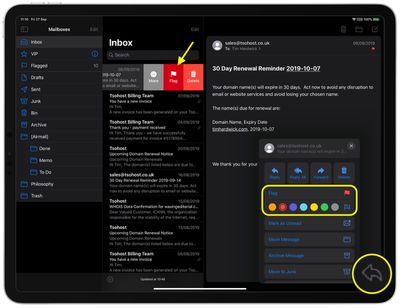
mail
Tap the Flag button there, and you'll reveal a submenu that allows you to choose one of seven colors, including the option to remove a flag. Note that whichever color you select here subsequently becomes the default color when you tap the Flag action or the More -> Mark... option via the inbox swipe gesture.

Did you know that you can customize the actions that appear when you use the Mail app's inbox gestures? Click here to learn how.


Related Forum: iOS 13

Top Rated Comments

adrianlondon Avatar
88 months ago
"it's just hidden away in the menu that appears when you hit the Reply button."

Who thought of that? iOS 13 developer meeting:

"Oh, let's move most of the options, including move and archive, behind an arrow that makes people think they're going to reply to an email."

"Shall we also remove loads of icons from the bottom so that it's just wasted space?"

"Sure! hahaha"

"OK, I'll get right on it after I've messed up notifications, gMail access, and actually displaying mails in the combined inbox".
Score: 21 Votes (Like | Disagree)
itsmilo Avatar
88 months ago
remember when Apple just worked? Now we got options being „hidden“ behind the most unintuitive areas.

Two more things come to mind: the AA icon in Safari hiding everything from desktop view to content blockers. Maybe it’s just me but that icon implies font sizes to me.

also really hidden is the drawing tool on images. Literally no one I know even knows about it existence.

Of course the iPad gestures over the years take the cake

Attachment Image

Attachment Image
Score: 11 Votes (Like | Disagree)
88 months ago

"it's just hidden away in the menu that appears when you hit the Reply button."

"Oh, let's move most of the options, including move and archive, behind an arrow that makes people think they're going to reply to an email."

"Shall we also remove loads of icons from the bottom so that it's just wasted space?"

This is probably the most annoying thing about iOS 13 for me. Why hide commonly used actions inside a menu (that doesn’t even look like it could be used for such actions “reply”) when there’s plenty of space for an archive or move command? So incredibly dumb. I just can’t understand how this is their solution.
Score: 5 Votes (Like | Disagree)
twistedpixel8 Avatar
88 months ago
For once, the crappy news outlets are spot on: iOS 13 is a complete mess. If I could go back to 12, I’d do it in a heartbeat.
Score: 5 Votes (Like | Disagree)
88 months ago
I make heavy use of flags, so this was nice to see coming to iOS. Nice that coloured flags sync everywhere.

Just unfortunate the design decision to bury it under the reply arrow.

Score: 4 Votes (Like | Disagree)
gim Avatar
88 months ago
The Mail App on iOS 13 is a buggy mess. Since the update it’s constantly showing me unread E-Mails (red badge over the icon) even though there are none. Will have to make the switch to outlook I guess.

Score: 4 Votes (Like | Disagree)

Popular Stories

General macOS Mail Feature

Apple Hide My Email Vulnerability Exposes Real Email Addresses

Wednesday July 1, 2026 6:20 am PDT by
A flaw in Apple's Hide My Email service can reportedly allow almost anyone to uncover the real email address behind a generated alias, and Apple has failed to address it for more than a year since it was first reported. 404 Media is withholding the technical specifics of the vulnerability because it remains exploitable, but the publication verified the issue this week using one of its own...
Apple Acquires Award Winning App Play Feature

Apple Acquires Award-Winning App 'Play'

Monday June 29, 2026 7:39 am PDT by
In February, Apple notified the European Commission that it would be acquiring certain assets from and have the right to hire certain employees from Rabbit 3 Times, the company behind the award-winning app design tool Play. The notification was published on the European Commission's website this week, following a four-month waiting period. Play was a Mac and iPhone app that allowed designers ...
American Express Gold Apple Pay Feature

American Express Announces New Apple Pay Feature

Tuesday June 30, 2026 10:27 am PDT by
American Express today announced that you can now redeem Membership Rewards points when checking out with Apple Pay on the web and in apps on the iPhone and iPad. When checking out with Apple Pay on iOS 18 or iPadOS 18 or later, tap on your eligible American Express card (Platinum, Gold, Green, and others) and select the Membership Rewards points option. You can use points to cover all or...

🔗 Related Apple News & Rumors

Stay updated with the latest Apple ecosystem news and verified rumors