

Disappearing Safari Tabs on iPhone or iPad? How to Find Them - MacRumorsOpen MenuShow RoundupsShow Forums menuVisit ForumsOpen Sidebar
Skip to Content

Disappearing Safari Tabs on iPhone or iPad? How to Find Them

by

Every so often, a seemingly small bug in Apple's operating systems survives the company's annual OS launches and continues to cause users huge frustration from one software update to the next.
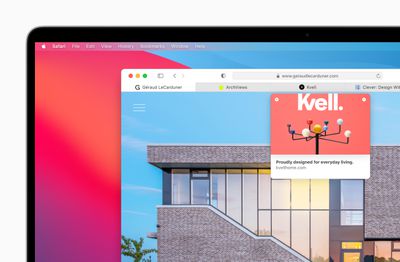
apple macos bigsur safari improvedtabs 06222020
The phenomenon of disappearing tabs in Safari is one such problem -– reports of multiple Safari tabs vanishing without a trace go back to at least iOS 13 and the issue still to this day blights the browser experience for some.

While there isn't an accepted solution to the problem of disappearing tabs, there are cases where it might seem that your tabs are gone, when in fact they are just hidden from view. Here are some ways that you may be able to get them back or stop them from disappearing in the first place.

Reveal Hidden Tabs

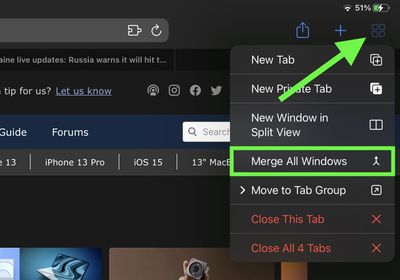
On iPadOS, for example, if you press and hold the Show Tab Overview button (four squares in a quadrant) in the top-right corner of the Safari window, this will reveal a dropdown menu that includes an option to Merge All Windows.
safari
Select this option, and all of your open tabs should appear in the current window, potentially including some that were not visible in the Tab Overview screen. Why this happens isn't entirely clear, but it may have something to do with the way iPadOS manages Safari windows that have been opened in Split View mode.

Reveal the Shelf

Another action worth trying on iPadOS is pressing and holding the Safari icon in the Dock or on the Home Screen and selecting Show All Windows from the popup menu that appears.

shelf
This will reveal any open windows in a shelf directly above the Dock, allowing you to switch between them and potentially reveal any tabs that had gotten lost.

Recently Closed Tabs

If you have an inkling that some of the tabs you're missing have been inadvertently closed, you can always use the Recently Closed Tabs option to re-open them. All you have to do is open up the tab view in Safari and long press on the "+" icon to get a look at all of the tabs that you've recently closed.
Even if you're aware of the gesture, it's worth a reminder that this feature exists in case someone gets ahold of your phone and checks your browser. Even if you've closed out a tab, it's still going to be visible in Safari, unless you were using a private browser window or have cleared your browsing history.

Turn Off Auto-Close Tabs

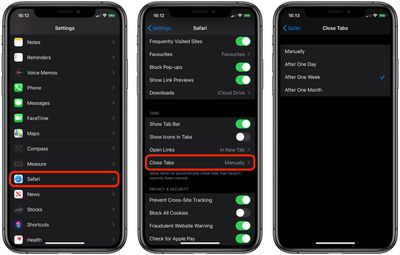
If you still haven't been able to find some of your tabs, make sure that Safari isn't closing them after a certain duration on your behalf: Open Settings, tap through to Safari -> Close Tabs and ensure that Manually is selected.

safari tabs

Bookmark All Open Tabs

If the above suggestions haven't worked for you, there is a workaround: Consider bookmarking your open tabs after each browsing session. This might sound like more hassle than it's worth, but since iOS 13 Apple has included a one-tap option to just that.

safari tabs
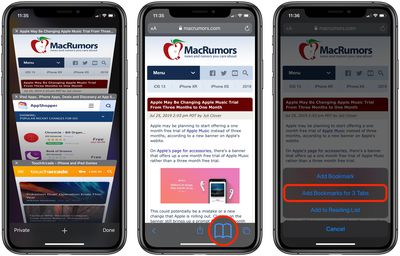
If you're on iPhone, make sure you have a few tabs open in Safari that you want to reference at a later time. Now, select one of those tabs, and in the main browsing window, long press the Bookmark icon (it looks like an open book).

A popup menu will appear at the on the screen from which you can select Add Bookmarks for X Tabs, the X being the number of tabs open.

Once you've tapped this option, you'll be asked to save the tabs in a new bookmarks folder (remember to give it a recognizable name). Alternately, you can choose a location from the existing folder list in which to save the tabs.

safari
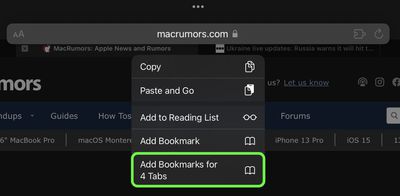
If you're on iPad, make sure you have a few tabs open in Safari, then simply press and hold on the address bar and select Add Bookmarks for X Tabs.

To access your bookmarks in Safari at any time, simply tap the Bookmarks icon in the main browsing interface or the sidebar to reveal all of your saved favorites and folders. Press and hold on the folder of bookmarks and select Open in New Tabs, or alternatively, Open in Tab Group if you want them grouped.

Tag: Safari

Popular Stories

Apple Event Logo

Apple Working on All-New Operating System

Wednesday July 29, 2026 11:39 am PDT by
Apple is developing an all-new operating system that is essentially a mix of tvOS, watchOS, and iOS, according to Bloomberg's Mark Gurman. In a report this week, he said the operating system will feature a grid of icons, widgets, and apps, along with customizable clock faces. The new software platform is intended for Apple's long-rumored smart home hub. With built-in facial recognition,...

Four iPhone 18 Pro Colors Mock Feature

iPhone 18 Pro and iPhone Ultra: Pre-Orders and Release Date

Thursday July 30, 2026 6:12 am PDT by
Apple has yet to reveal when the iPhone 18 Pro and iPhone Ultra will be announced and released, but the dates usually follow a familiar pattern. Labor Day is September 7 this year. The last time the holiday fell on that day was in 2020, but the iPhone event that year was delayed until October due to the COVID-19 pandemic. So, the last time Labor Day was on September 7 in a normal year was in ...
Dynamic Island iPhone 18 Pro Feature

iPhone 18 Pro: Twelve Changes Coming to Apple's Next Flagship

Thursday July 30, 2026 3:43 am PDT by
We're less than two months out from the launch of Apple's premium next-generation smartphone lineup, and while we're not expecting a dramatic change in terms of functionality, there are still several enhancements rumored to be coming to the iPhone 18 Pro and iPhone 18 Pro Max. One thing worth noting is that Apple is reportedly planning a major change to its iPhone release cycle this year,...

🔗 Related Apple News & Rumors

Stay updated with the latest Apple ecosystem news and verified rumors







































