

In macOS Ventura, Apple added an easier way to retrieve passwords for Wi-Fi networks that you have connected to in the past. Keep reading to learn what's changed.

Whenever you connect your Mac to a Wi-Fi network, macOS saves the network name and password so that the next time it is within range, your Mac can connect you to it automatically.
In Monterey and earlier versions of macOS, you can see these remembered networks in System Preferences -> Network if you click the Advanced option, but oddly enough, there's no option in preferences to access the saved passwords for each network.
That's changed in macOS Ventura – the following steps show you how you can copy the password for a known network. If you're still on an earlier version of macOS, the second set of steps explain how to find network passwords using Keychain Access.
How to Copy a Wi-Fi Network Password
- Click the Apple () symbol in the menu bar and choose System Settings... from the dropdown menu.
- Select Network in the sidebar.
- To copy the password for the currently connected Wi-Fi network, click the encircled ellipsis (three dots) icon next to the network in question, then select Copy Password.

- To copy the password for a network you previously connected to, scroll down and click the Advanced... button, then in the list of Known Networks, click the encircled ellipsis (three dots) icon next to the network in question and select Copy Password.
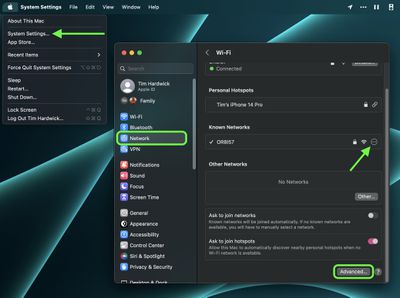
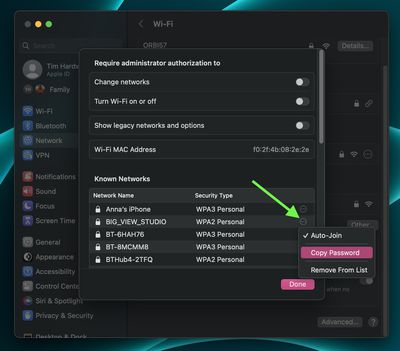
The password is now copied to your Mac's clipboard, ready to be pasted elsewhere using the Paste action (Command-V).
How to View Wi-Fi Passwords in Your Keychain
- Launch Keychain Access (located in the Applications/Utilities folder).
- Make sure the login keychain is selected in the sidebar.
- Start typing the name of the network into the search bar. You can also enter "AirPort" to find all stored Wi-Fi network passwords.
- Right-click (or Ctrl-click) an entry and choose Copy Password to Clipboard. Alternatively, to view the password, double-click the entry and check the box next to Show password, then enter your administrator login and password and click Allow.
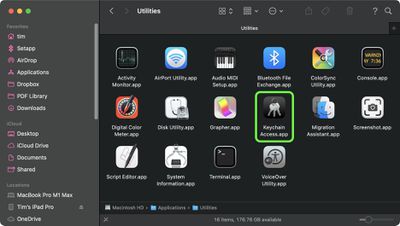
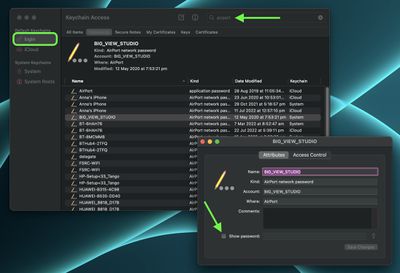
If you copied the password, it will now be waiting in your Mac's virtual clipboard, ready to be pasted elsewhere using the Paste action (Command-V).













































