Apple has a "Find my iPhone" feature for lost iPhones, iPads, Macs, and more, but there's also a "Find my AirPods" feature that can be useful if you happen to misplace your AirPods.
Find My AirPods has its limitations because it's not able to work when the AirPods aren't connected to an iOS device via Bluetooth, but the feature can help you locate AirPods lost nearby and it gives clues as to where your AirPods might be found if they're lost out of the range of the iPhone.
It's worth noting that Find My AirPods only works for the AirPods themselves -- it can't locate a lost AirPods Case, nor does it work when the AirPods are disconnected from the iPhone and stored in the case.
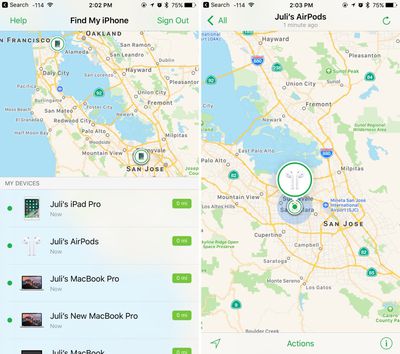
Find My AirPods is located within the "Find My" app on iOS devices and iCloud.com. If the AirPods are out of the case and connected to the iPhone, they'll show up on the Find My map just like an iPad, iPhone, Apple Watch, or Mac.
If your AirPods are in the case or not currently connected, the last known location will be displayed. If your AirPods haven't been in use at all recently, they'll be listed as "offline."
How to Find AirPods Lost Nearby
Your AirPods are most likely to be misplaced or lost when you set them down momentarily because there are no cords to keep them together or to make them easier to find. Find My AirPods is mostly designed to locate an AirPod that's nearby by playing a sound.
Open "Find My" on an iOS device or iCloud.com.
Tap the AirPods in the list.
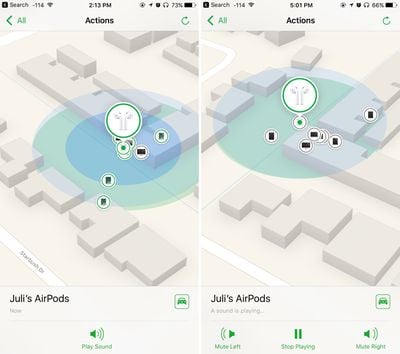
Tap "Actions."
Tap "Play Sound."
A soft chirping sound will start playing after you initiate the "Play Sound" command, which will gradually get louder and louder with each chirp to make the AirPods easier to locate.
If just the left or just the right AirPod is missing, you can also mute the sound coming from the left or the right. To stop the sound once the AirPods are located, you'll need to tap "Stop Playing." Putting the AirPods back in the case will also turn the sound off after a few seconds.
How to Find AirPods Lost Far Away
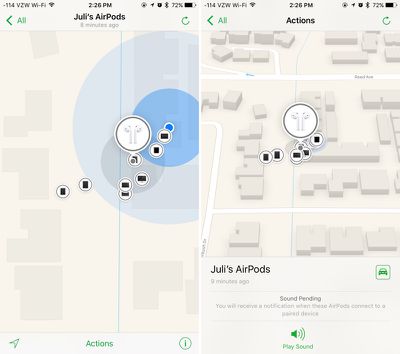
If your AirPods aren't connected to your iPhone, their exact location is not relayed to Find My. In this situation, the last known location of the AirPods when they were connected to an iPhone is displayed.
So, for example, if you use them while at the airport and then leave them behind, their location when they were last connected to your iPhone over Bluetooth will be displayed, even if the AirPods are moved somewhere else.
When the AirPods aren't connected to the iPhone, the last online location is displayed. It is not up to date.
For this reason, using Find My AirPods to locate an AirPod that's been left behind isn't going to be particularly accurate, but it will give you a general idea of where they were lost so you can go back to the location.
When attempting to locate an AirPod this way, tap the little car icon and it will give you Apple Maps directions to the last known location.
Limitations with Find My AirPods
Your AirPods will not play a sound while they're in the case, so if you lose the AirPods and the AirPods Case somewhere in the house, you're out of luck.
There's also no way to track the AirPods case because a Bluetooth connection is needed for Find My AirPods, so there is no option for locating a lost case.
Replacing a lost AirPod or AirPods Case
Apple offers AirPods replacements if one is lost and can't be located. It costs $69 to replace a single AirPod or to replace the AirPods Charging Case.
Find My AirPods is completely useless for the most common scenario: you can’t find where you put your AirPods.
Most people can learn to be careful and always put their AirPods in the case when not in their ears. But setting down the case somewhere in the house, good luck if you can’t remember where you last put them.
This is such an easily fixable problem. Have the AirPods case ping the iPhone once an hour or half hour. If it detects that it’s been asked to play a sound, it’ll take you an hour at worst to find where you put your AirPods. Without this, you’re on your own and have to find them manually, and they’ll play the damn sound after you already found them.
Okay, just tested this by placing my fingers over the prox sensors on one pod, and FmiPhone gave a warning before playing the sound (see attached screenshot).
They also start the alarm quiet and ramp up the volume. You have a bit of time to remove them before they reach peek volumes.
Lol. I didn't have them in My ears, but was curious about the sound. So while they were playing the alert I put one close to my ear and it was blistering.
I imagine that if they're in the ear that the app won't let you trigger the alert. I hope so anyway.
Okay, just tested this by placing my fingers over the prox sensors on one pod, and FmiPhone gave a warning before playing the sound (see attached screenshot).
Apple's long-rumored smart home hub will have an iMac G4-style design and a host of unique features, Bloomberg's Mark Gurman reports.
The smart home hub is said to feature a square 6-inch display, with variants that can be placed on a countertop or mounted on a wall. It features a single FaceTime camera on the front, with microphones and speakers in its connected base. Gurman described the...
Apple plans to introduce a series of new smart home products on Tuesday, October 13, according to Bloomberg's Mark Gurman.
Apple reportedly plans to debut its long-awaited smart home hub device, a new HomePod mini, and a new Apple TV on the date. The new HomePod mini and Apple TV are set to retain their existing designs, but tout faster chips to support Siri AI. The new HomePod mini will...
The iPhone Duo is reportedly facing production difficulties ahead of its October launch, with early output expected to be limited.
A person said to be close to Foxconn's supply chain told China's Jiemian News that final assembly yields for Apple's first foldable iPhone were only slightly above 60% as of September 17. The source said that, under Apple's current quality standards, it could...
Apple's first foldable iPhone, with a book-style design featuring a 5.4-inch outer display and a 7.6-inch inner display with a minimal crease down the middle.
















































Top Rated Comments
Most people can learn to be careful and always put their AirPods in the case when not in their ears. But setting down the case somewhere in the house, good luck if you can’t remember where you last put them.
This is such an easily fixable problem. Have the AirPods case ping the iPhone once an hour or half hour. If it detects that it’s been asked to play a sound, it’ll take you an hour at worst to find where you put your AirPods. Without this, you’re on your own and have to find them manually, and they’ll play the damn sound after you already found them.