How to Enter macOS Recovery Mode on Apple Silicon Macs - MacRumorsOpen MenuShow RoundupsShow Forums menuVisit ForumsOpen Sidebar
Skip to Content

How to Enter macOS Recovery Mode on Apple Silicon Macs

by

All modern Macs with Apple silicon feature a built-in recovery system called macOS Recovery that includes various utilities that can be accessed before your Mac boots up the operating system. This article explains what apps are available in macOS Recovery and how to use it.
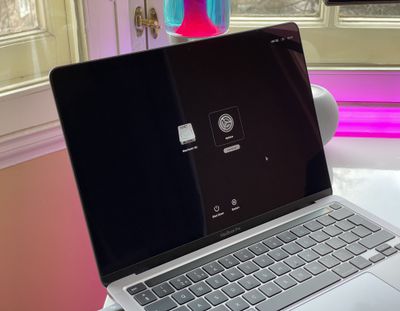
m1 mac startup options
With macOS Recovery, you can perform several troubleshooting related actions on your Mac if it isn't functioning as it should. Once you've entered macOS Recovery, you can repair your Mac's internal drive, reinstall macOS, restore your data from a Time Machine backup, start up in safe mode, transfer files between two Macs, and change security policies for different volumes.

The following apps are available in macOS Recovery:

  • Time Machine
  • Install macOS Ventura
  • Safari
  • Disk Utility
  • Startup Security Utility
  • Terminal
  • Share Disk
  • Startup Disk

How to Enter macOS Recovery

Follow these steps to start up your computer in macOS Recovery.

  1. Shut down your Mac if it's already on by clicking the Apple symbol in the menu bar and selecting Shut Down.
  2. When your Mac has shut down completely, press and hold the power button until "Loading startup options" appears on the screen.
  3. Click Options, then click Continue.
  4. If prompted, select a volume to recover, then click Next.
  5. Select your administrator account, then click Next.
  6. Enter your admin password, then click Continue.

After a short time, the Recovery app will appear in the menu bar, and you'll be able to select options and launch apps from the window or the menu bar.

m1 share disk startup
Note that if the Wi-Fi icon appears in the top-right corner of the screen and contains one or more bars, your Mac is connected to the internet. If the icon doesn't contain any bars, Wi-Fi is turned on but not connected to a wireless network. You can change the Wi-Fi status and join a network by clicking the Wi-Fi icon, after which you can download and reinstall macOS if required.

How to Quit macOS Recovery

When you've finished using the utilities in macOS Recovery, you can quit by clicking the Apple symbol in the menu bar and selecting Restart or Shut Down, or you can choose a different startup disk before restarting.


Popular Stories

skyrim

Skyrim Comes to Apple Silicon Macs With New Unofficial Installer

Tuesday October 20, 2026 7:56 pm PDT by
Bethesda's beloved role-playing game "The Elder Scrolls V: Skyrim" has reached multiple generations of consoles since its 2011 debut, but it never officially came to the Mac. A new unofficial project called SkyrimMT now aims to make playing and modding it on Apple silicon Macs easier than ever. Mac owners have found ways to play Skyrim over the years, including installing Windows through...

apple pro tell logo

Apple Launching Five New Products Today

Thursday November 5, 2026 12:59 am PST by
Apple is launching five new products on Friday, November 6, following pre-orders that opened last week, including its first touchscreen MacBook Pro models. The following new products will be available from today: iPad mini with OLED display and A20 Pro chip iMac with M6 chip 14-inch MacBook Pro with M6 chip 14-inch MacBook Pro with OLED touchscreen 16-inch MacBook Pro with OLED...
Apple Store Logo

Apple Store in UK Permanently Closing Later This Month

Tuesday November 3, 2026 7:34 am PST by
Apple today announced that its Festival Place store in Basingstoke, England will be permanently closing on Saturday, November 21. Apple Festival Place Apple had already announced that the store would be closing in November, but it had not provided the public with a specific date until now. Apple's store inside the Festival Place shopping center opened in 2011, so it had a 15-year run....
Latest Stories
OLED iPad Mini, M6 iMac, and New MacBook Pros Available From Today
28 minutes ago
Apple Surveys iPhone Duo Buyers About Crease and Camera
11 hours ago
Apple's First Touchscreen Mac is Now Arriving to Customers
12 hours ago
Claude Gets Personal Finance Feature With Bank Account Linking
13 hours ago
Apple Arcade Adds Crossy Road Rush and NBA 2K27
13 hours ago
Apple's New HomeView Smart Home Hub: Here's How Much RAM It Has
14 hours ago
iPad Mini vs. iPad Air Buyer's Guide: Now Just $50 Apart
15 hours ago
First iOS 27.3 and macOS Golden Gate 27.3 Public Betas Now Available
16 hours ago
Apple Announces a New Mac Sales Record
17 hours ago
Paid $200 for Logic Pro? Apple Says You Won't Get This New Feature
17 hours ago
Instagram's Edits Video Editor is Now Available on Mac
18 hours ago
Prevent Siri and Search From Accessing Specific iPhone Apps
18 hours ago
Best Early Black Friday Deals on iPhone 18 Pro and iPhone Duo
19 hours ago
MacBook Pro PROLED XDR Reviews Are In: Is the Touchscreen Worth It?
20 hours ago
Early Black Friday Accessory Deals at Amazon Include TVs, Headphones, and Charging Devices
20 hours ago
Apple Creator Studio App Updates Rolling Out, Starting With Logic Pro
20 hours ago
Siri AI Waitlist Now Limited to Times of 'High Demand,' Says Apple
22 hours ago
See Apple's Touchscreen MacBook Pro in Action
23 hours ago
MacBook Neo Shipments Expected to Double in 2027
23 hours ago
HomeView Code Suggests Future Support for AI Chatbot Apps, Anti-Spoofing Protection
1 day ago
Got an iPhone Duo on Launch Day? Today Could Be Your Last Chance to Return It
2 hours ago
Apple Launching Five New Products Today
1 hour ago
Apple Releases Safari Technology Preview 256 With Bug Fixes and Performance Improvements
1 day ago
Apps Can Now Try to Stop You From Canceling Subscriptions
1 day ago
'Super Mario Odyssey' Can Now Run on Apple TV Thanks to AI
2 days ago
How 'Resident Evil' Director Zach Cregger Uses His iPhone to Make Movies
2 days ago
HomePod Mini 2's Amount of RAM Confirmed
2 days ago
Apple TV's '12 Days of Snoopy' Special Arrives November 13
2 days ago
Apple is Putting Employees on an AI Budget
2 days ago
Apple Releases Xcode 27.3 Beta With Three New Features
2 days ago

🔗 Related Apple News & Rumors

Stay updated with the latest Apple ecosystem news and verified rumors