How to Enable Two-Step Verification for Apple ID - MacRumorsOpen MenuShow RoundupsShow Forums menuVisit ForumsOpen Sidebar
Skip to Content

How to Enable Two-Step Verification for Apple ID

by

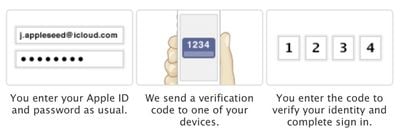
Apple introduced an additional layer of security for iPhone, iPad and Mac users in 2013 by rolling out two-step verification for Apple ID accounts. Two-step verification prevents anyone but you from accessing your Apple ID account, even if they know the password, by requiring a four-digit verification code sent via SMS or Find My iPhone on trusted devices. When you enable two-step verification, you must register at least one trusted device capable of receiving SMS text messages.
twostepverification
Once activated, two-step authentication is required when managing your Apple ID through My Apple ID, signing into iCloud, or making iTunes, iBooks or App Store purchases from a new device. Apple has also expanded two-step authentication to iMessage and FaceTime, requiring users to input an authentication code from a verified device on accounts that have two-factor verification enabled to prevent unauthorized entry attempts through both services.

Overview

Steps to Enable Two-Step Verification

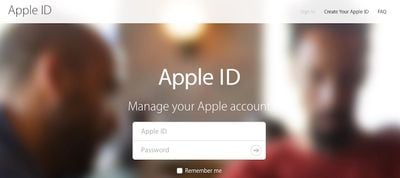
  1. Sign in to your Apple ID.
    Apple-ID-sign-in
  2. Click on "Get Started…" under Security > Two-Step Verification.

    Two-Step-Verification-Apple-ID-1

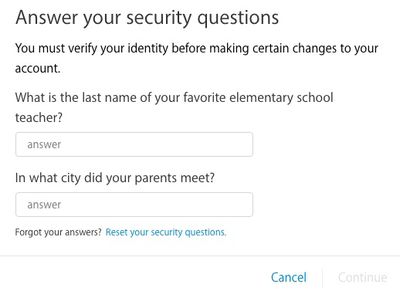
  3. Answer your Apple ID security questions if set and click Continue.
    Apple-ID-security-questions
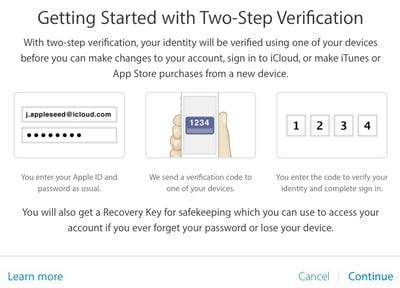
  4. Read "Getting Started with Two-Step Verification" and click Continue.
    Apple-ID-getting-started-two-step
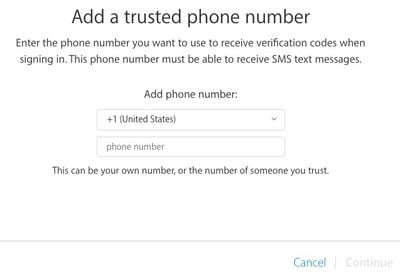
  5. Add a trusted phone number that can receive SMS text messages and click Continue.
    Apple-ID-two-step-phone-number
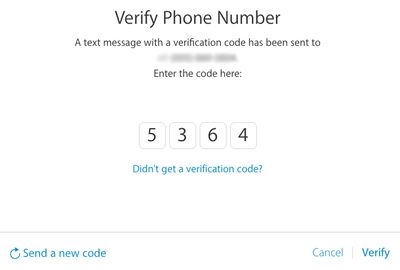
  6. A text message with a verification code will be sent to your trusted phone number. Enter the code and click Verify.
  7. Apple-ID-verify-phone
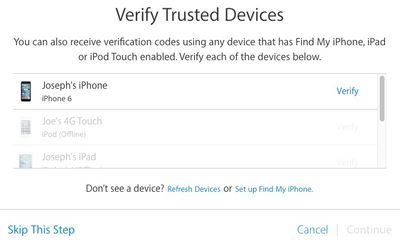
  8. Verify your trusted iPhone, iPad or iPod touch devices with Find My iPhone enabled and click Continue. Or click Skip This Step.
    verify-trusted-Apple-ID
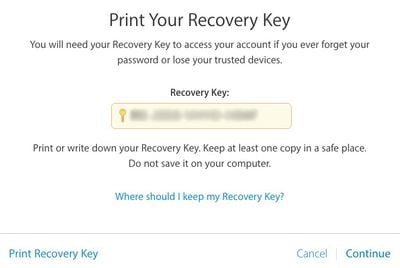
  9. Print or write down your Recovery Key to access your Apple ID account if you ever forget your password or lose your trusted devices.
    Apple-ID-recovery-key
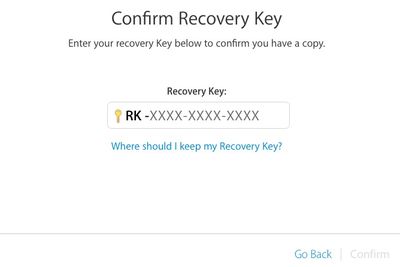
  10. Confirm your Recovery Key and click Confirm.
    Apple-ID-confirm-recovery-key
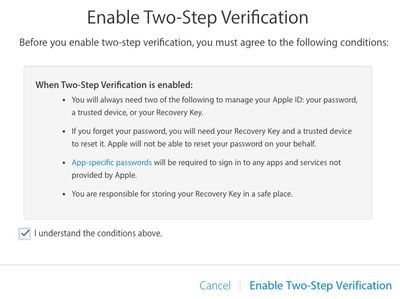
  11. Click on the checkbox if you agree to Apple's terms and conditions and click on Enable Two-Step Verification.
    Apple-ID-enable-two-step

Final Words

To ensure continued access to your Apple ID account after enabling two-step verification, it is essential that you record your recovery key in a safe place. Losing your two-factor recovery key could permanently lock you out of your Apple ID account, especially in the event you are being hacked. Without the recovery key, you will be forced to create a new Apple ID.

Two-step verification may provide an additional layer of security, but it is still highly recommended that you set a secure password for your Apple ID account. Avoid using common names, phrases or dictionary words in your password, and try to use as many lowercase and uppercase letters, numbers and symbols as possible.


Related Forum: Mac Apps

Top Rated Comments

thefourthpope Avatar
151 months ago
This security isn't worth the hassle for me. I'm constantly prompted to sign in to facetime and iMessages on my home mini, mb air, and work iMac. Then I get notifications on each plus iPhone and iPads that I signed in on one of those computers. And continuing the minor annoyance factor, iMessages still doesn't reliably sync read/deleted messages, so I get to delete Google or Evernote two-step verification texts four or five times.


This is just adding a new layer of notifications that I tend to think I don't want.

Please note: I have twice specified that this is my experience and my opinion. YMMV.
Score: 9 Votes (Like | Disagree)
151 months ago
Protip, if you want to set this up for your elderly parents, add your personal cell phone as an additional second factor method, that way you can provide tech support much easier.

Also, have your significant other's cell phone be a 2nd factor for your account, and your cell be a 2nd factor for your SO's account. You can have multiple cell phone numbers as 2nd factors.
Score: 4 Votes (Like | Disagree)
street.cory Avatar
151 months ago
This is dumb.

Wasn't the iPhone's fingerprint scanner supposed to do away with passwords?

No.
Score: 4 Votes (Like | Disagree)
151 months ago
2 factor auth is not available in my country.
Score: 3 Votes (Like | Disagree)
151 months ago
Basically, if you and your SO both have Apple IDs, add each others cell phone numbers to the list of 2nd factor devices.
Pretty straightforward what you are saying. I currently have two-step verification enabled with my phone as both my iOS verified device and my SMS verified device. It makes sense to add someone you trust, like a spouse, to the SMS verified device list in case your phone goes missing. It acts as sort of a backup to not needing to use the Recovery Key.

Speaking of the Recovery Key, take Apple seriously when they say you should keep it available but safe. Copy it into 1Password, LastPass, or similar software/service if you don't feel like keeping it on a piece of paper.
Score: 2 Votes (Like | Disagree)
151 months ago
Thought I would do it.....but before I could enable it, it wanted me to change my password.
My password is pretty good already and Apple has already made me change it at least once before.
I'm not interested.
Score: 2 Votes (Like | Disagree)

Popular Stories

iOS 27 Next to iPhone

Here's When iOS 27 Rolls Out Today in Every Time Zone [Update: It's Out]

Sunday September 13, 2026 3:00 am PDT by
Update 10:04 a.m.: iOS 27 is rolling out now, though it may take a bit for all users to see it, so keep checking! Apple is about to release iOS 27, which will finally deliver more advanced Siri AI capabilities as well as a variety of other refinements, improvements, and new features to iPhones. It's Apple's biggest software update of the year, and Apple announced at Wednesday's iPhone event...
iOS 27 Icon iPhone

iOS 27 Available Now With These 8 New Features

Monday September 14, 2026 9:00 am PDT by
Update — 10 a.m. Pacific Time: Apple has released iOS 27. During its iPhone 18 Pro and iPhone Duo event last week, Apple announced that iOS 27 will be released widely on Monday, September 14. iOS 27 should be available around 10 a.m. Pacific Time / 1 p.m. Eastern Time today via the Settings app, under General → Software Update. Below, we have highlighted eight new features and...
Apple iCloud Plus expansion hero

iCloud+ Now Includes Apple TV, Apple Arcade, and Curated Apple Music Stations in Over 100 Countries

Tuesday September 15, 2026 1:43 am PDT by
Apple today announced a new subscription initiative that turns paid iCloud+ subscriptions into a broader services bundle in more than 100 countries. In select countries, Apple says every paid iCloud+ plan, including the cheapest 50GB tier, now includes Apple TV and Apple Arcade "at no additional cost," while family sharing extends the storage, TV and Arcade access to up to five people....

🔗 Related Apple News & Rumors

Stay updated with the latest Apple ecosystem news and verified rumors