

Apple Increases Account Security With Optional Two-Step Verification System for Apple IDs - MacRumorsOpen MenuShow RoundupsShow Forums menuVisit ForumsOpen Sidebar
Skip to Content

Apple Increases Account Security With Optional Two-Step Verification System for Apple IDs

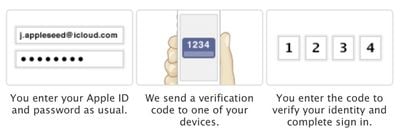
Apple has implemented a new two-step verification system for Apple IDs (via 9to5Mac), adding an additional layer of protection for Apple accounts with an extra security code and a "trusted" device.

Two-step verification will require you to verify your identity using one of your devices before you can make changes to your account or make an iTunes or App Store purchase from a new device. You will also get a Recovery Key for safekeeping which you can use to access your account if you ever forget your password or lose your device.

Once enabled, the new system replaces the standard security questions that are asked before users make purchases on a new device and password resets can only be done from the designated iPhone or iPad.
twostepverification
As the recovery key is used in place of security questions, keeping it secure is of the utmost importance. A lost or forgotten key can be recovered with a trusted device and a password, just as a password can be recovered with a trusted device and a recovery key.

The verification system will request a password that has one letter, one number, one capital letter, and at least eight characters. If such a password is not already in use, users will need to wait three days to fully enable two-step verification. Users with an already compliant password can move on immediately to the next step.

A security code will be sent through SMS or using the Find My iPhone app, and during setup, users can choose a single trusted device. To begin the process, users can visit the Apple ID website to implement two-step verification.


Popular Stories

Apple Event Logo

Apple Working on All-New Operating System

Wednesday July 29, 2026 11:39 am PDT by
Apple is developing an all-new operating system that is essentially a mix of tvOS, watchOS, and iOS, according to Bloomberg's Mark Gurman. In a report this week, he said the operating system will feature a grid of icons, widgets, and apps, along with customizable clock faces. The new software platform is intended for Apple's long-rumored smart home hub. With built-in facial recognition,...


imac video apple feature

Apple Made Its Second-Biggest Acquisition Ever This Year

Wednesday July 29, 2026 12:03 pm PDT by
Apple this year acquired Israeli startup Q.ai for close to $2 billion, according to the Financial Times. That would make this Apple's second-biggest acquisition ever, after it paid $3 billion for the popular headphone maker Beats in 2014. This is also the largest known Apple acquisition since the company purchased Intel's smartphone modem business and patents for $1 billion in 2019. Q.ai...
Dynamic Island iPhone 18 Pro Feature

iPhone 18 Pro: Twelve Changes Coming to Apple's Next Flagship

Thursday July 30, 2026 3:43 am PDT by
We're less than two months out from the launch of Apple's premium next-generation smartphone lineup, and while we're not expecting a dramatic change in terms of functionality, there are still several enhancements rumored to be coming to the iPhone 18 Pro and iPhone 18 Pro Max. One thing worth noting is that Apple is reportedly planning a major change to its iPhone release cycle this year,...

Top Rated Comments

dannyyankou Avatar
174 months ago
Can apple make it anymore annoying...geeez

Perhaps you missed the part that it's optional?

:rolleyes:
Score: 19 Votes (Like | Disagree)
174 months ago
1234.....how did Apple know my security code!!???

John Appleseed? Is that really you?
Score: 17 Votes (Like | Disagree)
174 months ago
Can apple make it anymore annoying...geeez
Seriously? Google introduces (http://www.google.com/search?q=google+introduces+two+step+verification&hl=en&biw=1727&bih=1304&sa=X&ei=j2RLUd_cIauu2gXGuYHABQ&ved=0CB0QpwUoBg&source=lnt&tbs=cdr%3A1%2Ccd_min%3A2%2F1%2F2011%2Ccd_max%3A3%2F1%2F2011&tbm=#hl=en&tbs=cdr:1%2Ccd_min%3A2%2F1%2F2011%2Ccd_max%3A3%2F1%2F2011&sclient=psy-ab&q=google+two+step+verification&oq=google+two+step+verification&gs_l=serp.3...4165.4165.0.4334.1.1.0.0.0.0.0.0..0.0...0.0...1c.1.7.psy-ab.QFMX0pozUkw&pbx=1&bav=on.2,or.r_qf.&bvm=bv.44158598,d.b2I&fp=5055737f513ba032&biw=1727&bih=1304) two-step verification and everyone goes gaga.

Apple introduces two-step verification and people complain.

Really sick of the anti-Apple everything happening these days. Sheesh.
Score: 15 Votes (Like | Disagree)
174 months ago
1234.....how did Apple know my security code!!???
Score: 15 Votes (Like | Disagree)
rbrian Avatar
174 months ago
1234.....how did Apple know my security code!!???

That's the kind of code only an idiot would have on his luggage... //www.youtube.com/watch?v=a6iW-8xPw3k :D
Score: 8 Votes (Like | Disagree)
174 months ago
Lot of confusion about Google Authenticator in this thread. It doesn't store anything on Google's servers, it gives you one time codes. You need this code AND your account password to login. Just read the Wikipedia article about it.

It works with other services like Dropbox, Lastpass, Amazon Web Services and Facebook because it is based on some standard method of creating codes. You don't even have to use the official Google Authenticator app, there are several others like Authenticator for Windows Phone and a version for so called Java dumb phones.

Someone asked about Facebook and Google Authenticator. They are telling you to use their own code generator but they are really just using the same method as Google and Dropbox. Just click the help button when you are setting it up and look for a 16 digit code (or something), this you type in Google Authenticator and it will give you one time codes back. I can confirm this is working. Also, nothing stops you from using several devices with Google Authenticator (or third-party alternatives) as long as you set them up at the same time.

You should of course have auto lock enabled on your phone if you are using a phone application like Google Authenticator to create codes. And it is still a good idea, even with 2 step activated, to use a password manager to create passwords for most accounts and Diceware for accounts where you have to remember the password.


Too bad Apple did not choose to support Google Authenticator.
Score: 4 Votes (Like | Disagree)

🔗 Related Apple News & Rumors

Stay updated with the latest Apple ecosystem news and verified rumors










































