How to Enable the Optimal Audio Codec for Your Bluetooth Headphones in macOS - MacRumorsOpen MenuShow RoundupsShow Forums menuVisit ForumsOpen Sidebar
Skip to Content

How to Enable the Optimal Audio Codec for Your Bluetooth Headphones in macOS

by

How good your digital music sounds often comes down to which file format it's encoded in. Be that as it may, every Mac audio setup is only as strong as it's weakest link, and if your Bluetooth connection isn't up to scratch, even the best BT headphones will fail to deliver a decent wireless listening experience.

By design, all Bluetooth devices support the low-power SBC audio compression codec as standard. Fortunately, modern Macs also support AAC (Apple's preferred iTunes codec) and aptX, which Android devices often use. These two codecs offer higher quality audio and generally lower latency than SBC, which is why most third-party wireless headphones on the market support one or the other, and sometimes both.
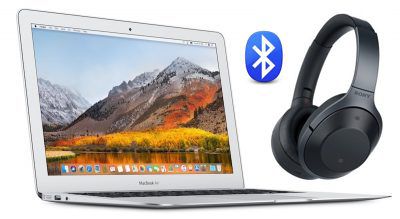
mac bluetooth audio codec aptx aac
Yet for whatever reason, despite their AAC/aptX support, some headphones fall back to the bog-standard SBC codec when connected to a Mac. This can lead to a particularly underwhelming audio experience, not to mention latency-related sync issues, which will be a distinct concern if you use your headphones while gaming or watching movies.

Thankfully, it's possible to force macOS to connect to your headphones using one of the two superior codecs. In this article, we'll show you how to do so using Apple's Bluetooth Explorer utility. (And if you're comfortable opening a Terminal window, we've included a couple of commands at the end that do the same thing.)

Bluetooth audio codecs
But first, it's worth checking which codecs your brand of headphones actually supports: Look for codec logos on the box, and make sure to check for references to codecs in the manual and any accompanying/online spec sheets.

Once you've established that your headphones support aptX and/or AAC, you'll want to identify which codec is being activated when you connect the headphones to your Mac. Follow these steps to find out.

How to Identify Which Bluetooth Codec is Active

  1. Establish a Bluetooth connection between your Mac and headphones in the normal manner.

  2. Play some audio on your Mac so that it's streaming to the headphones.

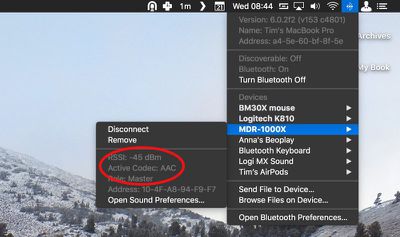
  3. Now hold down the Option (Alt) key and click on the Bluetooth symbol in the menu bar. (If you don't see it there, you need to check Show Bluetooth in menu bar in System Preferences -> Bluetooth.)

  4. Hover your mouse cursor over the headphones in the connection list. You should see the headphones' Active Codec shown in grey.
    active bluetooth codec macos

If your headphones are using AAC or aptX, you don't need to do anything. Without going into the technical details, both standards provide relatively stable wireless connections and – as far as Bluetooth goes – comparably decent sound quality. However, if the codec shown is SBC, you'll probably want to change it. Here's how.

How to Force-Enable aptX and AAC Codecs in macOS

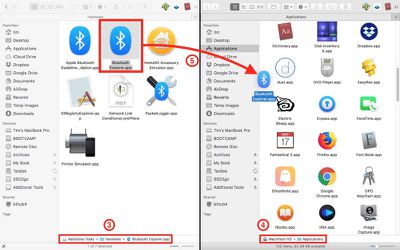
  1. Open a web browser, navigate to Apple's developer downloads page, and download Additional Tools for Xcode 9 [Direct Link] which contains Apple's Bluetooth Explorer utility. Note that to access the page you'll need to register for a free Apple developer account if you don't already have one. Alternatively, use Google to find the Bluetooth Explorer utility hosted elsewhere and skip to step 5, but if you're not downloading from Apple, be sure to screen the file for malware.
    xcode developer tools

  2. Once downloaded, double-click the Additional Tools dmg file to mount it on your desktop.

  3. Open the Additional Tools drive and navigate to the Hardware folder.

  4. Open your Mac's Applications folder in another Finder window or tab.
    Bluetooth Explorer copy

  5. Drag Bluetooth Explorer into your Mac's Applications folder and launch the app from there.

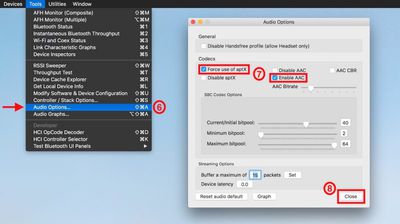
  6. From the Bluetooth Explorer menu bar, select Tools -> Audio Options.

  7. In the Codecs section, tick the checkboxes alongside Enable AAC and/or Force use of aptX (depending on your issue). Make sure Disable AAC and Disable aptX are left unchecked.
    Bluetooth Utility codec enable

  8. Click Close to finish.

  9. Restart your Mac, or reset the Bluetooth module.

When your Mac reboots, you can confirm that the codec change has been applied by following the first series of steps in this article.

Terminal commands for enabling AAC and aptX Codecs

To enable aptX, input the following command, press Enter, and type your user password if prompted:
sudo defaults write bluetoothaudiod "Enable AptX codec" -bool true

Alternatively, to enable AAC, input the following and press Enter:
sudo defaults write bluetoothaudiod "Enable AAC codec" -bool true

To disable either codec via Terminal, simply replace -bool true with -bool false at the end of the command.


Top Rated Comments

111 months ago
What I always wanted to know is: when listening to iTunes music already encoded in AAC, will it pass-through or re-encode in AAC? Because you potentially loose the benefits of good compression if you recompress. This came to my mind when finding out about albums that sound bad because they are recompressed themselves.

I have read in multiple sources that all audio is reencoded to AAC whether it comes from itunes as AAC or not. However, all the sources say that this reencoding does not cause much of a quality loss because AAC as a codec is transparent even after 100 reencodings. I use beoplay e8 and the sound is the best I have ever listened to with Bluetooth headsets that I have used so far and I have used quite a few aptx headsets by Sennheiser. The only problem with the above tutorial is that the setting are lost when reconnect your beoplay e8. I used sudo and normal user to change the plist instead of using the gui and the settings seem to be saved now. here is the commands that I used:
defaults write bluetoothaudiod "Enable AAC codec" -bool true

defaults write bluetoothaudiod "AAC Bitrate" 320

sudo defaults write bluetoothaudiod "Enable AAC codec" -bool true

sudo defaults write bluetoothaudiod "AAC Bitrate" 320
Score: 8 Votes (Like | Disagree)
111 months ago
Sadly, Apple doesn't seem to support aptX on iOS :(
Score: 8 Votes (Like | Disagree)
111 months ago
iPhones don’t support APTX which blows.
Score: 5 Votes (Like | Disagree)
Lasermoon Avatar
76 months ago

Anyone know if there is a way to verify which codec us being used in big sur? The option click on blueooth does not bring up the codec option like it used to in previous versions of mac OS.
Yes. I had to use bluetooth explorer > Audio Graphs
Score: 4 Votes (Like | Disagree)
RedGala Avatar
111 months ago
Great article. This is what macrumors is all about.
Score: 4 Votes (Like | Disagree)
timmyh Avatar
111 months ago
Interesting! I suspect Apple’s own audio devices, such as AirPods, and all of their newer OSs, support AAC?
Correct!
Score: 4 Votes (Like | Disagree)

Popular Stories

Home Hub Command Center with Dome Base Feature

Apple Smart Home Hub to Feature iMac G4-Style Design

Wednesday September 30, 2026 4:36 am PDT by
Apple's long-rumored smart home hub will have an iMac G4-style design and a host of unique features, Bloomberg's Mark Gurman reports. The smart home hub is said to feature a square 6-inch display, with variants that can be placed on a countertop or mounted on a wall. It features a single FaceTime camera on the front, with microphones and speakers in its connected base. Gurman described the...
HomePod minis on gradient feature 1 1

Three New Apple Smart Home Products Coming on October 13

Wednesday September 30, 2026 4:04 am PDT by
Apple plans to introduce a series of new smart home products on Tuesday, October 13, according to Bloomberg's Mark Gurman. Apple reportedly plans to debut its long-awaited smart home hub device, a new HomePod mini, and a new Apple TV on the date. The new HomePod mini and Apple TV are set to retain their existing designs, but tout faster chips to support Siri AI. The new HomePod mini will...
Apple TV Sans Remote Feature

New Apple TV 4K Leaked

Friday September 25, 2026 8:16 am PDT by
MacRumors contributor Aaron Perris has uncovered an image file from Apple for an unreleased Apple TV 4K, suggesting that a new model will finally be released soon. The image is specifically for an "Apple TV 4K (4th generation)" model. Apple TV 4K (4th generation) image (on a gradient) The image reveals that the Apple TV will have the same external design as the current model, with all of its...
Latest Stories
Apple's Smart Home Camera Will Apparently Have 'No Video Recording'
2 hours ago
Apple TV Just Updated Its Selection of 'Bonus' Movies
3 hours ago
iPhone 18 Pro Colors Buyer's Guide: Which Should You Choose?
3 hours ago
Early Prime Big Deal Days: Best Discounts on Accessories, TVs, and More at Amazon
4 hours ago
MacBook Pro With OLED Touch Screen Rumored to Launch in October or November
5 hours ago
Apple's All-New Home Hub Rumored to Launch in These Four Colors
6 hours ago
iPhone 18 Pro Aperture Control Goes Fully Manual in Halide 3.2
7 hours ago
Apple Stores Receive 'Do Not Open' Boxes Ahead of Smart Home Products Launch
7 hours ago
iPhone 18 Pro Sales Jump in China Ahead of iPhone Duo Launch
8 hours ago
Apple TV Still Down for Some Users Following Apple Services Outage
9 hours ago
PSA: Apple Mail on Mac May Stop Syncing Microsoft 365 Accounts Today
9 hours ago
Apple's Smart Home Hub: Everything We Know So Far
19 hours ago
Apple's Home Hub Borrows From the iPhone Duo's StandBy Mode
20 hours ago
Apple Invites App Updated With Three New Features
1 day ago
Apple Event on October 13?
1 day ago
Apple Watch SE 3 vs. Series 12 Buyer's Guide: Which Should You Buy?
1 day ago
iPad Mini 8 to Offer These 10 New Features
1 day ago
DoorDash Unveils AI Food Ordering Through Apple's Messages App
1 day ago
Amazon Takes Up to $150 Off Select M5 MacBook Air Models
1 day ago
Apple Still Plans to Release a New Full-Sized HomePod
1 day ago
Apple Working to Expand HomeKit
1 day ago
Apple Smart Home Hub to Feature iMac G4-Style Design
1 day ago
Three New Apple Smart Home Products Coming on October 13
1 day ago
Apple Pay Now Available in India With Axis Bank Cards
2 days ago
OpenAI Launches Always-On 'Dots' Agents to Rival Meta's Muse
2 days ago
AirPods 5 Teardown: Batteries Removable, Case Still Tough
2 days ago
iPhone 18 Pro Owners Complain of Speaker Crackling or Popping
2 days ago
You Can 'Get Ready' for iPhone Duo Pre-Orders on October 12
2 days ago
Apple Pay Reportedly Launching in India Today
2 days ago
Apple Releases New AirPods Beta Firmware
2 days ago

🔗 Related Apple News & Rumors

Stay updated with the latest Apple ecosystem news and verified rumors