How to Reset Your Mac's Bluetooth Module to Fix Connection Issues - MacRumorsOpen MenuShow RoundupsShow Forums menuVisit ForumsOpen Sidebar
Skip to Content

How to Reset Your Mac's Bluetooth Module to Fix Connection Issues

by

BluetoothIconXBluetooth is what your Mac uses to connect to wireless devices like keyboards, mice, trackpads, speakers, and other peripherals. Generally, it's a reliable technology. At some point however, the chances are you'll run into difficulty establishing a Bluetooth connection with one or more of your devices.

Most problems can be fixed by unpairing and repairing the Bluetooth device, changing its batteries, rebooting your Mac, or performing an SMC reset. But if none of these methods work, you can always try resetting your Mac's Bluetooth module. Here's how to do it in macOS using the hidden Bluetooth Debug menu.

How to Reset Your Mac's Bluetooth Module

Before proceeding, bear in mind that if your setup relies exclusively on Bluetooth for communicating with your keyboard and mouse, then you're going to temporarily lose connection to them using the following methods, so you might want to have a backup wired input device option just in case.

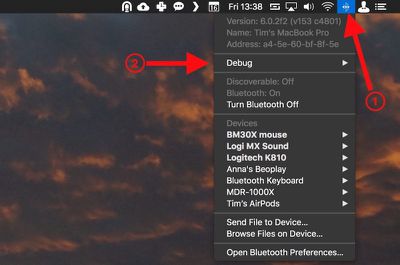
  1. Holding the Shift + Option (Alt) keys on your Mac's keyboard, click the Bluetooth symbol in the top-right corner of the macOS menu bar. (If you don't see it there, you need to check Show Bluetooth in menu bar in System Preferences -> Bluetooth.)
    macos bluetooth debug menu bar

  2. Locate the revealed Debug submenu and hover your mouse cursor over it.

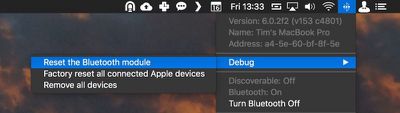
  3. Click Reset the Bluetooth module.
    macos reset Bluetooth module

  4. Now, restart your Mac.

You'll notice a couple of other potentially useful options in the Debug submenu. Factory reset all connected Apple devices does exactly what it says – forces any Apple-branded Bluetooth accessories back to the default settings they came with out of the box. It's a reliable fallback option if you've tried everything else to fix a connection issue, including resetting the Bluetooth module.

Lastly, the Remove all devices option might prove useful if you're moving your Bluetooth mouse and keyboard to another Mac, for example. However, you can also remove devices on an individual basis from the macOS menu bar, as long as you hold down Shift + Option (Alt) before you click the Bluetooth symbol.
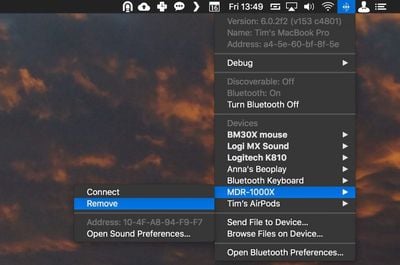
remove Bluetooth device macOS
Removing devices in this manner means you're not also banishing a whole bunch of other established Bluetooth connections like speakers and so on that you might want to keep.


Top Rated Comments

111 months ago
Enjoying all these hints lately a lot more than "news" about iOS games or rumored emoji changes.

Kind of reminds me of that great OS X Hints site (now defunct), if anybody remembers that. http://hints.macworld.com
Score: 7 Votes (Like | Disagree)
111 months ago
get some AirPods. They work great
Not sure how that’d help with my car system, Bluetooth speaker from Bose, etc.
Score: 3 Votes (Like | Disagree)
Rychiar Avatar
111 months ago
I find Bluetooth frustrating with my iPhone. My headset never auto-connects and I have to manually do it in settings. We should've come further than this.
get some AirPods. They work great
Score: 2 Votes (Like | Disagree)
Traverse Avatar
111 months ago
This is actually very useful. I’ve had problems with BT every so often
Score: 2 Votes (Like | Disagree)
Benz63amg Avatar
79 months ago

Thanks for this article; resetting the bluetooth module solved my year-old problem!
What problem was it?
Score: 1 Votes (Like | Disagree)
111 months ago
I find Bluetooth frustrating with my iPhone. My headset never auto-connects and I have to manually do it in settings. We should've come further than this.
No kidding. I was going to ask how to do this in iOS. Ever since iOS 11 (or maybe my iPhone X) Bluetooth has been amazingly buggy. I’ve had conversations with Apple which usually end in reloading the iPhone or the need for a new iPhone, but the problems persist.
Score: 1 Votes (Like | Disagree)

Popular Stories

iOS 27 Next to iPhone

Here's When iOS 27 Rolls Out Today in Every Time Zone [Update: It's Out]

Sunday September 13, 2026 3:00 am PDT by
Update 10:04 a.m.: iOS 27 is rolling out now, though it may take a bit for all users to see it, so keep checking! Apple is about to release iOS 27, which will finally deliver more advanced Siri AI capabilities as well as a variety of other refinements, improvements, and new features to iPhones. It's Apple's biggest software update of the year, and Apple announced at Wednesday's iPhone event...
iOS 27 Icon iPhone

iOS 27 Available Today With These 8 New Features

Monday September 14, 2026 9:00 am PDT by
Update: Apple has released iOS 27. During its iPhone 18 Pro and iPhone Duo event last week, Apple announced that iOS 27 will be released widely on Monday, September 14. iOS 27 should be available around 10 a.m. Pacific Time / 1 p.m. Eastern Time today via the Settings app, under General → Software Update. Below, we have highlighted eight new features and changes coming with iOS...
deep black iphone 18 pro

Apple Says iPhone 18 Pro Max Sold in U.S. Differs in One Way

Saturday September 12, 2026 3:27 pm PDT by
As noted by Nicolas Lellouche, who writes for the French tech website Numerama, Apple has updated its tech specs pages for the iPhone 18 Pro and iPhone 18 Pro Max to clarify which models are equipped with its new C2 cellular modem and where. Apple now says the iPhone 18 Pro has a C2 modem worldwide, while the iPhone 18 Pro Max uses the chip in every country except for the U.S. According...

🔗 Related Apple News & Rumors

Stay updated with the latest Apple ecosystem news and verified rumors