

How to Downgrade From iOS 15 to iOS 14 - MacRumorsOpen MenuShow RoundupsShow Forums menuVisit ForumsOpen Sidebar
Skip to Content

How to Downgrade From iOS 15 to iOS 14

by

If you've installed iOS 15 or iPadOS 15 through Apple's developer program or the public beta now it's been released, you may decide you want to downgrade because of usability or stability issues. Keep reading to learn how it's done.
iOS 15 banner public beta red
Apple usually only releases the public betas of ‌iOS and ‌iPadOS‌ once the developer versions are relatively stable. That said, Apple's beta versions of its major software updates can be notoriously buggy, especially the early releases.

You may find apps not working properly, poor battery life, device crashes, and features that don't do what they're supposed to. Fortunately, you can restore your iPhone or iPad to the previous version of iOS.

If you made an archived backup before you installed the beta, you can remove the ‌iOS 15 beta and restore the backup. If you didn't make a backup, you can still downgrade, but you won't be able to restore your device to its original state before you upgraded.

Also, if you've installed watchOS 8 on your Apple Watch, it's important to note that you won't be able to use it with your ‌iPhone‌ once you've gone back to iOS 14. And downgrading an Apple Watch to a previous version of watchOS can't be done manually either – if you want to remove ‌watchOS 8‌, you'll have to send your watch in to Apple.

How to Downgrade from iOS 15 or iPadOS 15

  1. Launch Finder on your Mac.
  2. Connect your iPhone or ‌iPad‌ to your Mac using a Lightning cable.
  3. Put your device into recovery mode. The method of doing this depends on your device, so check the list below these steps to find your model. Apple also provides more information on Recovery mode in this support article.
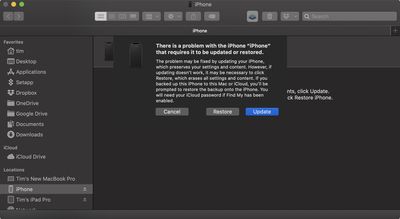
    restore

  4. A dialog will pop up asking if you want to restore your device. Click Restore to wipe your device and install the latest public release of iOS or iPadOS.
  5. Wait while the restore process completes.
How to Enter Recovery Mode on Your iOS Device

  • iPad models with Face ID: Press and quickly release the Volume Up button. Press and quickly release the Volume Down button. Press and hold the Top button until your device begins to restart. Continue holding the Top button until your device goes into recovery mode.

  • iPhone 8 or later: Press and quickly release the Volume Up button. Press and quickly release the Volume Down button. Then, press and hold the Side button until you see the recovery mode screen.

  • iPhone 7, iPhone 7 Plus, and iPod touch (7th generation): Press and hold the Top (or Side) and Volume Down buttons at the same time. Keep holding them until you see the recovery mode screen.

  • iPad with Home button, iPhone 6s or earlier, and iPod touch (6th generation) or earlier: Press and hold both the Home and the Top (or Side) buttons at the same time. Keep holding them until you see the recovery mode screen.

One you've followed the above steps, you can restore a backup of your device from iOS 14 or iPadOS 14 using your Mac or iCloud.


Related Forum: iOS 15

Top Rated Comments

69 months ago
We’ll you guys are smarter now. Don’t install beta updates. It’s just not worth it (for normal users).
Score: 6 Votes (Like | Disagree)
Mystakill Avatar
69 months ago
I just wish I could download the previous version of Safari. The new version is an absolute steaming pile o' crap. "Look! We put in all kind of new, useless gee whizzes & what's-its because our designer & developer wonks wanted to. Who cares if these (essentially) massive changes slow you down and make you less productive? It looks great, right? Right?"

I guess I'll be re-exploring Chrome, Firefox, et. al., for a new default browser.
Score: 5 Votes (Like | Disagree)
69 months ago

Can you do this for Watch OS ?
No.
Score: 4 Votes (Like | Disagree)
69 months ago

I would strongly advise against this if you were previously on the iOS 14.7 public beta.

I lost a good 4 hours of my life yesterday trying to do this.

Once you sign up for the iOS 15 public beta, the 14.7 will not be available again. The downgrade to iOS 14 will work but will put you on 14.6 but your backup will be from the 14.7 beta and is incompatible so can’t be used.

Complete **** show.

After getting back on iOS 14.6 and not being able to restore it. I had to set it up as a new phone, then get back onto the iOS 15 public beta, then reset the device and then restore it from the latest backup.
No sympathy for fools willing to be apple’s guinea pigs
Score: 3 Votes (Like | Disagree)
Marzzz Avatar
69 months ago

We’ll you guys are smarter now. Don’t install beta updates. It’s just not worth it (for normal users).
Not only do I not install beta updates, but I usually wait at least 6 months before installing a MacOS major update.
Score: 3 Votes (Like | Disagree)
bradl Avatar
64 months ago

Unfortunately theres a hand full of new apps that only work with older ios operating systems but the older ios operating systems arent available anywhere. Could the person that posted this article please include the link to the ios 14 download? I cant find it anywhere on the web, not even apples website. Prefferably post a link to ios 13 download but that may just be wishful thinking at this point. oh yeah apples got their heads up their you know whats.
You won't find iOS 14.x anywhere.

Well, let me correct that. You can find iOS 14 for download, but if I remember right, you would need iOS 14.7.2 at the most to be able to get to iOS 14.8. The only way to get to iOS 14.8 is via OTA updates, but iOS 14.7.2 was the last release in iOS 14 to be released as a full download. Additionally, Apple stopped signing 14.7.2 when iOS 15 came out, so you wouldn't be able to get onto that regardless..

In short, if you're on iOS 15.x, you're stuck on it with no way to get back to iOS 14.8.

BL.
Score: 2 Votes (Like | Disagree)

Popular Stories

Apple HomeView lineup feature1

Apple Announces 'HomeView' Smart Home Hub

Tuesday October 13, 2026 6:00 am PDT by
Apple today announced the "HomeView," an all-new kind of smart home hub featuring a 7-inch Liquid Retina display and Siri AI. Apple's senior vice president of Worldwide Marketing Greg Joswiak said: Apple HomeView is designed to be shared by everyone in the home yet feel completely personal to each user. It recognizes your face to shift from a household screen to your own experience,...
Apple TV 4K 4th Generation feature4

New Apple TV 4K Announced With A19 Chip, Updated Siri Remote, More

Tuesday October 13, 2026 6:08 am PDT by
Apple today announced the fourth-generation Apple TV 4K, with key features including an A19 chip, Siri AI support, an updated Siri Remote that has Find My support with Precision Finding, built in far-field microphones, support for surround sound with four HomePods in front and rear pairs, and more. The A19 chip in the new Apple TV 4K delivers up to 50% faster CPU performance and up to twice...
iOS 26 Home Feature

RIP, homeOS

Tuesday October 13, 2026 9:39 am PDT by
MacRumors was first to reveal the name "HomeView" last week, after discovering a trademark filing from a secretive shell company that we correctly suspected was linked to Apple. Apple was likely behind a "homeOS" trademark filing as well, but the company ultimately decided to stick with generic "HomeView software" naming, just like it refers to the HomePod's operating system as "HomePod...
Latest Stories
OLED MacBook Pro Won't Get M7 Chips Until Late 2027
2 hours ago
Apple Pledged $25 Million to Trump's White House Ballroom
3 hours ago
Touchscreen MacBook Pro Could Launch on November 6
5 hours ago
New Withings Users Must Pay $99/Year for Apple Health Syncing
5 hours ago
Meta and Apple Bring Muse Spark Open AI Model to Mac Studio
6 hours ago
iPad Mini 8: Apple Has Tested Both 60Hz and 120Hz ProMotion Displays
7 hours ago
Apple TV 4K 2022 vs. 2026 Buyer's Guide: All Differences Compared
8 hours ago
Apple CEO John Ternus on Early Foldables: 'Kind of Cheap and Crappy'
9 hours ago
Greg Joswiak Says Apple Isn't Focused on Making AI for 'Lunatic Fringe'
9 hours ago
Amazon Offers $120 Discount on AirPods Max 2, $50 Off AirPods Pro 3
10 hours ago
Apple CEO John Ternus Featured on Cover of TIME Magazine: 'New Era'
11 hours ago
Apple Announces Deadline to 'Get Ready' to Pre-Order the iPhone Duo
11 hours ago
MKBHD is 'Not Convinced' About Apple's New HomeView, Here's Why
12 hours ago
Apple's Wall-Mounted HomeView Ships Without a Power Adapter
12 hours ago
Rare Apple-1 With Steve Jobs Letter Sells for $1.15 Million
12 hours ago
Apple Now Inviting Media to October 28 'Launch Experience'
13 hours ago
iPhone Duo's A20 Pro Chip Benchmarked Ahead of Launch
1 day ago
10 HomeView Features You Might Have Missed
1 day ago
Apple Becomes Second Company to Close Above $5 Trillion
1 day ago
Which Apple Home Devices Get Siri AI, and When
1 day ago
Apple's Long-Delayed HomeView Was Already Being Tested in 2024
1 day ago
Apple Intelligence Coming to China in December With iOS 27.3
1 day ago
Apple Invites App Updated With Two New Features
1 day ago
OpenAI Says Ex-Employee Showed Its Device Plans to Apple
1 day ago
Discover the Best Cases and Screen Protectors for Your New iPhone Duo
1 day ago
Apple Store Near Los Angeles Closed Due to 'Events Beyond Our Control'
1 day ago
No, HomePod Mini 1 Won't Support Siri AI as CNET Reported
1 day ago
iPhone Duo Compromises: Everything You Have to Give Up
1 day ago
Apple HomeView Has These 15 Apps, Some CarPlay Apps and Widgets Also Supported
1 day ago
iPhone Duo: Apple Charging $49 for New Cover Layer, $229 for Battery
1 day ago

🔗 Related Apple News & Rumors

Stay updated with the latest Apple ecosystem news and verified rumors








































