

How to Disable Autoplaying Videos in the YouTube App's Home Tab - MacRumorsOpen MenuShow RoundupsShow Forums menuVisit ForumsOpen Sidebar
Skip to Content

How to Disable Autoplaying Videos in the YouTube App's Home Tab

by

Over the next few weeks, YouTube is rolling out a new feature for its mobile app called "Autoplay on Home," which automatically plays videos that appear on your Home tab. As you scroll through your Home feed, videos will begin to play on mute with captions auto-enabled.
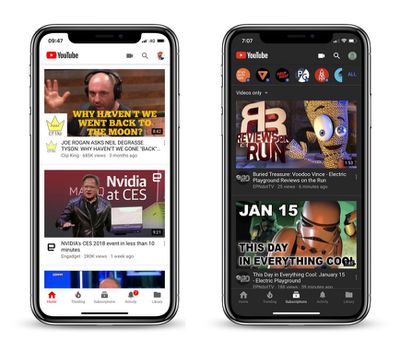
youtube mobileGoogle claims the previously Premium-only feature is a better way to experience new content on the go, and will help you "make more informed decisions about whether you want to watch a video," but not everyone is likely to agree, especially users who have a cellular data cap.

Fortunately, YouTube has provided some options to customize the app's new default behavior, which we'll mention shortly. But first, here's how you can turn off Autoplay on Home completely.

How to Disable Autoplay on Home in the YouTube App

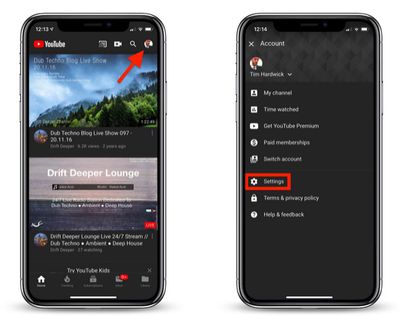
  1. Launch the YouTube app on your iPhone.
  2. Tap your profile icon in the upper right of the screen.
  3. Tap Settings.
    turn off autoplay on home youtube

  4. Tap Autoplay.
  5. Tap the Autoplay on Home toggle to turn it off.
In some circumstances, Autoplay on Home may be enabled only when you're using either Wi-Fi or cellular data. If you want to adjust this behavior, follow the steps above to bring you to YouTube's Autoplay settings, and you'll find options to Use on Wi-Fi and cellular data and Use only when connected to Wi-Fi.


Tag: YouTube

Top Rated Comments

Mac Fly (film) Avatar
98 months ago
I followed these instructions but don’t see the auto-play option in settings.
Score: 4 Votes (Like | Disagree)
Pepe4life Avatar
98 months ago
Why is every company doing this? Stop wasting my bandwidth on crap I don’t want to see
Score: 4 Votes (Like | Disagree)
CarlJ Avatar
98 months ago
I followed these instructions but don’t see the auto-play option in settings.
Same here - these types of articles are usually filled with screenshots detailing the whole procedure, while this article stops the screenshots after "tap Settings". I'm on Version 13.47.7, and don't see any "Autoplay" text anywhere on the Settings page. It's something bordering on suspicious that they don't have an screenshot of the offending setting.
Score: 2 Votes (Like | Disagree)
98 months ago
I'm not a frequent YT app user, but when I do, I find it very un-intuitive and difficult to maneuver.

When I go to a particular subscribed YT'er and see the list of videos, I play the first one, and if I press the "skip to next" button, it plays some completely unrelated video instead of the next one in the list of videos. Just navigating the screens is misery.

Certainly they could do better.
Score: 2 Votes (Like | Disagree)
98 months ago
Awful “feature”. Off you go. Thanks.
Score: 2 Votes (Like | Disagree)
83 months ago

Over the next few weeks, YouTube is rolling out a new feature for its mobile app called "Autoplay on Home," which automatically plays videos that appear on your Home tab. As you scroll through your Home feed, videos will begin to play on mute with captions auto-enabled.

disable youtube app autoplay on home feature image
Google claims ('https://productforums.google.com/forum/#!topic/youtube/5D-5iO1hyNI') the previously Premium-only feature is a better way to experience new content on the go, and will help you "make more informed decisions about whether you want to watch a video," but not everyone is likely to agree, especially users who have a cellular data cap.

Fortunately, YouTube has provided some options to customize the app's new default behavior, which we'll mention shortly. But first, here's how you can turn off Autoplay on Home completely.

How to Disable Autoplay on Home in the YouTube App
[LIST=1]
* Launch the YouTube app on your iPhone.
* Tap your profile icon in the upper right of the screen.
* Tap Settings.
disable youtube app autoplay on home feature image

Tap Autoplay.
* Tap the Autoplay on Home toggle to turn it off.

In some circumstances, Autoplay on Home may be enabled only when you're using either Wi-Fi or cellular data. If you want to adjust this behavior, follow the steps above to bring you to YouTube's Autoplay settings, and you'll find options to Use on Wi-Fi and cellular data and Use only when connected to Wi-Fi.
Article Link: How to Disable Autoplaying Videos in the YouTube App's Home Tab ('https://www.macrumors.com/how-to/disable-youtube-app-autoplay-on-home-feature/')
In order to disable this setting. Open YouTube, Click on your Profile pic in the top right as it says. After this select "Settings" then select "General" then Click/Select "Muted playback in feeds" then Select "Off".

This fuction will be disabled and you can now use YouTube again without announcing yourself with the annoying setting. Enjoy:)
p.s. i legit just made an account to comment this to help anyone with this issue..i know how awful it is to try to find help with something and no one seems to be of help with incorrect information most of the time so i decided to help and use correct information i know is authentic bc i used it.
Score: 1 Votes (Like | Disagree)

Popular Stories

General YouTube Feature Redux

YouTube Will Now Automatically Label AI Videos Even When Creators Don't

Wednesday May 27, 2026 5:06 pm PDT by
YouTube today said it is introducing automatic AI detection, with automatic AI labeling applied to videos with "significant photorealistic AI use." Creators are still expected to manually disclose when realistic AI is used for videos even with the new automatic labeling system. Creators who think their content was incorrectly identified as AI-generated can update the disclosure status in...
iphone 17 pro black feature

iPhone 18 Pro's Camera Upgrade Will Cost Apple 50% More

Friday May 29, 2026 3:44 am PDT by
The iPhone 18 Pro and iPhone 18 Pro Max's all-new variable aperture lens will cost Apple 50% more than the camera unit used in current models, according to supply chain analyst Ming-Chi Kuo. Variable aperture has been one of the most persistent iPhone camera rumors of the past few years. Kuo first flagged the feature in late 2024, and it has since been corroborated by multiple reports and...
HomePod mini and Apple TV Sage

New Apple TV and HomePod Mini Are 'Nearly Ready' to Launch, New Siri Remote Also Rumored

Sunday May 31, 2026 8:47 am PDT by
New models of the Apple TV 4K and HomePod mini are "nearly ready to go," according to the latest word from Bloomberg's Mark Gurman. Both devices have been ready "for months," but Apple is holding off on launching them until the more personalized version of Siri is available, he said. "I am told the hardware for the next Apple TV set-top box and HomePod mini has been done for months and...

🔗 Related Apple News & Rumors

Stay updated with the latest Apple ecosystem news and verified rumors






































