

If you're being interrupted by phone calls coming through to your Mac from your iPhone, you can disable this continuity feature temporarily or permanently. Keep reading to learn how.

If you own an iPhone and a Mac, you may find that phone calls to your iPhone also ring through to your Mac. This can be distracting or just not useful, especially if you tend to have your iPhone with you at all times.
Fortunately, there are a few options at your disposal that enable you to temporarily or permanently prevent calls coming through to your Mac. We've outlined them below, beginning with the temporary use of Do Not Disturb.
How to Temporarily Disable Mac Phone Calls
If you want to stop calls from coming to your Mac temporarily, the easiest thing to do is turn on Do Not Disturb. (Note that this will silence all other notifications on your Mac as well.)
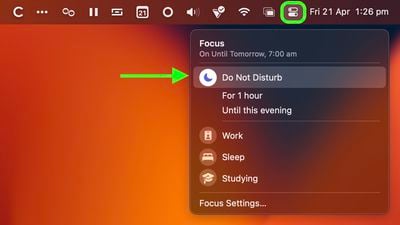
To do so, click the Control Center icon (the double pill button) in the top-right corner of your Mac's menu bar, click Focus, then select Do Not Disturb. If you don't select a duration (e.g., For 1 hour or Until this evening) Do Not Disturb will remain active until the next day.
How to Permanently Disable Mac Phone Calls in macOS
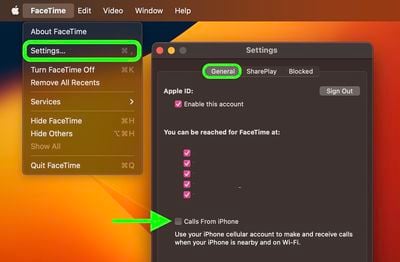
- On your Mac, launch the FaceTime app.
- Select FaceTime -> Settings... in the menu bar.
- Click the General tab if it's not already selected.
- Click the box next to Calls From iPhone to uncheck it.
How to Permanently Disable Mac Phone Calls in iOS
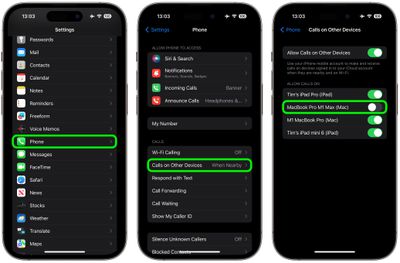
- On your iPhone, open the Settings app.
- Scroll down and tap Phone.
- Under "Calls," tap Calls on Other Devices.
- Toggle off the switch next to the Mac(s) that you want to disable call forwarding on. Alternatively, toggle off Allow Calls on Other Devices at the top of the menu.
Did you know that Apple provides features on Mac and iOS that allow you to block nuisance calls from the same number coming through to your FaceTime account? Check out our dedicated how-to for all the details.













































