

How to Adjust or Disable Font Smoothing in macOS Big Sur - MacRumorsOpen MenuShow RoundupsShow Forums menuVisit ForumsOpen Sidebar
Skip to Content

How to Adjust or Disable Font Smoothing in macOS Big Sur

by

If you recently installed macOS Big Sur and you're wondering why the text looks blurry on your display, it could be because font smoothing is enabled by default. This article shows you how to disable it with a simple Terminal command.
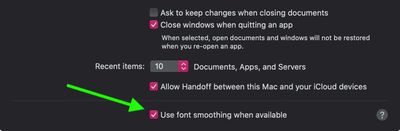
font smoothing catalina
Before macOS 11 Big Sur came along, Apple offered the ability to disable font smoothing in the General tab of System Preferences. Unfortunately for some, upgrading to Big Sur removes this option from the preferences pane and re-enables font smoothing. Fortunately, however, there is another way to re-instate it. The following steps show you how.

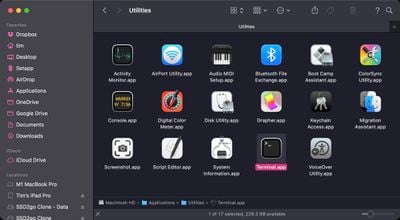
  1. Launch the Terminal app on your Mac from the /Applications/Utilities folder.
    applications terminal

  2. At the command prompt, type the following: defaults -currentHost write -g AppleFontSmoothing -int 0
    disable font smoothing big sur

  3. Restart your Mac for the changes to take effect.
Note that you can adjust the level of smoothing more granually by changing the number at the end of this command. The "0" disables font smoothing, while "1" enables light font smoothing, "2" enables default medium smoothing, and "3" enables strong smoothing. For example, if after disabling font smoothing you want to return to the default setting, replace the "0" at the end of the command with a "2."


Related Forum: macOS Big Sur

Popular Stories

Apple Event Logo

Apple Working on All-New Operating System

Wednesday July 29, 2026 11:39 am PDT by
Apple is developing an all-new operating system that is essentially a mix of tvOS, watchOS, and iOS, according to Bloomberg's Mark Gurman. In a report this week, he said the operating system will feature a grid of icons, widgets, and apps, along with customizable clock faces. The new software platform is intended for Apple's long-rumored smart home hub. With built-in facial recognition,...
imac video apple feature

Apple Made Its Second-Biggest Acquisition Ever This Year

Wednesday July 29, 2026 12:03 pm PDT by
Apple this year acquired Israeli startup Q.ai for close to $2 billion, according to the Financial Times. That would make this Apple's second-biggest acquisition ever, after it paid $3 billion for the popular headphone maker Beats in 2014. This is also the largest known Apple acquisition since the company purchased Intel's smartphone modem business and patents for $1 billion in 2019. Q.ai...
Apple Intelligence Comes Under Fire Feature

Apple Will 'Watch Everything Burn' When AI Bubble Bursts - Ed Zitron

Monday July 27, 2026 7:11 am PDT by
Memory prices have doubled, Macs and iPads have gone up, and iPhones are expected to follow. Ed Zitron – who writes the Where's Your Ed At newsletter, hosts the Better Offline podcast, and has been described by Politico as the AI boom's most "acerbic gadfly" – has spent years arguing the buildout driving those costs will never pay for itself. We asked him what happens to Apple if he's...

🔗 Related Apple News & Rumors

Stay updated with the latest Apple ecosystem news and verified rumors








































