 If the photos on your Mac are taking over your hard drive, or you just want to start your photo and video collection afresh, the good news is that Photos for Mac allows you to delete all the media in the Photo Library in just a few short steps.
Before you go down this route, make sure you've backed up any photos or videos that you want to keep. iCloud will only let you restore all your deleted photos at once, but you can take a more selective approach by using a third-party solution like Google Photos or Dropbox on Mac or PC.
Note that if you've enabled iCloud Photo Library, any photos and videos you delete on your Mac are also deleted on any other devices for which iCloud Photo Library is also enabled (your iPhone or iPad, for example).
How to Delete All Photos on Your Mac
- Launch the Photos app on your Mac.
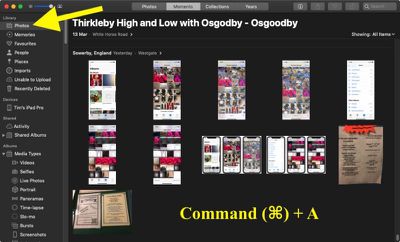
- Select Photos from the Library section at the top of the left column.

- Press the key combination Command+A to select all photos in your library.
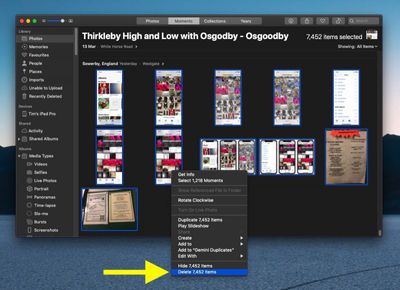
- Press the Backspace key. Alternatively, right-click any photo and select Delete [number of] items.
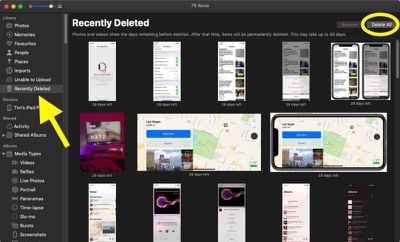
- Next click Recently Deleted in the Library section in the left column.
- Click Delete All at the top-right corner of the window.
- Click OK to confirm.
If you use iCloud Photos, you can save on space in future by selecting Preferences... in the Photos menu bar, clicking the iCloud tab, and choosing Optimize Mac Storage. This ensures full-resolution photos and videos are replaced with smaller, device-sized versions. You can still download full-resolution versions from iCloud at any time.