

In iOS 17, Apple has increased the options available for clearing Safari's web history and website data. You can even clear Safari's cache for a specific Safari profile. Keep reading to learn how it works.

Whenever you browse the web in Safari, the browser stores website data so that it doesn't have to download it again each time you revisit a site. In theory this should speed up your browsing experience, but there are some scenarios where you might want to clear the cache and start anew.
If a site you regularly frequent has elements that have stopped working, or if a site has stopped loading completely, there may be a conflict between an older version of it that Safari has cached and a newer one. Or perhaps you simply want to protect your privacy by wiping the slate clean and removing all the data associated with websites you've visited.
With iOS 17, Apple doesn't just let you clear Safari's history and website data for a specific timeframe. You can also clear the cache for a specific Safari Profile. (Profiles are is designed to help separate your browsing sessions into things like Work, School, or Personal: For more on how to use Profiles, click this link.)
How to Clear Safari Cache
Here's how to clear Safari history and website data on iPhones running iOS 17, and iPads running iPadOS 17.
- Open the Settings app.
- Scroll down and tap Safari.
- Tap Clear History and Website Data in blue.
- Choose a timeframe in which to clear your history: Last hour, Today, Today and yesterday, or All history.
- Choose a specific profile to clear from the list, or check All Profiles.
- To close all open tabs within your timeframe and profile(s), toggle on the switch next to Close All Tabs.
- Tap Clear History, then confirm when prompted.
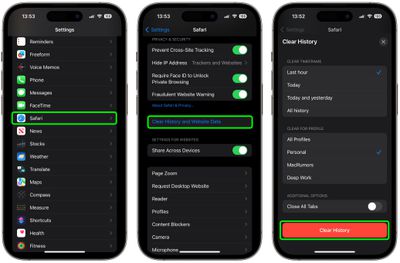
That's all you need to do. The next time you open the associated profile(s), you should notice that all web history for the chosen timeframe will be gone.
















































