How to Separate Your iPhone Browsing Habits With Safari Profiles - MacRumorsOpen MenuShow RoundupsShow Forums menuVisit ForumsOpen Sidebar
Skip to Content

How to Separate Your iPhone Browsing Habits With Safari Profiles

by

In iOS 17, Safari has gained a new feature called Profiles, which is designed to help separate your browsing sessions into things like Work, School, or Personal. Here's how to use it in the beta and when iOS 17 is released to the general public later this month.
iOS 17 General Safari Feature
In ‌iOS 17‌, Apple expands on Tab Groups with a Profile feature that is designed to let you separate your browsing for different use cases. You can create a "Work" profile and a "Personal" profile, for example, so all of your work-related browsing is kept separate from your personal browsing.

Each profile gets its own icon and silos your history, Tab Groups, Favorites, Private Browsing tabs, and cookies. You can even assign specific extensions to different profiles to optimize your browsing experience based on the task at hand.

How to Create a Safari Profile

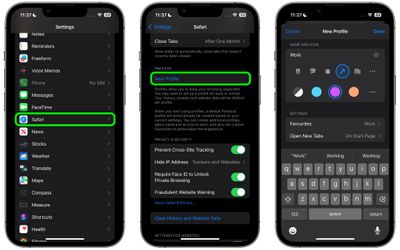
To set up profiles on iPhones running iOS 17, simply follow these steps:

  1. Open the Settings app on you iPhone or iPad.
  2. Scroll down to Safari.
  3. Under the "Profiles" section, tap New Profile.
  4. Select an icon, name, and background color for the profile.

  5. Choose your settings for Favorites and New Tabs.
  6. Tap Done.

safari

When you create a new profile, your device will automatically generate a "Personal" profile to differentiate other browsing sessions conducted outside of the profile you created.

Both profiles and additional ones you create can be edited in the same section of the Settings app. When editing an existing profile, you can also opt to enable any Safari extensions you have installed on your device, as well as delete the profile if desired.

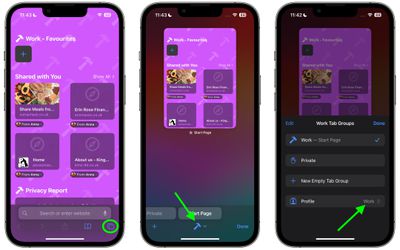
How to Switch Between Profiles in Safari

  1. In Safari, tap the Tabs icon with two overlapping squares.
  2. Tap the middle icon to bring up the active profile's menu.
  3. Tap the Profile option to change which profile is active.
safari

The Safari Profiles feature is available in iOS 17, iPadOS 17 and macOS Sonoma, as well as being part of Safari 17 for macOS Monterey and macOS Ventura. Any profiles you create will be synced across devices logged into the same Apple ID.

Tag: Safari
Related Forums: iOS 17, iPadOS 17

Top Rated Comments

Agent OrangeZ Avatar
38 months ago
Why not just give us user profiles for the WHOLE DEVICE? (because that would just make too much sense)
Score: 7 Votes (Like | Disagree)
Rygaard Avatar
38 months ago
how about Google maps 5 hours of driving with GPS dont count towards SCREENTIME ??
Score: 7 Votes (Like | Disagree)
TheMacDaddy1 Avatar
38 months ago
I wish they would bring back Safari for Windows. I have to use Windows at work sometimes and because I do I use Chrome across Mac and Windows.

Score: 6 Votes (Like | Disagree)
WarmWinterHat Avatar
38 months ago

how about Google maps 5 hours of driving with GPS dont count towards SCREENTIME ??
Yes! Let us exempt certain apps from Screentime. Waze for me.
Score: 6 Votes (Like | Disagree)
fwmireault Avatar
38 months ago
I am on the beta, the feature is nicely implemented! You can tie a profile to your focus mode, which is quite useful
Score: 6 Votes (Like | Disagree)
Pinkyyy 💜🍎 Avatar
38 months ago
Looking forward to both this feature and Web Apps on Sonoma. Hopefully they both work as intended !
Score: 4 Votes (Like | Disagree)

Popular Stories

Apple Event Logo

Apple Working on All-New Operating System

Wednesday July 29, 2026 11:39 am PDT by
Apple is developing an all-new operating system that is essentially a mix of tvOS, watchOS, and iOS, according to Bloomberg's Mark Gurman. In a report this week, he said the operating system will feature a grid of icons, widgets, and apps, along with customizable clock faces. The new software platform is intended for Apple's long-rumored smart home hub. With built-in facial recognition,...
imac video apple feature

Apple Made Its Second-Biggest Acquisition Ever This Year

Wednesday July 29, 2026 12:03 pm PDT by
Apple this year acquired Israeli startup Q.ai for close to $2 billion, according to the Financial Times. That would make this Apple's second-biggest acquisition ever, after it paid $3 billion for the popular headphone maker Beats in 2014. This is also the largest known Apple acquisition since the company purchased Intel's smartphone modem business and patents for $1 billion in 2019. Q.ai...
Dynamic Island iPhone 18 Pro Feature

iPhone 18 Pro: Twelve Changes Coming to Apple's Next Flagship

Thursday July 30, 2026 3:43 am PDT by
We're less than two months out from the launch of Apple's premium next-generation smartphone lineup, and while we're not expecting a dramatic change in terms of functionality, there are still several enhancements rumored to be coming to the iPhone 18 Pro and iPhone 18 Pro Max. One thing worth noting is that Apple is reportedly planning a major change to its iPhone release cycle this year,...

🔗 Related Apple News & Rumors

Stay updated with the latest Apple ecosystem news and verified rumors