

 In iOS 14, Apple introduced a new Translate app that's designed to give real-time translations for 11 different languages. Not only does it translate text, it can also speak translations out loud so that you can get the proper pronunciation or play the translation to someone who speaks a different language.
Another neat feature of the Translate app is that it allows you to check the dictionary definition of individual words in your translations, which is useful if you're trying to learn a language or you just want to double-check the translation. The following steps show you how to do it.
How to Check the Definition of a Translated Word
- Launch the Translate app on your iPhone or iPad.
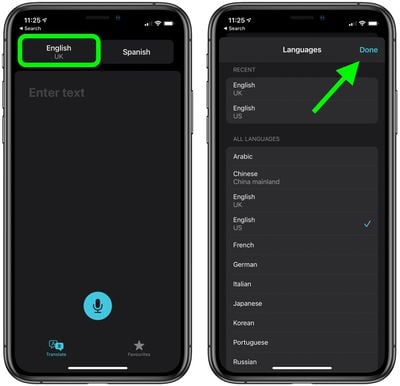
- Select the language you'd like to translate from and the language you'd like to translate to using the two buttons at the top.

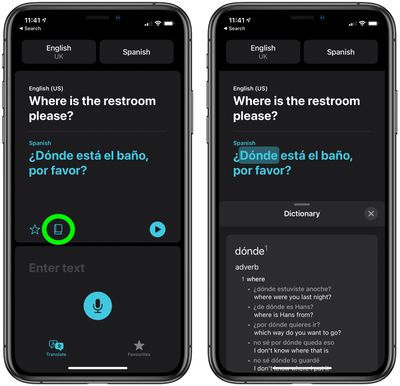
- Tap the large input area and type (or paste) the text that you want translated, then tap Go to get your text translation. Translations are shown in large text, with the original phrase in black and the translation shown in blue.
- To check the definition of an individual word in your translation, tap a word.
- Now tap the Dictionary button. To expand the view of the definition, use the drag bar at the top.
Don't forget that the translate app also lets you save translations for future reference. For more on the Translate app, be sure to check our comprehensive guide.














































