How to Change Where Screenshots Are Saved on Your Mac - MacRumorsOpen MenuShow RoundupsShow Forums menuVisit ForumsOpen Sidebar
Skip to Content

How to Change Where Screenshots Are Saved on Your Mac

by

When you take a screenshot on your Mac – using the Shift-Command-3 shortcut to capture the whole screen, or Shift-Command-4 to capture a portion of it – the image files are saved straight to your desktop. This can result in this:
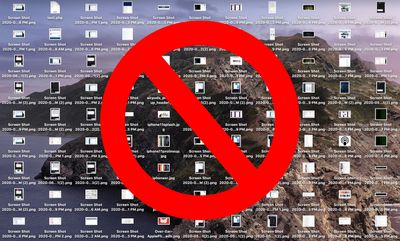
no screenshots
If you'd like to change that default save location to somewhere different, simply follow the steps below.

If you're running macOS Mojave or later, you can press Shift-Command-5 to invoke the screen capture panel, click on Options and choose "Other Location" to choose a destination.
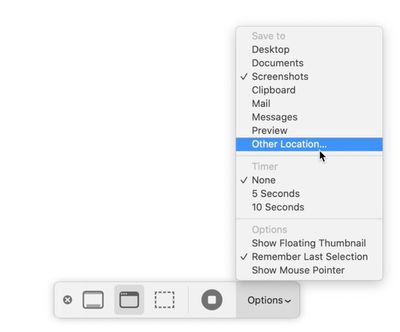
options

For versions of macOS prior to Mojave, you'll have to follow these instructions:

How to Change Where Screenshots Get Saved on Mac (Prior to Mojave)

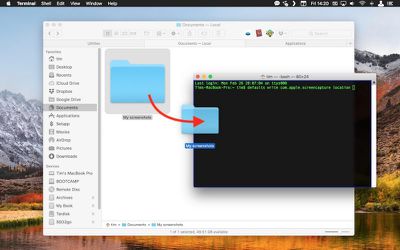
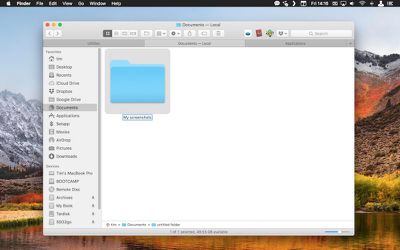
  1. Open a Finder window and press Shift-Command-N to create a new folder where you want your screenshots to be saved, and give the folder a recognizable name.
    screenshot save location 1

  2. Launch the Terminal app (found in Applications/Utilities).
    terminal

  3. Type in the following command and then press the spacebar, but don't hit Enter just yet: defaults write com.apple.screencapture location
    terminal

  4. Now drag the folder you just created into the Terminal window. The folder's path should appear after the command you typed in. Press Enter.
    screenshot save location 2

Your captured images will now be saved in the designated folder whenever you use the screenshot shortcuts.

Important note: Do not delete this folder until you've changed the save location to somewhere else using the same Terminal command, or you'll run into issues. If you want to switch things back in future so that images are saved on your desktop again, simply input the Terminal command as above, but change the path to ~/Desktop.


Top Rated Comments

83 months ago
In Catalina, Shift-Cmd-5, click Options, choose Other Location. Sticky setting.
Score: 9 Votes (Like | Disagree)
darkpaw Avatar
83 months ago
Couple of issues with this. If you're writing out steps, they really need to be correct, or you end up confusing the user, someone who may never have used Terminal before.

Step 1: You don't need to click the folder's name, because when you press Shift + Command + N, the folder's name is already highlighted for editing. Also, you can always just press Enter to rename a file.

Step 3: Be sure to tell the user to add a space at the end, or their Terminal command will be "defaults write com.apple.screencapture locationFOLDER". I realise that the text on the article does have the space at the end, but a non-expert won't know that it's meant to be there unless you point it out to them.
Score: 7 Votes (Like | Disagree)
arn Avatar
83 months ago
article's been updated. Though the real trick is getting a screenshot of the screenshot options. ;)
Score: 5 Votes (Like | Disagree)
59 months ago

Don't work for Monterey.
a quick search should help you answer your question. I think you will find this works:

Change where screenshots are saved Mac
[LIST=1]
* Press Command-Shift-5 to open the Screenshot app.
* Select Options.
* From the Save to section, select your preferred location.
* If you select Other Location, you can choose a different folder of choice or create a new folder.

Select the one you like, and it persists, I never use the screen shot app myself, just the keyboard shortcuts. Most times I use the copy to clipboard option and paste it immediately.

Despite what some have said in this thread, you can deflect the show floating thumbnail option and the thumbnail does not show with the screenshot being immediately saved.


Attachment Image
Score: 3 Votes (Like | Disagree)
arn Avatar
83 months ago

More importantly though, is it possible to save screenshots immediately? I HATE when I take a screenshot and must wait for it to disappear from the bottom right and appear onto the desktop. Yes I know I can drag it but sometimes that ends up opening it by mistake due to double clicking the thumbnail on the bottom right. Can't you make it instant "like in the old days?"

change screenshots folder image

In the same Command-Shift-5 Options pop up. Uncheck "Show Floating Thumbnail" -- but I still feel like it takes too long to appear.


arn
Score: 3 Votes (Like | Disagree)
TJ82 Avatar
83 months ago
Awfully convoluted.

Makes us Mac users look like neanderthals.
Score: 3 Votes (Like | Disagree)

Popular Stories

Home Hub Command Center with Dome Base Feature

Apple Smart Home Hub to Feature iMac G4-Style Design

Wednesday September 30, 2026 4:36 am PDT by
Apple's long-rumored smart home hub will have an iMac G4-style design and a host of unique features, Bloomberg's Mark Gurman reports. The smart home hub is said to feature a square 6-inch display, with variants that can be placed on a countertop or mounted on a wall. It features a single FaceTime camera on the front, with microphones and speakers in its connected base. Gurman described the...
HomePod minis on gradient feature 1 1

Three New Apple Smart Home Products Coming on October 13

Wednesday September 30, 2026 4:04 am PDT by
Apple plans to introduce a series of new smart home products on Tuesday, October 13, according to Bloomberg's Mark Gurman. Apple reportedly plans to debut its long-awaited smart home hub device, a new HomePod mini, and a new Apple TV on the date. The new HomePod mini and Apple TV are set to retain their existing designs, but tout faster chips to support Siri AI. The new HomePod mini will...
Apple TV Sans Remote Feature

New Apple TV 4K Leaked

Friday September 25, 2026 8:16 am PDT by
MacRumors contributor Aaron Perris has uncovered an image file from Apple for an unreleased Apple TV 4K, suggesting that a new model will finally be released soon. The image is specifically for an "Apple TV 4K (4th generation)" model. Apple TV 4K (4th generation) image (on a gradient) The image reveals that the Apple TV will have the same external design as the current model, with all of its...
Latest Stories
Apple TV Still Down for Some Users Following Apple Services Outage
37 minutes ago
PSA: Apple Mail on Mac May Stop Syncing Microsoft 365 Accounts Today
1 hour ago
Apple's Smart Home Hub: Everything We Know So Far
12 hours ago
Apple's Home Hub Borrows From the iPhone Duo's StandBy Mode
13 hours ago
Apple Invites App Updated With Three New Features
16 hours ago
Apple Event on October 13?
18 hours ago
Apple Watch SE 3 vs. Series 12 Buyer's Guide: Which Should You Buy?
19 hours ago
iPad Mini 8 to Offer These 10 New Features
20 hours ago
DoorDash Unveils AI Food Ordering Through Apple's Messages App
21 hours ago
Amazon Takes Up to $150 Off Select M5 MacBook Air Models
21 hours ago
Apple Still Plans to Release a New Full-Sized HomePod
22 hours ago
Apple Working to Expand HomeKit
1 day ago
Apple Smart Home Hub to Feature iMac G4-Style Design
1 day ago
Three New Apple Smart Home Products Coming on October 13
1 day ago
Apple Pay Now Available in India With Axis Bank Cards
1 day ago
OpenAI Launches Always-On 'Dots' Agents to Rival Meta's Muse
2 days ago
AirPods 5 Teardown: Batteries Removable, Case Still Tough
2 days ago
iPhone 18 Pro Owners Complain of Speaker Crackling or Popping
2 days ago
You Can 'Get Ready' for iPhone Duo Pre-Orders on October 12
2 days ago
Apple Pay Reportedly Launching in India Today
2 days ago
Apple Releases New AirPods Beta Firmware
2 days ago
Apple Shares New Guide for Using iOS 27 Parental Controls
2 days ago
Apple Creator Studio and Final Cut Camera Get New Features
2 days ago
Apple Explains Why It Removed ICE Tracking Apps Last Year
2 days ago
Amazon Expands $779.99 Apple Watch Ultra 4 Deal to More Models
2 days ago
Switch Siri AI for ChatGPT on Your Mac
2 days ago
Apple Says Emergency SOS via Satellite Now Available in Norway
2 days ago
AppleCare Guide: Is it Worth Paying For?
2 days ago
Apple Reportedly Planned to Replace 5,000 Support Employees With AI
2 days ago
Apple Planning to Launch Products Faster and More Often
2 days ago

🔗 Related Apple News & Rumors

Stay updated with the latest Apple ecosystem news and verified rumors