How to Change HomeKit Accessory Icons in the Home App - MacRumorsOpen MenuShow RoundupsShow Forums menuVisit ForumsOpen Sidebar
Skip to Content

How to Change HomeKit Accessory Icons in the Home App

by

Whenever you add a HomeKit accessory to Apple's Home app, a default icon is assigned to it. Smart lights, for example, are given the default bulb icon, but if you have various types of light fittings, that's not very helpful for identifying them in the app at a glance.

change homekit icons
What you may not know is that you can change the icons of many third-party ‌HomeKit‌ accessories to something that lets you distinguish them more easily. This is a particularly good way to represent what device you have plugged into a smart switch, for instance. Here's how it works.

How to Change HomeKit Accessory Icons

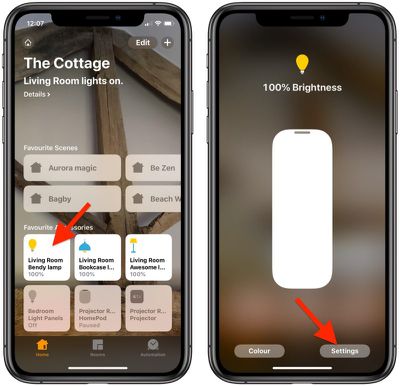
  1. Launch the Home app on your iPhone or iPad.
  2. Press and hold the accessory whose icon you would like to change.
    change homekit icons 0

  3. Tap Settings at the bottom right of the screen.
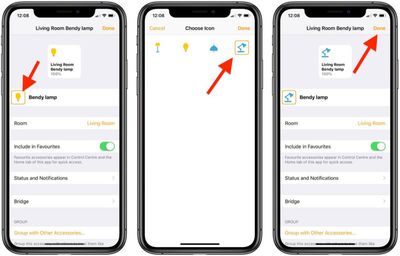
  4. Locate the icon next to the accessory name. If there's an orange square around the icon, you can change it. Tap it to do so.
  5. Choose a new icon by tapping it. In our example, you can change the default light bulb icon to a floor lamp, desk lamp, or ceiling lamp.
    change homekit icons 1

  6. Tap Done.
  7. Tap Done again.
  8. Tap once more to return to the main Home screen.
Note that you can't change the icons in the Home app for Apple devices like HomePods and Apple TVs. The same goes for some third-party accessories like thermostats for example, although it's worth checking if you're not sure.


Popular Stories

ecovacs black friday

FCC Bans New Foreign-Made Robot Vacuums, Threatening Future Matter and HomeKit Models

Thursday July 30, 2026 11:55 am PDT by
The FCC this week banned all new "foreign-produced advanced robotic devices" because of an "unacceptable risk to the national security of the United States." The government says networked robotic systems lead to vulnerabilities that allow bad actors to control the devices and collect surveillance data from Americans. Advanced robotic devices are defined as software-controlled autonomous...

Apple Event Logo

Apple Working on All-New Operating System

Wednesday July 29, 2026 11:39 am PDT by
Apple is developing an all-new operating system that is essentially a mix of tvOS, watchOS, and iOS, according to Bloomberg's Mark Gurman. In a report this week, he said the operating system will feature a grid of icons, widgets, and apps, along with customizable clock faces. The new software platform is intended for Apple's long-rumored smart home hub. With built-in facial recognition,...
imac video apple feature

Apple Made Its Second-Biggest Acquisition Ever This Year

Wednesday July 29, 2026 12:03 pm PDT by
Apple this year acquired Israeli startup Q.ai for close to $2 billion, according to the Financial Times. That would make this Apple's second-biggest acquisition ever, after it paid $3 billion for the popular headphone maker Beats in 2014. This is also the largest known Apple acquisition since the company purchased Intel's smartphone modem business and patents for $1 billion in 2019. Q.ai...

🔗 Related Apple News & Rumors

Stay updated with the latest Apple ecosystem news and verified rumors