How to Change Your Default Card for Apple Pay Purchases on Your Apple Watch - MacRumorsOpen MenuShow RoundupsShow Forums menuVisit ForumsOpen Sidebar
Skip to Content

How to Change Your Default Card for Apple Pay Purchases on Your Apple Watch

by

You can use Apple Pay in stores to make purchases using your iPhone wherever you see the ‌Apple Pay‌ logo or the contactless symbol. It's as easy as holding your device near the terminal and authenticating the transaction with Face ID or Touch ID.
apple pay twitter
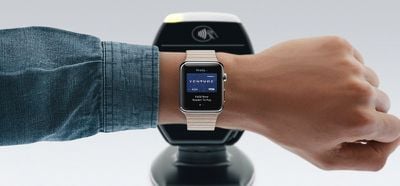
But if it's more convenient, you can use your Apple Watch instead. Simply double-click the side button and hold the display of your ‌Apple Watch‌ within a few centimeters of the contactless reader, and the transaction will be processed with an audible ding.

Your Apple Watch will use the default card in your Wallet that's set up to work with ‌Apple Pay‌. If you have multiple cards in your wallet, you can easily change the default card your Apple Watch uses by following the steps below.

How to Change the Default Card for Apple Pay on Apple Watch

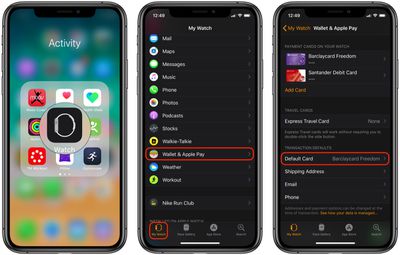
  1. Launch Apple's stock Watch app on your iPhone.
  2. Tap the My Watch tab.make apple card default card on apple watch
  3. Tap Wallet & Apple Pay.
  4. Under Transaction Defaults, tap Default Card, then choose the card you'd like to use for ‌Apple Pay‌ transactions.

Once you've chosen‌ your default card on ‌Apple Watch‌, you can start paying for things with it right away.

Pro Tip: If you have two cards that you switch between frequently, set one card as the default on your Apple Watch and the other card as the default on your iPhone. Once you remember which card is set to which device, you can choose which one to pay with simply by using either your watch or your phone at the terminal.
Related Roundup: Apple Pay

Popular Stories

columbia apple pay

Apple Pay Promo Offers Discount on Columbia Gear

Thursday July 23, 2026 9:38 am PDT by
Apple today sent out emails letting Apple Pay users know about the latest promotion, which offers $20 off purchases of $120 or more from sportswear company Columbia. The $20 discount is valid when making a purchase from the Columbia website and using Apple Pay to check out. The discount is not available in Columbia retail locations, and products from the Amaze Puff Collection and the ROC...

Apple Event Logo

Apple Working on All-New Operating System

Wednesday July 29, 2026 11:39 am PDT by
Apple is developing an all-new operating system that is essentially a mix of tvOS, watchOS, and iOS, according to Bloomberg's Mark Gurman. In a report this week, he said the operating system will feature a grid of icons, widgets, and apps, along with customizable clock faces. The new software platform is intended for Apple's long-rumored smart home hub. With built-in facial recognition,...
imac video apple feature

Apple Made Its Second-Biggest Acquisition Ever This Year

Wednesday July 29, 2026 12:03 pm PDT by
Apple this year acquired Israeli startup Q.ai for close to $2 billion, according to the Financial Times. That would make this Apple's second-biggest acquisition ever, after it paid $3 billion for the popular headphone maker Beats in 2014. This is also the largest known Apple acquisition since the company purchased Intel's smartphone modem business and patents for $1 billion in 2019. Q.ai...

🔗 Related Apple News & Rumors

Stay updated with the latest Apple ecosystem news and verified rumors