

watchOS 10.2: How to Change Watch Faces With a Swipe - MacRumorsOpen MenuShow RoundupsShow Forums menuVisit ForumsOpen Sidebar
Skip to Content

watchOS 10.2: How to Change Watch Faces With a Swipe

by

In watchOS 10.2, you can enable a swipe gesture to switch between Apple Watch faces more easily, just like you used to be able to in watchOS 9. Keep reading to learn how it's done.
apple watch ultra 1 image
If you are a long-time Apple Watch user, you probably remember a time when it was possible to switch watch faces with a simple swipe gesture across the display. That was the default interaction in watchOS 9, but then Apple removed the gesture with the upgrade to watchOS 10.

Apple changed the interaction because of user complaints that it was too easy to accidentally change watch faces. But for anyone who never had this problem, Apple just made things harder – by requiring a long press before swiping to change the active watch face.

Fortunately, prior to the release of watchOS 10.2, Apple seemed to realize what it had done, and it has introduced a setting that re-instates the earlier method of swiping to change watch faces. If you preferred the older interaction, the following steps show you how to enable it.

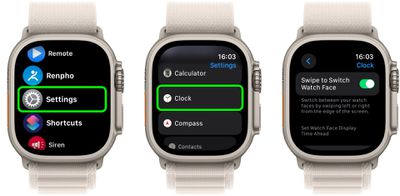
  1. Open the Settings app on your watch.
  2. Tap Clock.
  3. Toggle on the switch next to Swipe to Switch Watch Face.
settings

That's all there is to it. If you have more than one watch face assigned to your Apple Watch, you will now be able to swipe quickly and easily between them.


Top Rated Comments

contacos Avatar
37 months ago
Apple settings are so dumb like what does that have to do with "Clock"? They really need to nuke their whole settings panel on any iDevice really and start from scratch. It's like they are trying to squeeze today's features into settings from iOS 2 and it just does not work and does not make any sense anymore.

Score: 18 Votes (Like | Disagree)
37 months ago
I also changed it back as soon as 10.2 was available, but I do not understand why some settings (like this one) are only available from the watch itself and not from the Watch App on my iPhone. I had searched there before giving up and going through all Settings on the watch.

Some other settings are only available from the Watch App on iPhone, so I find it unintuitive when to use which Settings.
Score: 11 Votes (Like | Disagree)
37 months ago
So nice that feature returned!
Score: 11 Votes (Like | Disagree)
headlessmike Avatar
37 months ago
I prefer to keep this disabled as I used to accidentally switch faces more often than intentionally. But I'm happy for y'all that missed the old behavior.
Score: 10 Votes (Like | Disagree)
37 months ago
As far as I remember, it did not work exactly the same way before.
In WatchOS 9, when you swiped, you got the new face showing the time. Seems so logic
In WatchOS 10.2, when you swipe, you first get the standard (10:09) time displayed for 1 second and then the actual time. Pretty ugly glitch effect.

How is it they were not able to reestablish what existed before when setting is set to "Swipe" ? Is it because they went a quick and dirty way, just reusing the long press code and simply segueing automatically to the new face. But the result is not nice looking.
Score: 9 Votes (Like | Disagree)
pdaholic Avatar
37 months ago
I spent 20 min looking for this setting after my watch updated this morning. Wasn’t expecting it there. Thanks!
Score: 9 Votes (Like | Disagree)

Popular Stories

Home Hub Command Center with Dome Base Feature

Apple Smart Home Hub to Feature iMac G4-Style Design

Wednesday September 30, 2026 4:36 am PDT by
Apple's long-rumored smart home hub will have an iMac G4-style design and a host of unique features, Bloomberg's Mark Gurman reports. The smart home hub is said to feature a square 6-inch display, with variants that can be placed on a countertop or mounted on a wall. It features a single FaceTime camera on the front, with microphones and speakers in its connected base. Gurman described the...
HomePod minis on gradient feature 1 1

Three New Apple Smart Home Products Coming on October 13

Wednesday September 30, 2026 4:04 am PDT by
Apple plans to introduce a series of new smart home products on Tuesday, October 13, according to Bloomberg's Mark Gurman. Apple reportedly plans to debut its long-awaited smart home hub device, a new HomePod mini, and a new Apple TV on the date. The new HomePod mini and Apple TV are set to retain their existing designs, but tout faster chips to support Siri AI. The new HomePod mini will...
Apple TV Sans Remote Feature

New Apple TV 4K Leaked

Friday September 25, 2026 8:16 am PDT by
MacRumors contributor Aaron Perris has uncovered an image file from Apple for an unreleased Apple TV 4K, suggesting that a new model will finally be released soon. The image is specifically for an "Apple TV 4K (4th generation)" model. Apple TV 4K (4th generation) image (on a gradient) The image reveals that the Apple TV will have the same external design as the current model, with all of its...
Latest Stories
Apple TV Still Down for Some Users Following Apple Services Outage
39 minutes ago
PSA: Apple Mail on Mac May Stop Syncing Microsoft 365 Accounts Today
1 hour ago
Apple's Smart Home Hub: Everything We Know So Far
12 hours ago
Apple's Home Hub Borrows From the iPhone Duo's StandBy Mode
13 hours ago
Apple Invites App Updated With Three New Features
16 hours ago
Apple Event on October 13?
18 hours ago
Apple Watch SE 3 vs. Series 12 Buyer's Guide: Which Should You Buy?
19 hours ago
iPad Mini 8 to Offer These 10 New Features
20 hours ago
DoorDash Unveils AI Food Ordering Through Apple's Messages App
21 hours ago
Amazon Takes Up to $150 Off Select M5 MacBook Air Models
21 hours ago
Apple Still Plans to Release a New Full-Sized HomePod
22 hours ago
Apple Working to Expand HomeKit
1 day ago
Apple Smart Home Hub to Feature iMac G4-Style Design
1 day ago
Three New Apple Smart Home Products Coming on October 13
1 day ago
Apple Pay Now Available in India With Axis Bank Cards
1 day ago
OpenAI Launches Always-On 'Dots' Agents to Rival Meta's Muse
2 days ago
AirPods 5 Teardown: Batteries Removable, Case Still Tough
2 days ago
iPhone 18 Pro Owners Complain of Speaker Crackling or Popping
2 days ago
You Can 'Get Ready' for iPhone Duo Pre-Orders on October 12
2 days ago
Apple Pay Reportedly Launching in India Today
2 days ago
Apple Releases New AirPods Beta Firmware
2 days ago
Apple Shares New Guide for Using iOS 27 Parental Controls
2 days ago
Apple Creator Studio and Final Cut Camera Get New Features
2 days ago
Apple Explains Why It Removed ICE Tracking Apps Last Year
2 days ago
Amazon Expands $779.99 Apple Watch Ultra 4 Deal to More Models
2 days ago
Switch Siri AI for ChatGPT on Your Mac
2 days ago
Apple Says Emergency SOS via Satellite Now Available in Norway
2 days ago
AppleCare Guide: Is it Worth Paying For?
2 days ago
Apple Reportedly Planned to Replace 5,000 Support Employees With AI
2 days ago
Apple Planning to Launch Products Faster and More Often
2 days ago

🔗 Related Apple News & Rumors

Stay updated with the latest Apple ecosystem news and verified rumors











































