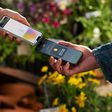
Apple Watch tracks your movement and heart rate. It uses that information in conjunction with your gender, height, age, and weight to estimate how many calories you burn during daily movement, including light strolls and dedicated workouts.

However, Apple Watch needs proper calibration to get the most accurate reading of your movement and heart rate, which is used to help determine distance and pace measurements when you are walking or running without your iPhone, or while using a treadmill.
christy turlington burns
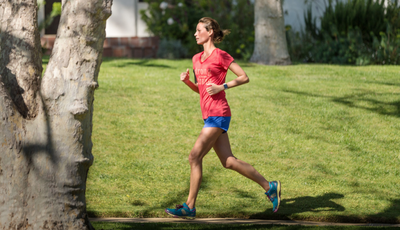
Calibration is fairly easy and takes about 20 minutes of exercise. For this purpose, you will need both your iPhone and your Apple Watch. After calibrating, you won't need to bring your iPhone on walks or runs anymore.

Make sure the environment is ideal for GPS tracking. Flat ground with good reception and clear skies works best, but as long as your GPS is on, you should be just fine.

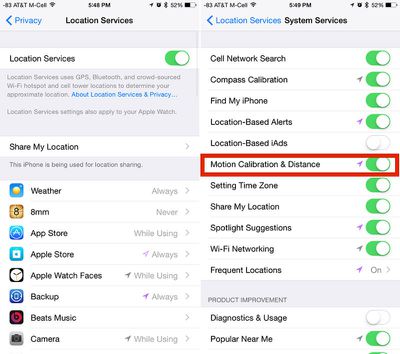
Ensure that Location Services is activated on your iPhone. Open the Settings app and select Privacy. Then tap Location Services and make sure the switch is in the On position.
locationservicescalibration
Check that "Motion Calibration and Distance" is activated on your iPhone. On the Location Services screen, scroll down to the very bottom and select System Services. Find Motion Calibration & Distance and make sure the switch is in the On position.

Hold your iPhone in your hand or attach it to an armband during your outdoor run or walk. This will help get the best possible calibration on your iPhone.
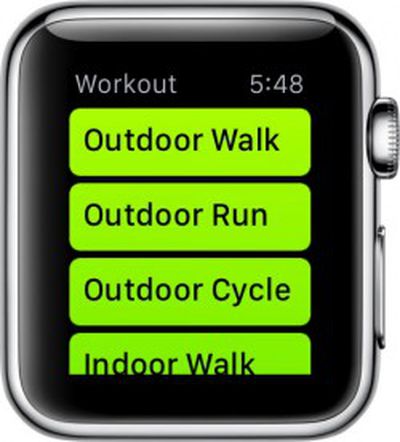
applewatchfitnessOpen the Workout app on Apple Watch and select Outdoor Walk or Outdoor Run and set your goal. Tap Start and begin. Walk or run for 20 minutes.

If you are unable to walk or run for 20 minutes at one time, you can spread the calibration over multiple outdoor sessions. Just make sure you bring your iPhone with you each time.

You may need to perform multiple 20-minute calibration workouts. If you normally walk or run at varying speeds, for example if you tend to run for three minutes and walk for one minute, you will need to calibrate each speed separately (or do 40 minutes worth of walking/running). Basically, the more you calibrate, the more accurate the reading will be.

Calibration data is stored on Apple Watch. If you unpair it from your iPhone, you will have to recalibrate in the future.

The calibration process also helps improve estimates of calorie burning and movement approximations in the Activity app. So, it is a good idea to complete the process, even if you don't plan on running or walking outdoors on a regular basis.


Related Roundup: Apple Watch 11
Buyer's Guide: Apple Watch (Neutral)

Top Rated Comments

DavidTheExpert Avatar
140 months ago
Could you please write an article on how to tell the time? I'm a little bit confused what all the numbers mean.
Score: 26 Votes (Like | Disagree)
abuskeletor Avatar
140 months ago
I use Walkmeter on my iPhone, which shows my route on a map using different colours for my pace and speed. It's useful to see where I was faster and slower.

Can the Apple Watch do this? Didn't think so.

In addition, a phone in a trouser pocket will be more accurate for steps than a watch on the arm, as the arm will record many more false steps due to the difficulty of interpreting arm movements. Our hips are much more stable, and are therefore that much easier to interpret a step with.

Your hips don't lie?
Score: 13 Votes (Like | Disagree)
TMRJIJ Avatar
140 months ago
Could you please write an article on how to tell the time? I'm a little bit confused what all the numbers mean.

Please don't MR. These instructions were so confusing, I got my leg caught in the ceiling fan.
Score: 7 Votes (Like | Disagree)
unsaltedrhino Avatar
140 months ago
Copy/paste much?

https://support.apple.com/en-us/HT204516
Score: 7 Votes (Like | Disagree)
Nobita Avatar
140 months ago
Might as well rename this website to WatchManualRumors.com
Score: 6 Votes (Like | Disagree)
darwen Avatar
140 months ago
Um, no. They're posted to the main page.

On a mobile device it will show at the top of the list, on a desktop it is off to the side. That being said, it seems like now is a good time for them to rethink the way the site works on mobile.

MacRumors, I understand you guys are trying to get better SEO with all these guides, but they are really irrelevant for a lot of your users. Currently, on a mobile device, the top 3 articles are "how to" watch guides. You are starting to alienate some of the long time readers.
Score: 5 Votes (Like | Disagree)

Popular Stories

Aston Martin CarPlay Ultra Screen

Apple's CarPlay Ultra to Expand to These Vehicle Brands Later This Year

Sunday February 1, 2026 10:08 am PST by
Last year, Apple launched CarPlay Ultra, the long-awaited next-generation version of its CarPlay software system for vehicles. Nearly nine months later, CarPlay Ultra is still limited to Aston Martin's latest luxury vehicles, but that should change fairly soon. In May 2025, Apple said many other vehicle brands planned to offer CarPlay Ultra, including Hyundai, Kia, and Genesis. In his Powe...
Apple Logo Black

Apple's Next Launch is 'Imminent'

Sunday February 1, 2026 12:31 pm PST by
The calendar has turned to February, and a new report indicates that Apple's next product launch is "imminent," in the form of new MacBook Pro models. "All signs point to an imminent launch of next-generation MacBook Pros that retain the current form factor but deliver faster chips," Bloomberg's Mark Gurman said on Sunday. "I'm told the new models — code-named J714 and J716 — are slated...
iOS 26

iOS 26.3 and iOS 26.4 Will Add These New Features to Your iPhone

Tuesday February 3, 2026 7:47 am PST by
We are still waiting for the iOS 26.3 Release Candidate to come out, so the first iOS 26.4 beta is likely still at least a week or two away. Following beta testing, iOS 26.4 will likely be released to the general public in March or April. Below, we have recapped known or rumored iOS 26.3 and iOS 26.4 features so far. iOS 26.3 iPhone to Android Transfer Tool iOS 26.3 makes it easier...
Apple MacBook Pro M4 hero

New MacBook Pros Reportedly Launching Alongside macOS 26.3

Sunday February 1, 2026 5:42 am PST by
Apple is planning to launch new MacBook Pro models with M5 Pro and M5 Max chips alongside macOS 26.3, according to Bloomberg's Mark Gurman. "Apple's faster MacBook Pros are planned for the macOS 26.3 release cycle," wrote Gurman, in his Power On newsletter today. "I'm told the new models — code-named J714 and J716 — are slated for the macOS 26.3 software cycle, which runs from...
iOS 26 Home Feature

Apple Gives Final Warning to Home App Users

Tuesday February 3, 2026 8:55 am PST by
In 2022, Apple introduced a new Apple Home architecture that is "more reliable and efficient," and the deadline to upgrade and avoid issues is fast approaching. In an email this week, Apple gave customers a final reminder to upgrade their Home app by February 10, 2026. Apple says users who do not upgrade may experience issues with accessories and automations, or lose access to their smart...