Troubleshoot Issues on Apple Watch by Backing Up and Restoring - MacRumorsOpen MenuShow RoundupsShow Forums menuVisit ForumsOpen Sidebar
Skip to Content

Troubleshoot Issues on Apple Watch by Backing Up and Restoring

by

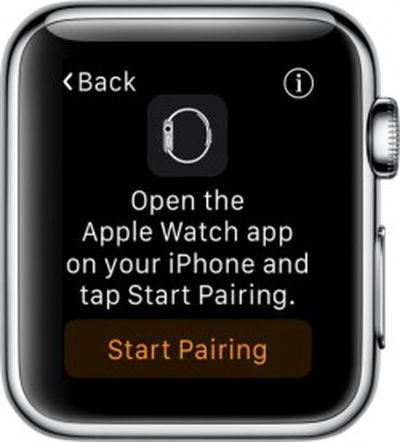
Apple Watch PairingNo matter how much research and testing goes into ensuring the Apple Watch runs smoothly with no problems, there's always a chance that you will have to perform a few IT-style actions in order to fix a minor issue with your device.

The best way to troubleshoot a problem on Apple Watch is to backup the data and restore it. We've got a guide for backing up your Apple Watch to your iPhone and then restoring data from a backup.

Backups include most data collection, like system settings, language, Mail, Calendar, Stocks, app-specific data, and health and fitness data (if you are using iCloud or an encrypted iTunes backup).

Backups do not include calibration data, synced playlists, credit and debit cards used for Apple Pay, and your Apple Watch passcode

Backup iPhone First

Before starting the process on your Apple Watch, it is a good idea to sync the data on your iPhone to ‌iCloud‌ or iTunes. When you do, any previously backed up Apple Watch data is included.

Unpair Apple Watch

The only way to force a backup on Apple Watch is to unpair it from your iPhone. Unfortunately, this is a time consuming process.
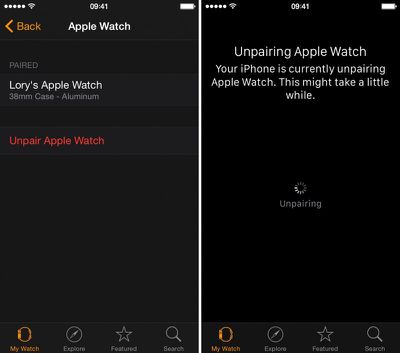
How to backup and restore apple watch 2

  1. Open the Apple Watch app on your iPhone and navigate to the My Watch section.
  2. Select Apple Watch from the list.
  3. Tap "Unpair Apple Watch." Tap again to confirm.
  4. Wait until Apple Watch is unpaired and the display asks you to confirm your language.

Re-pair Apple Watch

You will then be directed to pair Apple Watch with your iPhone. This process also takes a while.
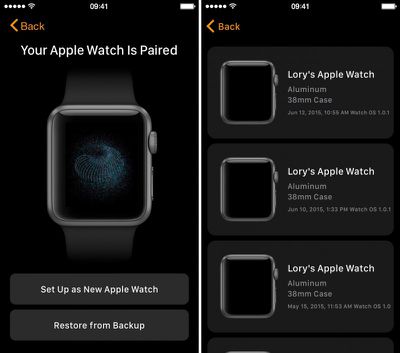
How to backup and restore apple watch 3

  1. Go back to the Apple Watch app and select Apple Watch from the list and tap "Pair Apple Watch."
  2. Select "Restore From Backup" and choose a backup you wish to restore from.
  3. Agree to the terms and conditions.
  4. Enter your Apple ID password when prompted.
  5. If two-step verification is enabled, complete the process when prompted.
  6. Create a four-digit passcode on Apple Watch when prompted.
  7. Select whether to unlock Apple Watch with your iPhone.
  8. Wait for the data to sync. When finished, you will get a notification on Apple Watch.

Reenter Unsaved Data

Because the backup does not include your workout calibrations, playlists, and credit or debit cards in ‌Apple Pay‌, this must all be added manually. Check out our guides for calibrating Apple Watch, listening to music, and setting up Apple Pay on Apple Watch.

Here is a tip: If you ever need to speak with Apple support for an issue with Apple Watch, do yourself a favor and follow the steps above to backup and restore Apple Watch before you contact them. One of the first steps they always have you follow is unpairing and re-pairing Apple Watch. This will save you 15 minutes of awkward silence.


Related Roundup: Apple Watch 11

Top Rated Comments

Traverse Avatar
145 months ago
Off all the things I have to worry about and trouble shoot in my life, my watch is one thing I don't want to have to worry about. A watch should "just work." Still, added features bring added complexities.
Score: 4 Votes (Like | Disagree)
145 months ago
Off all the things I have to worry about and trouble shoot in my life, my watch is one thing I don't want to have to worry about. A watch should "just work." Still, added features bring added complexities.
Oh Boy. Get yourself a regular watch and your troubles are over. And I had a cheapo Casio digital watch in the past that just suddenly displayed all sorts of incorrect data.

The Apple Watch is more than just a watch. It's a computer. And you know that very well. So to say you want it to function perfectly is just unrealistic. It does "just work" the vast majority of the time. Just as the iPhone and my other computers do. But the complexity of these devices is enormous. You are not being fair to expect perfection. You should consider deleting all electronic devices from your life. Living off the land in a shack in the middle of Idaho will eliminate many of the troubles you deal with.
Score: 3 Votes (Like | Disagree)
145 months ago
Off all the things I have to worry about and trouble shoot in my life, my watch is one thing I don't want to have to worry about. A watch should "just work." Still, added features bring added complexities.
Most things in life often require some troubleshooting at some point, even those that have been invented and used long ago before electricity or anything even close to it. There's really nothing out there that "just works" all the time the way you want it, even taking one of the most basic essentially prehistoric examples of simply using a rock to bang on a nut to break it open can fail sometime for various reason (perhaps the rock is porous or something like that, as an example).
Score: 1 Votes (Like | Disagree)
145 months ago
I still can't sync a playlist to the watch...very strange....I've tried everything. Not working...
Stuck with: "Syncing" changing to "Sync in progress"...it repeats into infinity.
And yes, all devices are plugged into power.
Score: 1 Votes (Like | Disagree)
145 months ago
backup restore apple watch image
No matter how much research and testing goes into ensuring the Apple Watch runs smoothly with no problems, there's always a chance that you will have to perform a few IT-style actions in order to fix a minor issue with your device.

The best way to troubleshoot a problem on Apple Watch is to backup the data and restore it. We've got a guide for backing up your Apple Watch to your iPhone and then restoring data from a backup.

Backups include most data collection, like system settings, language, Mail, Calendar, Stocks, app-specific data, and health and fitness data (if you are using iCloud or an encrypted iTunes backup).

Backups do not include calibration data, synced playlists, credit and debit cards used for Apple Pay, and your Apple Watch passcode

Backup iPhone First

Before starting the process on your Apple Watch, it is a good idea to sync the data on your iPhone to iCloud or iTunes. When you do, any previously backed up Apple Watch data is included.

Unpair Apple Watch

The only way to force a backup on Apple Watch is to unpair it from your iPhone. Unfortunately, this is a time consuming process.



Click here to read more... ('https://www.macrumors.com/how-to/backup-restore-apple-watch/')

Article Link: Troubleshoot Issues on Apple Watch by Backing Up and Restoring ('https://www.macrumors.com/how-to/backup-restore-apple-watch/')
It's not quite such a good idea to 'un-pair' and 'pair' the watch to create a backup, as this creates multiple 'Sources' in the Helath application on your iPhone.
Score: 1 Votes (Like | Disagree)
145 months ago
It's important to note that the activity data is not backed up either- well, it didn't back it up for me. I've had to restore my watch two times since I got it, and each time my activity and workouts were wiped clean. Any and every achievement you have gotten will also be gone.
Score: 1 Votes (Like | Disagree)

Popular Stories

3 4 24 Sport Band Refresh Feature

Sketchy Rumor Claims Apple Watch Series 12 Could Introduce Sensor in Band

Friday July 3, 2026 8:54 am PDT by
The Apple Watch Series 12 could ship with a new health sensor built directly into one of its bands, according to a sketchy rumor from a known leaker. The leaker known as "Kosutami" says the sensor will be injection-molded into a silicone band, and only a silicone band, apparently because Apple has not yet solved how to embed similar hardware in bands made from other materials. No detail was...
watchos 27

Siri AI Comes to Apple Watch in watchOS 27 Beta 3

Monday July 6, 2026 1:24 pm PDT by
With watchOS 27 beta 3, Apple added support for Siri AI and the Siri app, so Apple Watch users can now use the features right from their wrist. Apple said Siri AI would be coming to the watch back when watchOS 27 was first introduced, but the feature wasn't live until now. The Dynamic App Grid that pops up when the Digital Crown is pressed displays the Siri app in the center, and the...
Apple Watch Series 10 Jet Black

Apple Watch Series 13 Rumored to Mark the End of an Era

Wednesday July 8, 2026 1:29 pm PDT by
While the Apple Watch Series 12 is still a few months away, a new rumor suggests that next year's Apple Watch Series 13 will mark the end of an era. According to a recent post from a known leaker on the Chinese social media platform Weibo, the Apple Watch will be receiving a major redesign next year, and this will apparently include a new way of attaching bands to the watch. As a result, the ...

🔗 Related Apple News & Rumors

Stay updated with the latest Apple ecosystem news and verified rumors