

Apple Watch Ultra: How to Activate, Cancel, and Disable the Siren - MacRumorsOpen MenuShow RoundupsShow Forums menuVisit ForumsOpen Sidebar
Skip to Content

Apple Watch Ultra: How to Activate, Cancel, and Disable the Siren

by

If you ever become lost, injured, or have some other emergency situation and want to draw attention to your location, ‌Apple Watch Ultra‌ includes an 86-decibel siren that you can use.
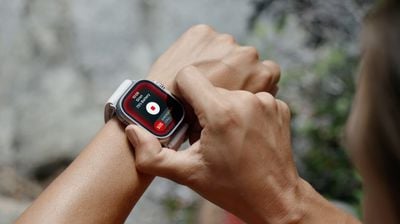
ultra siren watch
The siren uses a unique sound signature that incorporates two distinct alternating patterns, which can repeat for several hours. The first pattern suggests distress, while the second mimics the universally recognized SOS pattern, and the siren can be heard up to 600 feet or 180 meters away.

As such, it's pretty loud, so don't turn it on in enclosed environments or hold your watch close to your ears when the Siren is sounding.

How to Turn on Siren on Apple Watch Ultra

You can turn on the Siren using the Action button or the side button.

Using the Action Button:

  1. Press and hold the Action button until the Siren slider appears.
  2. Drag the Siren slider to start a countdown.
  3. After the countdown, the Siren starts.

Alternatively, you can press and hold the Action button to start the countdown, then continue holding the Action button until Siren starts. If you don't want the Siren going off using this continual hold action, go to Settings -> Action Button, and switch off the toggle next to Hold to Turn On.
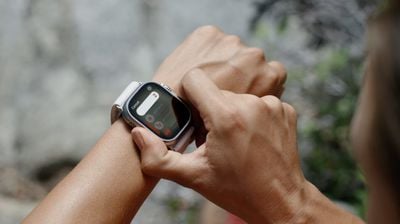
siren countdown

Using the Side Button

  1. Press and hold the Side button until the Siren slider appears.
  2. Drag the Siren slider to start a countdown.
  3. After the countdown, the Siren starts.

How to Cancel the Siren on Apple Watch Ultra

You can cancel the Siren during the countdown. If you're holding the Action button, simply release it to cancel. If you initiated the countdown by dragging the Siren slider, cover the watch display with the palm of your hand for at least three seconds to cancel.
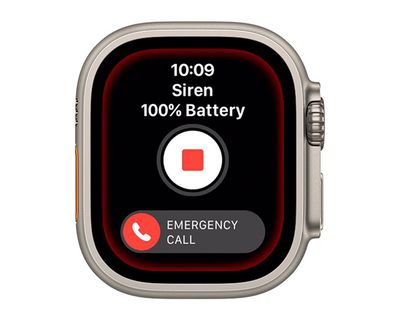
watch
To cancel the Siren while it's sounding, simply tap the central Stop button in the Siren app.

How to Disable the Siren Action Button Function

If you're concerned about the possibility of accidentally activating the Siren via a long press of the Action button, you can disable the function. Here's how.

  1. Launch the Settings app on your Apple Watch Ultra.
  2. Tap Action Button.
  3. Scroll down and under "Siren" toggle off the switch next to Hold to Turn On.
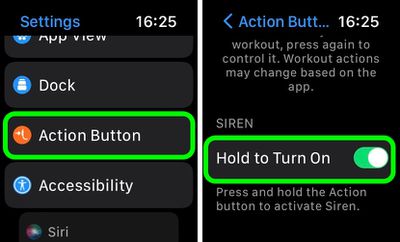
settings

Once that's done, holding down the Action button won't activate the Siren. Note that you can still activate the Siren by way of the Action Button, but now you have to hold the button and then swipe across the Siren slider, making it much harder to unintentionally sound the alert.


Related Roundup: Apple Watch Ultra 3
Related Forum: Apple Watch

Top Rated Comments

AlexisV Avatar
50 months ago


Attachment Image
Score: 4 Votes (Like | Disagree)
50 months ago

This seems like a feature that could and should be included in every Apple Watch
Survival is an apple watch ultra exclusive feature
Score: 2 Votes (Like | Disagree)
FloridaScrubJay Avatar
50 months ago
Hope it is not used as an alternative for the flight attendant call button on airplanes. 😳
Score: 2 Votes (Like | Disagree)
OliOliOliOli Avatar
50 months ago

If you ever become lost, injured, or have some other emergency situation and want to draw attention to your location, ‌Apple Watch Ultra‌ includes an 86-decibel siren that you can use.

apple watch ultra use siren image

The siren uses a unique sound signature that incorporates two distinct alternating patterns, which can repeat for several hours. The first pattern suggests distress, while the second mimics the universally recognized SOS pattern, and the siren can be heard up to 600 feet or 180 meters away.

As such, it's pretty loud, so don't turn it on in enclosed environments or hold your watch close to your ears when the Siren is sounding.

How to Turn on Siren on Apple Watch Ultra

You can turn on the Siren using the Action button or the side button.
Using the Action Button:

[LIST=1]
* Press and hold the Action button until the Siren slider appears.
* Drag the Siren slider to start a countdown.
* After the countdown, the Siren starts.

Alternatively, you can press and hold the Action button to start the countdown, then continue holding the Action button until Siren starts. If you don't want the Siren going off using this continual hold action, go to Settings -> Action Button, and switch off the toggle next to Hold to Turn On.

apple watch ultra use siren image

Using the Side Button

[LIST=1]
* Press and hold the Side button until the Siren slider appears.
* Drag the Siren slider to start a countdown.
* After the countdown, the Siren starts.

How to Cancel the Siren on Apple Watch Ultra

You can cancel the Siren during the countdown. If you're holding the Action button, simply release it to cancel. If you initiated the countdown by dragging the Siren slider, cover the watch display with the palm of your hand for at least three seconds to cancel.

apple watch ultra use siren image

To cancel the Siren while it's sounding, simply tap the central Stop button in the Siren app.

Article Link: Apple Watch Ultra: How to Use the Built-In Siren to Signal for Help ('https://www.macrumors.com/how-to/apple-watch-ultra-use-siren/')
It’s strange, that’s is also a great option for womens in dangerous situations and no one mention it…
Score: 1 Votes (Like | Disagree)
Madhatter32 Avatar
50 months ago
If you actually need this feature you are in a world of hurt.

Score: 1 Votes (Like | Disagree)
50 months ago
A great feature to obnoxiously let everyone in your surrounding know you bought an apple Watch ultra
Score: 1 Votes (Like | Disagree)

Popular Stories

Apple Watch Ultra 2 Complications

What to Expect From Apple Watch Series 12 and Apple Watch Ultra 4

Sunday July 26, 2026 8:07 am PDT by
Bloomberg's Mark Gurman has outlined what to expect from the Apple Watch Series 12 and Apple Watch Ultra 4 this year. Spoiler: not very much. While it was rumored that Touch ID may be coming to the Apple Watch Series 12, Gurman said he does not expect the Series 12 or Ultra 4 to have any major design changes compared to the current Series 11 and Ultra 3 models. Touch ID probably counts as a...

Apple Event Logo

Apple Working on All-New Operating System

Wednesday July 29, 2026 11:39 am PDT by
Apple is developing an all-new operating system that is essentially a mix of tvOS, watchOS, and iOS, according to Bloomberg's Mark Gurman. In a report this week, he said the operating system will feature a grid of icons, widgets, and apps, along with customizable clock faces. The new software platform is intended for Apple's long-rumored smart home hub. With built-in facial recognition,...
imac video apple feature

Apple Made Its Second-Biggest Acquisition Ever This Year

Wednesday July 29, 2026 12:03 pm PDT by
Apple this year acquired Israeli startup Q.ai for close to $2 billion, according to the Financial Times. That would make this Apple's second-biggest acquisition ever, after it paid $3 billion for the popular headphone maker Beats in 2014. This is also the largest known Apple acquisition since the company purchased Intel's smartphone modem business and patents for $1 billion in 2019. Q.ai...

🔗 Related Apple News & Rumors

Stay updated with the latest Apple ecosystem news and verified rumors






































