

Live Activities Taking Over Your Apple Watch? Here's the Fix - MacRumorsOpen MenuShow RoundupsShow Forums menuVisit ForumsOpen Sidebar
Skip to Content

Live Activities Taking Over Your Apple Watch? Here's the Fix

by

In watchOS 26, the Smart Stack for your Apple Watch is pretty clever. The collection of widgets can be pulled up with a scroll of the Digital Crown, and shows you relevant information throughout your day. But sometimes, its eagerness to help can be a bit much, especially when it comes to Live Activities.
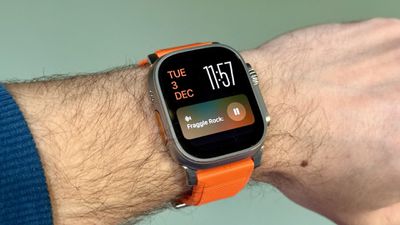
live activities watch
You're probably familiar with this scenario: You raise your wrist expecting to see your customized watch face, but it's been replaced by media playback controls because someone's watching your Apple TV, or a timer you set earlier for cooking that still has ages left to run. Live Activities in the Smart Stack can clearly be useful, but having them automatically take over your display isn't always ideal. Here's how to take back control:

  1. Open Settings on your Apple Watch.
  2. Tap Smart Stack.
  3. Select Live Activities.
  4. Toggle off the switch next to Auto-Launch Live Activities.
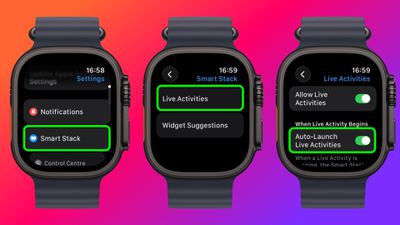
settings

After disabling auto-launch, Live Activities will still be available in your Smart Stack when you want them – you'll just need to manually scroll to see them instead of having them pop up automatically.

If you want more granular control, you're in luck. From the same settings screen you can control which Apple apps display Live Activities. Using the Watch app on your iPhone, you can also manage Live Activities settings for third-party apps. This lets you keep the notifications you find useful while preventing the less important ones from interrupting your watch face.

Pro Tip: If it's just those persistent media controls that bug you, head to Media Apps in the same settings menu and turn off Live Activities completely, or alternatively under "Auto-Launch," select Off or Smart Stack for a more focused watch face experience.


Top Rated Comments

the 12th Doctor Avatar
24 weeks ago
Here’s some pictures from 10 years ago…knock it tf off Smart Stack. I get it. I’ve gotten fat.
Score: 8 Votes (Like | Disagree)
Return Zero Avatar
24 weeks ago
My problem is still the Smart Stack automatically activating when the crown is turned accidentally. The fact they don't let you deactivate this is asinine, especially considering 1) they completely changed the core functionality of both buttons a while back, and 2) they've added so much more customization to almost everything else.

Score: 8 Votes (Like | Disagree)
mr_matalino Avatar
24 weeks ago
I can’t tell you how bad I needed this article!!!
Score: 6 Votes (Like | Disagree)
rotvaldi Avatar
24 weeks ago
They replaced the large sports buttons with small circular ones, which are difficult to press while moving during physical activity.

Score: 5 Votes (Like | Disagree)
ProbablyDylan Avatar
24 weeks ago

Stand up!!!! xD
"WOW! You sure slept badly, huh?"
"HEY! Did you notice it's super loud in here?"
"Don't forget to breathe!"

🙄
Score: 3 Votes (Like | Disagree)
24 weeks ago
I will no longer wear an Apple Watch, or any “Smartwatch” due to the constant notifications. Ninety percent of the time, I look at my wrist for the time. I’m back to wearing analog watches and very happy doing so.
Score: 2 Votes (Like | Disagree)

Popular Stories

Apple Event Logo

Apple Working on All-New Operating System

Wednesday July 29, 2026 11:39 am PDT by
Apple is developing an all-new operating system that is essentially a mix of tvOS, watchOS, and iOS, according to Bloomberg's Mark Gurman. In a report this week, he said the operating system will feature a grid of icons, widgets, and apps, along with customizable clock faces. The new software platform is intended for Apple's long-rumored smart home hub. With built-in facial recognition,...
imac video apple feature

Apple Made Its Second-Biggest Acquisition Ever This Year

Wednesday July 29, 2026 12:03 pm PDT by
Apple this year acquired Israeli startup Q.ai for close to $2 billion, according to the Financial Times. That would make this Apple's second-biggest acquisition ever, after it paid $3 billion for the popular headphone maker Beats in 2014. This is also the largest known Apple acquisition since the company purchased Intel's smartphone modem business and patents for $1 billion in 2019. Q.ai...
Dynamic Island iPhone 18 Pro Feature

iPhone 18 Pro: Twelve Changes Coming to Apple's Next Flagship

Thursday July 30, 2026 3:43 am PDT by
We're less than two months out from the launch of Apple's premium next-generation smartphone lineup, and while we're not expecting a dramatic change in terms of functionality, there are still several enhancements rumored to be coming to the iPhone 18 Pro and iPhone 18 Pro Max. One thing worth noting is that Apple is reportedly planning a major change to its iPhone release cycle this year,...

🔗 Related Apple News & Rumors

Stay updated with the latest Apple ecosystem news and verified rumors






































