

How to Use the Mail App on Apple Watch - MacRumorsOpen MenuShow RoundupsShow Forums menuVisit ForumsOpen Sidebar
Skip to Content

How to Use the Mail App on Apple Watch

by

Dealing with daily emails on Apple Watch is probably low on the list of things you want to do with the wrist-worn device, especially since you can't actually write or respond to emails in the Apple Watch Mail app. However, Mail can be a useful way to clean out your inbox without pulling out your iPhone. Plus, if you need to address an email right away, you can always use Handoff with your iPhone or Mac.
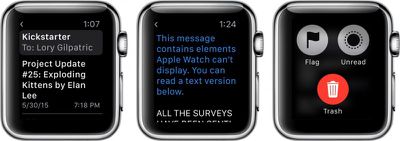
Mail on Apple Watch 1
We've got some basics for how to use the Mail app on Apple Watch, plus some useful tips on customizing the app to suit your on-the-go needs.

Reading Email

If you are out and about and want to know if that email you have been waiting for has finally shown up, you can use Apple Watch to help you out. Mail for Apple Watch supports data detectors, so you can tap on phone numbers or addresses to automatically launch the appropriate app right from an email, a convenient feature when you're out and about.
Mail on Apple Watch 2

  1. Navigate to the Home Screen by pushing the Digital Crown and find your Mail app icon.
  2. Tap the Mail app.
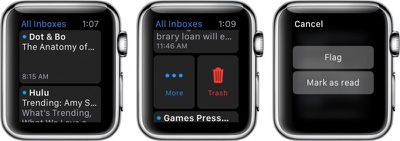
  3. Use the Digital Crown to scroll through inbox messages, or drag your finger up or down on the screen.
  4. Tap an email to read the contents.
  5. You can mark the email as unread, flag it, or trash it from within the body of the email. Press firmly on the display to call up the available actions.
  6. You can also quickly delete, flag, or mark as unread messages from the inbox list. Swipe to the left on a message header to call up the available actions.

Using Handoff

The Mail app on Apple Watch is read-only, and some emails won't display on the wrist worn device. You can switch over to the iPhone or the Mac to deal with these emails using Handoff.
Mail on Apple Watch 6
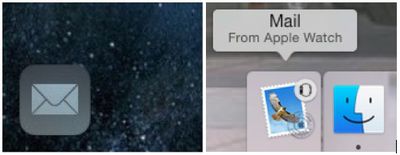
From the Lock screen on iOS 8, swipe up from the Handoff Mail app icon in the lower left corner of the screen. If your iPhone is already unlocked, double press the Home button and swipe all the way to the left. Then, tap the Mail app icon.

From the dock on OS X Yosemite, click the Handoff Mail app icon at the front or top of the dock.

Customize Options and Notifications

The most useful aspect of the Mail app on Apple Watch is getting notifications sent directly to your wrist so you never miss an important email, but sometimes, the default notification settings can be overwhelming. If you get a lot of junk mail, you might want to customize your notifications.
Mail on Apple Watch 3
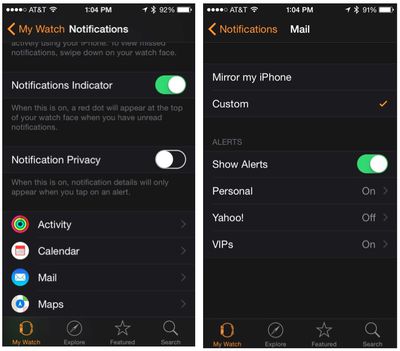
By default, notifications and Mail options mirror the settings of your iPhone, but if you only want to receive notifications from specific people or from VIPs that you've earmarked, you can change the options using the Apple Watch app on the iPhone.

Notifications:
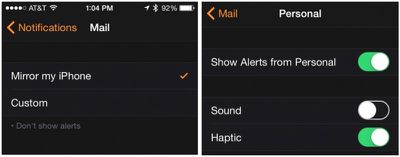
Mail on Apple Watch 4

  1. Open the Apple Watch app on your iPhone and select My Watch.
  2. Tap Notifications. Then, tap Mail.
  3. Tap Custom to customize your notifications for each email account.
  4. Select an email account. Then, toggle the Sound and Haptics features on or off, depending on your preference.

Email Account Options:
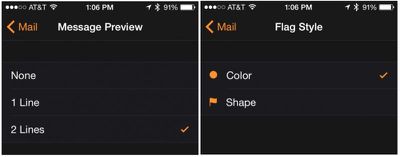
Mail on Apple Watch 5

  1. Open the Apple Watch app on your iPhone and select My Watch.
  2. Tap Mail. Then tap Custom to customize the options for your email accounts.
  3. You can choose to view all inboxes or select one account. You can also choose to view only the emails in a specific folder, like VIPs or Starred mail.
  4. You can switch between one or two lines of header to preview from the Message Preview section.
  5. Tap Flag Style to switch between color and shape icons for flagged emails.
  6. If you are worried about accidentally deleting an important message, turn on the Ask Before Deleting feature.
  7. You can organize emails by conversation or view them as single messages in order.

By knowing all of your options, Mail on Apple Watch can be very useful for keeping you connected to important emails throughout the day while still allowing you to be in the moment. Quickly triaging emails from your wrist will free you up to spend more face time with those around you.

If you're looking for an email app that can do more, there are a few third-party options that offer features Apple's own Mail app does not. Readdle's Spark email app for the iPhone, for example, includes an Apple Watch component that lets you archive, snooze, and reply to emails using dictation.


Related Roundup: Apple Watch 12
Buyer's Guide: Apple Watch (Buy Now)
Related Forum: Apple Watch

Top Rated Comments

joshwenke Avatar
148 months ago
Let's stop with these posts. Thanks.
Score: 19 Votes (Like | Disagree)
148 months ago
Next up, the MacRumors guide to breathing.
Score: 11 Votes (Like | Disagree)
joshwenke Avatar
148 months ago
It is amazingly easy to simply not read an article that does not interest you, rather than complain how it does not fit your concept of what should appear on the site.

As someone who enjoys reading content that falls beyond a narrow interpretation of the NAME of this site, I felt compelled to take a moment to encourage the editors to keep these articles coming. Sometimes it's handy to be reminded of a piece of information on using an Apple device, even if it is documented elsewhere.
We, as the readers and the source of income for the MacRumors staff, have a right to say what interests us in articles and what is just click bait. Right now, there have been too many articles like this posted. I won't mind if they make a "Tutorials" link in their menu bar, or remove them altogether, but I believe I am speaking for the entire community when we ask them to stop posting these things on the landing page of MacRumors.com.
Score: 8 Votes (Like | Disagree)
AstroRob Avatar
148 months ago
It is amazingly easy to simply not read an article that does not interest you, rather than complain how it does not fit your concept of what should appear on the site.

As someone who enjoys reading content that falls beyond a narrow interpretation of the NAME of this site, I felt compelled to take a moment to encourage the editors to keep these articles coming. Sometimes it's handy to be reminded of a piece of information on using an Apple device, even if it is documented elsewhere.
Score: 8 Votes (Like | Disagree)
pubwvj Avatar
148 months ago
I thought this was the MacRumors site not the "how to do things that are already well documented" site.

More rumors.

Less documentation.

Score: 6 Votes (Like | Disagree)
rodpascoe Avatar
148 months ago
We all know it's click-bait but why can't they change the sites behaviour on mobile devices to stop these appearing as a "front page" article.

I don't own a watch and having played with one both in store and at a colleagues house I know I never will. Yes, I don't have to read the articles (came here for the comments because it was annoying me) but I do have to read the title and then scroll past and it clutters up my feed.

I joined this site nearly 10 years ago as every article was about a rumoured product from Apple. Now there are so few of these and more reviews and how-to articles. Nothing wrong with that, just put them under a menu we can chose not to click on.

Score: 5 Votes (Like | Disagree)

Popular Stories

Surprise and Shine Live Coverage Article

Apple Event Live Blog: iPhone Duo, iPhone 18 Pro, and More

Wednesday September 9, 2026 9:10 am PDT by
Apple's "Surprise and Shine" event kicks off today at 10:00 a.m. Pacific Time, where we're expecting to see the foldable iPhone Duo, the iPhone 18 Pro and Pro Max, Apple Watch Series 12 and Ultra 4 models, new AirPods 5 earphones, and perhaps some other announcements. Apple is providing a live video stream on its website, on YouTube, and in the company's TV app across various platforms. We...

apple surprise and shine event

Apple Event Today: iPhone 18 Pro and iPhone Duo Cheat Sheet

Tuesday September 8, 2026 10:24 am PDT by
Apple's biggest event of the year is almost here, and all eyes are on Cupertino. With the first foldable iPhone expected to headline Apple's "Surprise and Shine" event on Wednesday, September 9, at 10:00 a.m. Pacific Time, the rumor mill has been running full throttle, fuelled by the biggest single design change in the life of the iPhone. To get you up to speed, here's a quick reference...
apple watch series 12

Leak Hints at Four New Features for Apple Watch Series 12 and Ultra 4

Monday September 7, 2026 8:57 am PDT by
Ahead of the announcement of the Apple Watch Series 12 and Ultra 4 later this week, code in the watchOS 27 and iOS 27 betas points to a series of new features for the product line. The information comes from a new post from MacRumors forums member "pdfu." The findings include: New "Readiness" app: An all-new separate Watch app referred to in code as "Readiness," distinct from the...
Latest Stories
Apple's All-New Home Hub Rumored to Launch in These Four Colors
14 minutes ago
iPhone 18 Pro Aperture Control Goes Fully Manual in Halide 3.2
1 hour ago
Apple Stores Receive 'Do Not Open' Boxes Ahead of Smart Home Products Launch
2 hours ago
iPhone 18 Pro Sales Jump in China Ahead of iPhone Duo Launch
2 hours ago
Apple TV Still Down for Some Users Following Apple Services Outage
3 hours ago
PSA: Apple Mail on Mac May Stop Syncing Microsoft 365 Accounts Today
4 hours ago
Apple's Smart Home Hub: Everything We Know So Far
14 hours ago
Apple's Home Hub Borrows From the iPhone Duo's StandBy Mode
15 hours ago
Apple Invites App Updated With Three New Features
19 hours ago
Apple Event on October 13?
20 hours ago
Apple Watch SE 3 vs. Series 12 Buyer's Guide: Which Should You Buy?
22 hours ago
iPad Mini 8 to Offer These 10 New Features
22 hours ago
DoorDash Unveils AI Food Ordering Through Apple's Messages App
1 day ago
Amazon Takes Up to $150 Off Select M5 MacBook Air Models
1 day ago
Apple Still Plans to Release a New Full-Sized HomePod
1 day ago
Apple Working to Expand HomeKit
1 day ago
Apple Smart Home Hub to Feature iMac G4-Style Design
1 day ago
Three New Apple Smart Home Products Coming on October 13
1 day ago
Apple Pay Now Available in India With Axis Bank Cards
2 days ago
OpenAI Launches Always-On 'Dots' Agents to Rival Meta's Muse
2 days ago
AirPods 5 Teardown: Batteries Removable, Case Still Tough
2 days ago
iPhone 18 Pro Owners Complain of Speaker Crackling or Popping
2 days ago
You Can 'Get Ready' for iPhone Duo Pre-Orders on October 12
2 days ago
Apple Pay Reportedly Launching in India Today
2 days ago
Apple Releases New AirPods Beta Firmware
2 days ago
Apple Shares New Guide for Using iOS 27 Parental Controls
2 days ago
Apple Creator Studio and Final Cut Camera Get New Features
2 days ago
Apple Explains Why It Removed ICE Tracking Apps Last Year
2 days ago
Amazon Expands $779.99 Apple Watch Ultra 4 Deal to More Models
2 days ago
Switch Siri AI for ChatGPT on Your Mac
2 days ago

🔗 Related Apple News & Rumors

Stay updated with the latest Apple ecosystem news and verified rumors




































