Apple Watch Ultra: How to Customize the Action Button - MacRumorsOpen MenuShow RoundupsShow Forums menuVisit ForumsOpen Sidebar
Skip to Content

Apple Watch Ultra: How to Customize the Action Button

by

Apple Watch Ultra features a customizable Action button on the left side of the case that is capable of performing a variety of functions. This article explains what it can do, and how you can configure it.
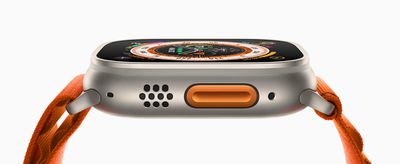
Apple Watch Ultra Orange Alpine Loop Action button 220907 big
Apart from activating the Siren, the Action Button on Apple Watch Ultra can be customized to perform a number of functions, offering quick access to them without you having to tap through various screens.

When you first set up your Apple Watch Ultra, you'll be invited to assign one of the following functions to it:

  • Workout
  • Stopwatch
  • Waypoint
  • Backtrack
  • Dive
  • Flashlight
  • Shortcut
  • None

You can customize your selection further, depending on the app or function chosen. If you chose the Workout app, for example, pressing the Action button once will open the Workout app, but you can also assign the "First Press" function within the app to start a specific workout.
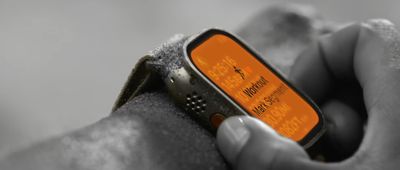
action button mark segment
But that's not all. When you've started the activity, you can then press again to perform a secondary function, such as marking segments or laps in a track workout, or switching from cycling to running in a triathlon. Again though, what function this is will depend on the current activity.

How to Map Functions to the Action Button

Once your Apple Watch Ultra is set up, you can re-assign functions to the Action button via a new menu right on your wrist, like so.

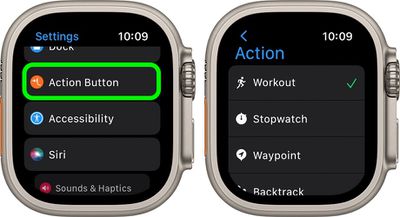
  1. On Apple Watch Ultra, launch the Settings app.
  2. Scroll down and tap Action Button.
  3. Tap the menu under "Action" and select one of the following options: Workout, Stopwatch, Waypoint, Backtrack, Dive, Flashlight, and Shortcut.
    settings

  4. Tap the arrow in the left-hand corner to go back to Action Button settings.
  5. Tap the menu under "App" if it appears, then select an app to perform the action. Some actions, such as Flashlight, don't show the App option.
  6. Tap the arrow to go back.
  7. Tap the menu under "First Press" if it appears, then select an action. Some features allow different actions to happen on the first and second press of the button.
Tips appear on the screen under "Gestures" explaining how the Action button works with the settings that you've assigned to it. For example, tips for an outdoor walk show you that pressing the Action button once starts a workout, and pressing the Action button and the side button at the same time pauses the workout.

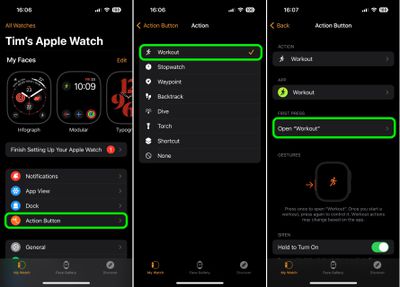
Configuring the Action Button via iPhone

You can also use the iOS Watch app to configure what the Action button on the Apple Watch Ultra does.

  1. Launch the Watch app on your iPhone.
  2. Tap the My Watch tab if it's not already selected.
  3. Tap Action Button.
  4. Under "Action," tap the currently selected action to change it.
  5. Select from one of the following options: Workout, Stopwatch, Waypoint, Backtrack, Dive, Flashlight, and Shortcut.
  6. Tap Action Button to go back to the previous menu.
  7. Tap the menu under "App" if it appears, then select an app to perform the action. Some actions, such as Flashlight, don't show the App option.
  8. Tap the arrow to go back.
  9. Tap the menu under "First Press" if it appears, then select an action. Some features allow different actions to happen on the first and second press of the button.
settings

Note that tips on the screen under "Gestures" explaining how the Action button works with the settings that you've assigned to it.

Note that if you want to pause the current action, you can press and hold both the Action and Side buttons at the same time. Try to avoid pressing the Side button or the Digital Crown accidentally when you press the Action button. Your Apple Watch will do whatever is assigned to the Action button if you happen to press another button at the same time, unless a button combination is configured.

Related Roundup: Apple Watch Ultra 4
Related Forum: Apple Watch

Top Rated Comments

Stiksi Avatar
53 months ago
This is certainly not ”extremely customizable” like it has been described over and over. ”Somewhat customizable” is more like it. If Apple would just get over itself and actually give us a Shortcuts system that is extensive and deeply integrated, that would make it a whole different thing but this is just typical Apple: it does exactly what was shown in the keynote and maybe a couple other things but that’s it. I mean it’s nice to have but if you’re going to add a whole extra button, maybe make it count a bit more.

Score: 5 Votes (Like | Disagree)
disquieted Avatar
53 months ago
I own one and love it. It was rugged enough to handle my lifestyle which includes walking the dog around the block twice a day and making my morning nitro cold brew in the kitchen...after 3 1/2 days, it still is holding up very well.
Score: 3 Votes (Like | Disagree)
beanbaguk Avatar
53 months ago
I'm sorry. I can't get over this. As I've said before; Only Apple could successfully reinvent a button as a major feature! 🤣
Score: 3 Votes (Like | Disagree)
ProfessionalFan Avatar
53 months ago

I'm sorry. I can't get over this. As I've said before; Only Apple could successfully reinvent a button as a major feature! 🤣
That's a take.

If they didn't add this new (useful) action button, people would be saying it is the same watch. Some would find something to complain about no matter what.
Score: 1 Votes (Like | Disagree)

Popular Stories

Apple Watch New Charging Puck

Here's Why a New Apple Watch Charging Puck Was Just Released

Wednesday September 16, 2026 8:53 am PDT by
The new Apple Watch Series 12 and Apple Watch Ultra 4 have hardware changes that allow for faster charging, but you will need to use the new version of the Apple Watch Magnetic Fast Charger included in the box in order to achieve this boost. If you need extra ones for your own charging stands or travel or so forth, Apple released the new version of the charger on its online store last week, with...
apple watch ultra 3 and ultra 4

Apple Watch Ultra 3 vs. Ultra 4 Buyer's Guide

Wednesday September 16, 2026 5:40 am PDT by
The Apple Watch Ultra 4 is now available for pre-order, bringing a new health sensing system, more memory, and longer battery life over its predecessor. Here's everything that's new. Last year, the Apple Watch Ultra 3 introduced a larger, more efficient display, satellite connectivity, 5G, and improved battery life. The Ultra 4 retains the same basic design and display, but focuses on more...
watchos 27

PSA: watchOS 27 Removes This Useful Feature From Your Apple Watch

Thursday September 17, 2026 1:34 am PDT by
Apple released watchOS 27 on September 14, bringing a new Audio Intelligence feature set to its latest Apple Watch models, but as a result, owners of previous models are set to lose out doubly in the process. Apple Watch Series 12 and Ultra 4 models later this year will get Live Rewind, a feature that provides a transcript of any spoken audio that was picked up by the device in the last 15...
Latest Stories
Meta and Apple Bring Muse Spark Open AI Model to Mac Studio
20 minutes ago
iPad Mini 8: Apple Has Tested Both 60Hz and 120Hz ProMotion Displays
37 minutes ago
Apple TV 4K 2022 vs. 2026 Buyer's Guide: All Differences Compared
2 hours ago
Apple CEO John Ternus on Early Foldables: 'Kind of Cheap and Crappy'
3 hours ago
Greg Joswiak Says Apple Isn't Focused on Making AI for 'Lunatic Fringe'
3 hours ago
Amazon Offers $120 Discount on AirPods Max 2, $50 Off AirPods Pro 3
4 hours ago
Apple CEO John Ternus Featured on Cover of TIME Magazine: 'New Era'
5 hours ago
Apple Announces Deadline to 'Get Ready' to Pre-Order the iPhone Duo
5 hours ago
MKBHD is 'Not Convinced' About Apple's New HomeView, Here's Why
5 hours ago
Apple's Wall-Mounted HomeView Ships Without a Power Adapter
6 hours ago
Rare Apple-1 With Steve Jobs Letter Sells for $1.15 Million
6 hours ago
Apple Now Inviting Media to October 28 'Launch Experience'
7 hours ago
iPhone Duo's A20 Pro Chip Benchmarked Ahead of Launch
18 hours ago
10 HomeView Features You Might Have Missed
19 hours ago
Apple Becomes Second Company to Close Above $5 Trillion
20 hours ago
Which Apple Home Devices Get Siri AI, and When
21 hours ago
Apple's Long-Delayed HomeView Was Already Being Tested in 2024
21 hours ago
Apple Intelligence Coming to China in December With iOS 27.3
22 hours ago
Apple Invites App Updated With Two New Features
22 hours ago
OpenAI Says Ex-Employee Showed Its Device Plans to Apple
23 hours ago
Discover the Best Cases and Screen Protectors for Your New iPhone Duo
1 day ago
Apple Store Near Los Angeles Closed Due to 'Events Beyond Our Control'
1 day ago
No, HomePod Mini 1 Won't Support Siri AI as CNET Reported
1 day ago
iPhone Duo Compromises: Everything You Have to Give Up
1 day ago
Apple HomeView Has These 15 Apps, Some CarPlay Apps and Widgets Also Supported
1 day ago
iPhone Duo: Apple Charging $49 for New Cover Layer, $229 for Battery
1 day ago
iPhone Duo: Skipping AppleCare+ Could Be $1,499 Mistake
1 day ago
Ready for HomeView? Don't Miss These Smart Home Accessory Deals
1 day ago
Apple Says HomePod 2 Also Works as Default Speaker With Select Macs
1 day ago
HomePod Mini 2: All the New Features
1 day ago

🔗 Related Apple News & Rumors

Stay updated with the latest Apple ecosystem news and verified rumors