Apple Vision Pro: How to Screenshot or Record Your View - MacRumorsOpen MenuShow RoundupsShow Forums menuVisit ForumsOpen Sidebar
Skip to Content

Apple Vision Pro: How to Screenshot or Record Your View

by

If you want to share what you see when you're wearing Apple Vision Pro, you can capture the entire view as an image, or alternatively, make a video recording. Keep reading to learn how.
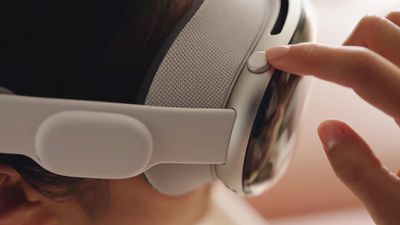
Apple Vision Pro Digital Crown
On Vision Pro headsets, Apple has built in a function that lets you capture a still picture of your entire field of view that gets saved as an image file, making it convenient for sharing.

It works similarly to the way you take screenshots on iPhone and Apple Watch. Except with Vision Pro, everything you see is included, including your physical room, active Environments, and any apps you are using.

How to Capture Your View

Here are two different methods you can use to capture a still image of your view on ‌Apple Vision Pro‌.

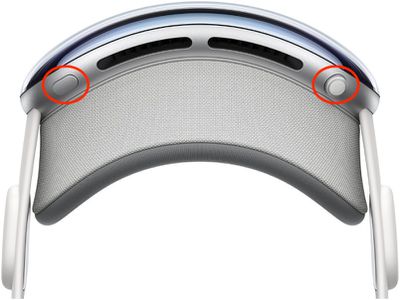
  • Simultaneously press the Digital Crown and the top button.
    apple vision pro screenshot

  • Say, "Siri, take a screenshot."

When you take a capture, it's automatically saved to Photos. Note that your view is obscured when entering a password or passcode.

How to Record Your View

You can also record a video clip of your view when wearing ‌Apple Vision Pro‌.

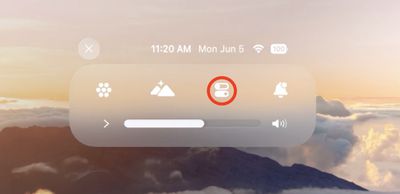
  1. Look up and tap the downward pointing chevron near the top of your view.
  2. Tap the Control Center button (the icon made up of two horizontal switches).
    control center

  3. Tap the Record button, and your recording will begin when the countdown ends.
    control center

  4. To stop recording, tap the Record button again or the red status bar at the top of your view, then tap Stop.
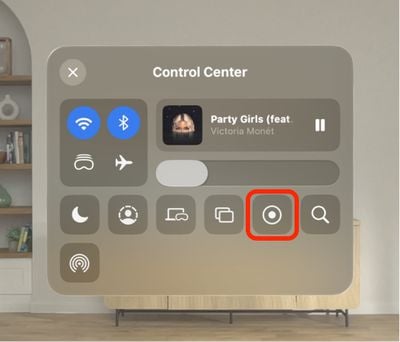
If you don't see the Screen Recording button in Control Center, go to Settings ➝ Control Center, then add the control in question and follow the above steps again.
Related Roundup: Apple Vision Pro
Buyer's Guide: Vision Pro (Neutral)
Related Forum: Apple Vision Pro

Popular Stories

General visionOS watchOS and tvOS Betas Feature Redux

Apple Seeds watchOS 26.5, tvOS 26.5 and visionOS 26.5 Release Candidates

Monday May 4, 2026 10:11 am PDT by
Apple today provided developers with the release candidate versions of upcoming watchOS 26.5, tvOS 26.5, and visionOS 26.5 betas for testing purposes. The software comes a week after Apple released the fourth betas for each platform. The software updates are available through the Settings app on each device, and because these are developer betas, a free developer account is required....
visionOS 26 Feature

Apple Releases visionOS 26.5

Monday May 11, 2026 10:01 am PDT by
Apple today released visionOS 26.5, the fifth update to the visionOS 26 operating system that launched in September. visionOS 26.5 comes close to two months after Apple released visionOS 26.4. ‌visionOS 26‌.5 can be downloaded on all Vision Pro headsets by navigating to the Settings app, selecting the General section, and choosing the Software Update option. To install an update, the...


M5 Vision Pro Thumb 2

Gurman: New Apple Vision Pro Won't Arrive for at Least Two Years

Monday May 11, 2026 5:16 am PDT by
Apple hasn't fully abandoned the Vision Pro, but anyone hoping for a successor will be waiting at least two more years, according to Bloomberg's Mark Gurman. Writing in his latest Power On newsletter, Gurman resisted suggestions that Apple has walked away from the headset entirely. The well-connected reporter says the company continues to develop new technologies and materials behind the...

🔗 Related Apple News & Rumors

Stay updated with the latest Apple ecosystem news and verified rumors