How to Take Control of Apple News Alerts in iOS 11 - MacRumorsOpen MenuShow RoundupsShow Forums menuVisit ForumsOpen Sidebar
Skip to Content

How to Take Control of Apple News Alerts in iOS 11

by

Apple News Icon1Apple News is the built-in news app for iOS 11 that aggregates and curates stories and topics from a variety of third-party news sources. The service is only available in the U.S., Australia, and the U.K. at the time of writing, so not all new iPhones and iPads will come with the stock app installed.

Apple News aims to offer a cleanly presented and personalized news service that caters to your tastes and interests, although one of its default behaviors is to spit out alerts from sources that you may or may not be interested in. Apple News refers to news sources in the app as "channels", and here we are going to run through two ways to control the alerts you receive from them.

How to Control News Alerts From Specific Channels

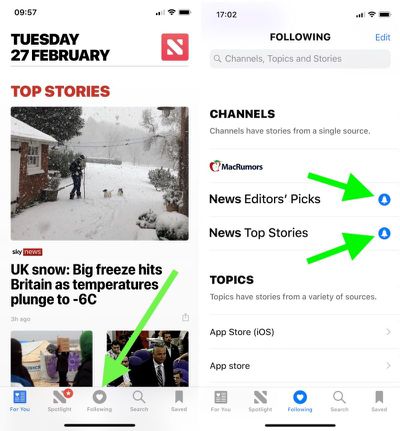
  1. Launch the News app on your iOS device.

  2. Tap the Following button at the bottom of the screen.

  3. Under the Channels list, look for any news sources that you didn't sign up for, and tap the blue bell icon next to them. If the bell icon next to a channel is greyed out, alerts from it are already disabled; if there's no bell icon beside a channel, it doesn't send alerts at all.
    apple news app 1

  4. To remove a source from your channels so that it no longer shows up anywhere in Apple News, tap the Edit button in the upper right of the screen, and then tap the red minus icon next to the source in question.
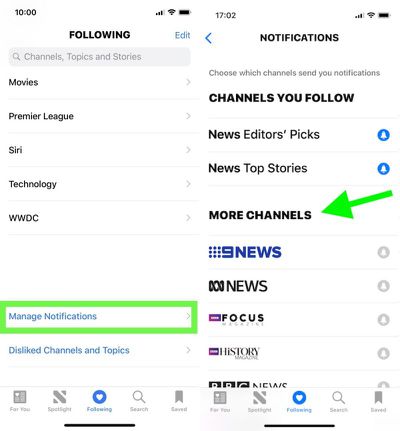
Tip: Scroll all the way to the bottom of the "Following" screen and you'll find another option to Manage Notifications. Tapping this opens a dedicated Notifications screen, where you'll see the channels you follow that offer news alerts as well as other channels with alert options that you don't currently follow.
apple news app 2

How to Disable Apple News Alerts Completely

If you'd rather disable all alerts for Apple News in one fell swoop, follow these steps.

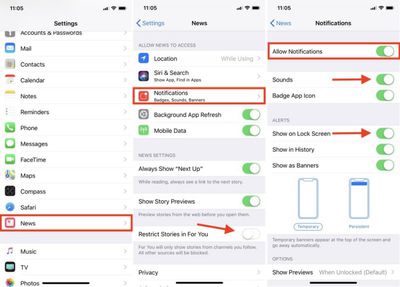
  1. Launch the Settings app on your iOS device.

  2. Scroll down the main list and tap News.

  3. Tap Notifications. (Tip: From this screen, you can prevent stories by channels you don't follow from appearing in the News app's "For You" section. Simply toggle on Restrict Stories in For You.)

  4. Toggle off Allow Notifications.

apple news notifications
If later you decide that you don't want to kill off News alerts altogether, this last screen is the one to return to, as it also offers additional options for controlling the behavior of notifications when they're enabled. You could simply stop new alerts from making an audible sound, for example, or just prevent them from showing up on the Lock Screen.


Related Forum: iOS 11

Top Rated Comments

HiRez Avatar
112 months ago
The problem with almost any app that has notifications is they they can’t seem to help themselves from abusing it by sending you a never-ending stream of alerts that swamps your lock screen and notification list.

So for News, like just about everything else for me, Off is the only sane option.

Score: 6 Votes (Like | Disagree)
PinkyMacGodess Avatar
112 months ago
I just want to know how to remove completely some of the sources for 'news'. Like I have some of the worst sources popup for science and tech news, and also want to block often wrong Fox News so I don't see their 'reportage' hit pieces anymore.

Resolved: You have to go into one of their articles, touch 'share', and then can 'dislike channel'. Seems a lot less intuitive than just swiping right (or left?) and clicking 'dislike channel'. But I'm finally free of their bullhockey 'news'.:D
Score: 3 Votes (Like | Disagree)
The Game 161 Avatar
112 months ago
the best way to take control of apple's new app is to delete it.
why? it's a very good app for news.
Score: 2 Votes (Like | Disagree)
PinkyMacGodess Avatar
112 months ago
I found it terrible, but to each their own.
It requires some participation from the user. I've got quite an eclectic mix of sources, and am generally pretty happy with it. It's what you put into it...
Score: 1 Votes (Like | Disagree)
jonnyb098 Avatar
112 months ago
Dittos. The bias shown in their curation and need to editorialize is shameful.
How is it biased??? I see news stories from CNN, FOX with almost a perfect split.

This is like when people complain about recommendations in Apple Music. The curation is only as good as you make it based on reading habits and likes/dislikes.
Score: 1 Votes (Like | Disagree)
112 months ago
the best way to take control of apple's new app is to delete it.
Dittos. The bias shown in their curation and need to editorialize is shameful.
Score: 1 Votes (Like | Disagree)

Popular Stories

Home Hub Command Center with Dome Base Feature

Apple Smart Home Hub to Feature iMac G4-Style Design

Wednesday September 30, 2026 4:36 am PDT by
Apple's long-rumored smart home hub will have an iMac G4-style design and a host of unique features, Bloomberg's Mark Gurman reports. The smart home hub is said to feature a square 6-inch display, with variants that can be placed on a countertop or mounted on a wall. It features a single FaceTime camera on the front, with microphones and speakers in its connected base. Gurman described the...
HomePod minis on gradient feature 1 1

Three New Apple Smart Home Products Coming on October 13

Wednesday September 30, 2026 4:04 am PDT by
Apple plans to introduce a series of new smart home products on Tuesday, October 13, according to Bloomberg's Mark Gurman. Apple reportedly plans to debut its long-awaited smart home hub device, a new HomePod mini, and a new Apple TV on the date. The new HomePod mini and Apple TV are set to retain their existing designs, but tout faster chips to support Siri AI. The new HomePod mini will...
iphone duo colors

Apple Shares Photos Shot on iPhone Duo

Thursday October 1, 2026 1:37 pm PDT by
Apple on Instagram today shared a curated gallery of six photos shot on the iPhone Duo. The photos were shot by American photographers Jake Michaels and Jason Nocito, as part of a project commissioned by Apple. iPhone Duo is equipped with four cameras:A rear 48-megapixel Fusion Main camera A rear 48-megapixel Ultra Wide camera A front 12-megapixel Center Stage camera in the outer display A...
Latest Stories
Upgrading From an Older Apple Watch? Here's How the New Features Stack Up
15 minutes ago
Beats 360 Cushion Kits and Apple Accessories See Early Prime Day Price Drops
39 minutes ago
Apple Store in UK Reopening on iPhone Duo Launch Day
1 hour ago
AT&T Acknowledges iPhone 18 Pro Max Issues: 'Update Immediately'
12 hours ago
New 'AirFly Drive' Accessory Turns Wired CarPlay Into Wireless CarPlay
18 hours ago
Apple Shares Photos Shot on iPhone Duo
19 hours ago
Apple Says iPhone Duo Has Replaceable 'Cover Layer'
20 hours ago
Apple's Smart Home Camera Will Apparently Have 'No Video Recording'
22 hours ago
Apple TV Just Updated Its Selection of 'Bonus' Movies
1 day ago
iPhone 18 Pro Colors Buyer's Guide: Which Should You Choose?
1 day ago
Early Prime Big Deal Days: Best Discounts on Accessories, TVs, and More at Amazon
1 day ago
MacBook Pro With OLED Touch Screen Rumored to Launch in October or November
1 day ago
Apple's All-New Home Hub Rumored to Launch in These Four Colors
1 day ago
iPhone 18 Pro Aperture Control Goes Fully Manual in Halide 3.2
1 day ago
Apple Stores Receive 'Do Not Open' Boxes Ahead of Smart Home Products Launch
1 day ago
iPhone 18 Pro Sales Jump in China Ahead of iPhone Duo Launch
1 day ago
Apple TV Still Down for Some Users Following Apple Services Outage
1 day ago
Microsoft 365 Work Accounts May Stop Syncing in Apple Mail
4 hours ago
Apple's Smart Home Hub: Everything We Know So Far
2 days ago
Apple's Home Hub Borrows From the iPhone Duo's StandBy Mode
2 days ago
Apple Invites App Updated With Three New Features
2 days ago
Apple Event on October 13?
2 days ago
Apple Watch SE 3 vs. Series 12 Buyer's Guide: Which Should You Buy?
2 days ago
iPad Mini 8 to Offer These 10 New Features
2 days ago
DoorDash Unveils AI Food Ordering Through Apple's Messages App
2 days ago
Amazon Takes Up to $150 Off Select M5 MacBook Air Models
2 days ago
Apple Still Plans to Release a New Full-Sized HomePod
2 days ago
Apple Working to Expand HomeKit
2 days ago
Apple Smart Home Hub to Feature iMac G4-Style Design
2 days ago
Three New Apple Smart Home Products Coming on October 13
2 days ago

🔗 Related Apple News & Rumors

Stay updated with the latest Apple ecosystem news and verified rumors