How to Add an AirDrop Shortcut to Your Mac's Dock - MacRumorsOpen MenuShow RoundupsShow Forums menuVisit ForumsOpen Sidebar
Skip to Content

How to Add an AirDrop Shortcut to Your Mac's Dock

by

airdropApple's AirDrop feature lets you wirelessly send and receive files between nearby Macs as well as to and from local iOS devices. It's usually accessed from the sidebar of an open Finder Window (or using the Command + Shift + R keyboard shortcut within Finder), but here we're going to share with you a trick that enables you to launch AirDrop straight from your Mac's Dock.

Having the AirDrop shortcut in your Dock will allow you to access it from any screen, regardless of the application you're using, and without having to open a Finder window first. Regular AirDrop users in particular should appreciate the convenience it provides.

How to Add AirDrop to Your Mac's Dock

  1. Open a Finder window or click the Desktop.

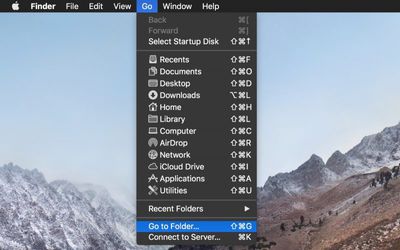
  2. In the Finder menu bar, select Go -> Go to Folder.
    Finder go to folder

  3. Paste the following directory path into the dialog and press Enter: /System/Library/CoreServices/Finder.app/Contents/Applications/
    Finder go to folder dialog

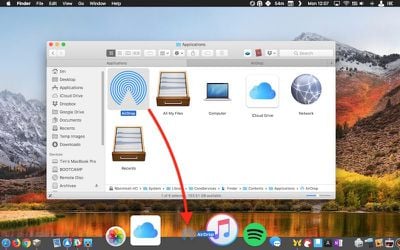
  4. The Contents/Applications folder within the Finder.app package will appear. Using your mouse, drag the AirDrop app to the desired location in your Dock.
    drag airdrop to dock

  5. Close the Finder window.

Next time you want to open the AirDrop window to share something, simply click the app icon in your Mac's Dock. Note that you can also drag the iCloud Drive app from the Finder package in the same way, for quick one-click access to the files and folders in your cloud storage.


Tag: AirDrop

Top Rated Comments

Gorms Avatar
107 months ago
This is actually really useful for me. Thank you for this tip!

AirDrop is one of macOS’ best features... (when it works)

Score: 8 Votes (Like | Disagree)
Saipher Avatar
107 months ago
Thank you MacRumors, these tips articles are very helpful. :)
Score: 5 Votes (Like | Disagree)
Chupa Chupa Avatar
107 months ago
Not sure I understand how this streamlines workflow. Dragging a file to the dock seems like more work than just ctrl+click -> share -> airdrop. What am I missing?
Score: 4 Votes (Like | Disagree)
unsharptooth Avatar
107 months ago
[doublepost=1527258466][/doublepost]This would be really useful if you could just drop your file there and a pop up asked you who you wanted to send it to. And maybe a pop up after it's finished sending too. Hopefully they improve upon that with 10.14.
Yu can select the files, right click > share > Airdrop. You’ll get a pop up listing nearby devices and progress when sending.
Score: 2 Votes (Like | Disagree)
107 months ago
Thanks for the tip. I share files back and forth with my iPad all the time.
Score: 2 Votes (Like | Disagree)
rhoydotp Avatar
107 months ago
Receiving files.
100% agree with this! Most people just probably send and not receive files so it may not be that useful to them.
Score: 1 Votes (Like | Disagree)

Popular Stories

Apple Event Logo

Apple Working on All-New Operating System

Wednesday July 29, 2026 11:39 am PDT by
Apple is developing an all-new operating system that is essentially a mix of tvOS, watchOS, and iOS, according to Bloomberg's Mark Gurman. In a report this week, he said the operating system will feature a grid of icons, widgets, and apps, along with customizable clock faces. The new software platform is intended for Apple's long-rumored smart home hub. With built-in facial recognition,...
imac video apple feature

Apple Made Its Second-Biggest Acquisition Ever This Year

Wednesday July 29, 2026 12:03 pm PDT by
Apple this year acquired Israeli startup Q.ai for close to $2 billion, according to the Financial Times. That would make this Apple's second-biggest acquisition ever, after it paid $3 billion for the popular headphone maker Beats in 2014. This is also the largest known Apple acquisition since the company purchased Intel's smartphone modem business and patents for $1 billion in 2019. Q.ai...
Dynamic Island iPhone 18 Pro Feature

iPhone 18 Pro: Twelve Changes Coming to Apple's Next Flagship

Thursday July 30, 2026 3:43 am PDT by
We're less than two months out from the launch of Apple's premium next-generation smartphone lineup, and while we're not expecting a dramatic change in terms of functionality, there are still several enhancements rumored to be coming to the iPhone 18 Pro and iPhone 18 Pro Max. One thing worth noting is that Apple is reportedly planning a major change to its iPhone release cycle this year,...

🔗 Related Apple News & Rumors

Stay updated with the latest Apple ecosystem news and verified rumors