iOS 17: How to Add Effects to Stickers in Messages - MacRumorsOpen MenuShow RoundupsShow Forums menuVisit ForumsOpen Sidebar
Skip to Content

iOS 17: How to Add Effects to Stickers in Messages

by

In iOS 17, Apple has added several new features to its Messages app to make communicating with other Apple users more creative and fun. One such feature is the ability to add effects to your stickers. Keep reading to learn how it works.
iOS 17 Messages Feature
iMessage stickers arrived way back in iOS 10, allowing users to resize stickers, put them on top of chat bubbles, add them in photos, and stick them on top of other stickers, with simple controls for dragging.

Stickers have come a long way since then. In ‌iOS 17‌, for example, users are now able to create their own stickers from photo subjects, and even add neat little effects to individual stickers to change up their look.

There are a number of effects that can be added to stylize your stickers, including a white outline, comic-like shading, a puffy 3D look, and a shiny, holographic finish. The sticker effects will animate and reflect the light appropriately, making your self-created stickers look professionally done.

The following steps show you how sticker effects are applied in iOS 17.

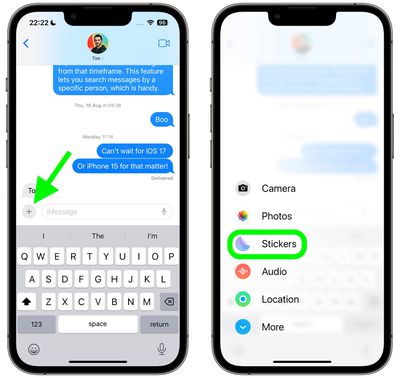
  1. In a Messages conversation, tap the + button next to the text input field.
  2. Tap the Stickers option in the vertical list that appears.
    2add effects stickers messages

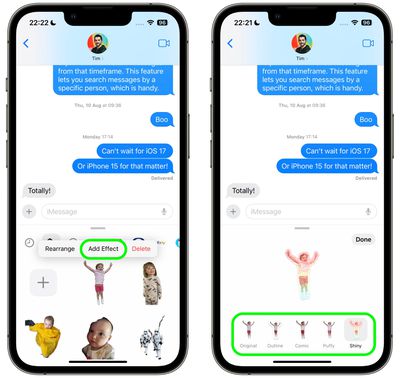
  3. Press and hold on an individual sticker until it "pops," then tap Add Effect in the popup menu.
  4. Tap one of the available effects options: Original, Outline, Comic, Puffy, or Shiny.
  5. Tap Done to finish.
    1add effects stickers messages

That's all there is to it – your stylized sticker is now ready to be shared with the world.

Did you know that another new Messages feature in iOS 17 is the ability to turn Live Photos into Live Stickers? Click the link to learn how it's done.


Popular Stories

iOS 27 Next to iPhone

Here's When iOS 27 Rolls Out Today in Every Time Zone [Update: It's Out]

Sunday September 13, 2026 3:00 am PDT by
Update 10:04 a.m.: iOS 27 is rolling out now, though it may take a bit for all users to see it, so keep checking! Apple is about to release iOS 27, which will finally deliver more advanced Siri AI capabilities as well as a variety of other refinements, improvements, and new features to iPhones. It's Apple's biggest software update of the year, and Apple announced at Wednesday's iPhone event...
iOS 27 Icon iPhone

iOS 27 Available Now With These 8 New Features

Monday September 14, 2026 9:00 am PDT by
Update — 10 a.m. Pacific Time: Apple has released iOS 27. During its iPhone 18 Pro and iPhone Duo event last week, Apple announced that iOS 27 will be released widely on Monday, September 14. iOS 27 should be available around 10 a.m. Pacific Time / 1 p.m. Eastern Time today via the Settings app, under General → Software Update. Below, we have highlighted eight new features and...


Apple iCloud Plus expansion hero

iCloud+ Now Includes Apple TV, Apple Arcade, and Curated Apple Music Stations in Over 100 Countries

Tuesday September 15, 2026 1:43 am PDT by
Apple today announced a new subscription initiative that turns paid iCloud+ subscriptions into a broader services bundle in more than 100 countries. In select countries, Apple says every paid iCloud+ plan, including the cheapest 50GB tier, now includes Apple TV and Apple Arcade "at no additional cost," while family sharing extends the storage, TV and Arcade access to up to five people....

🔗 Related Apple News & Rumors

Stay updated with the latest Apple ecosystem news and verified rumors