

Use These iPhone Features to Stay Safer - MacRumorsOpen MenuShow RoundupsShow Forums menuVisit ForumsOpen Sidebar
Skip to Content

Use These iPhone Features to Stay Safer

The iPhone has quite a few built-in safety features that are designed to help keep you safe, and with New Year's Eve parties approaching, it may be worth a refresher on what your iPhone can do and the options you can enable to protect yourself.
FindMy Feature

Stolen Device Protection

Stolen Device Protection keeps your data safe in case someone steals your iPhone and also happens to know your passcode. Earlier this year, there were reports about thieves spying on a victim's passcode before stealing an iPhone, giving them access to Find My, iCloud Keychain passwords, banking accounts, and more.
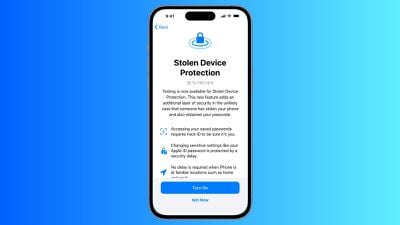
ios stolen device protection
With Stolen Device Protection, Face ID or Touch ID authentication is required to view passwords in ‌iCloud‌ Keychain, turn off Lost Mode, erase content and settings, use saved Safari payment methods, and apply for or view an Apple Card. Authentication and an hour-long waiting period is required for changing an Apple ID password, changing an iPhone passcode, removing ‌Face ID‌/‌Touch ID‌, and turning off ‌Find My‌.

Stolen Device Protection is actually an iOS 17.3 feature, so there are some extra steps to use it. You'll need to download and install the iOS 17.3 public beta from Apple's beta software website and follow the instructions. It's a little bit of a hassle, but if you're going to be out in public and drinking, Stolen Device Protection is worth the effort just in case.

Note: Apple does not recommend installing beta software on a primary device, and there is a chance that the install could cause issues with your iPhone. We have not seen reports of iOS 17.3 causing problems, but it is worth weighing the benefits and downsides before opting for a beta.

Messages Check In

If you're going out somewhere, you can use the Check In feature in Messages to let a trusted friend or family member know where you're going and when you should arrive.
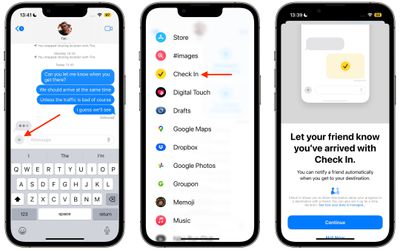
messages check in
When you head out, turn on Check In, and it will keep track of your progress. If you stop along the way, Messages will ping you to see what's going on, and if you do not respond, helpful information like your battery level, location, route traveled, location of last iPhone unlock, and cellular status will be shared with the trusted person.

Check In is a feature that ensures someone is keeping an eye on you from afar, and if you're in an accident, accosted, or otherwise in trouble, it gives detailed information that can be used to find you.

Use Find My

You can also give a trusted friend or family member access to your location through the ‌Find My‌ app. Go to ‌Find My‌, choose the People tab, and tap Share My Location.
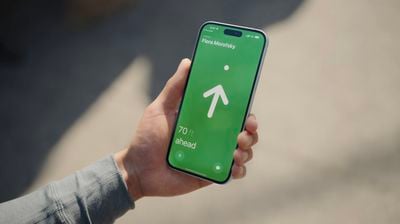
find my friends precision finding
With the iPhone 15 and the second-generation Ultra Wideband chip, ‌Find My‌ can be used to track down your friends in a crowd if you're in a place like a concert venue. Note that both people need to have an iPhone 15 model.

Medical ID

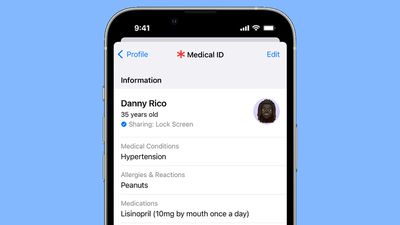
Make sure your medical information is up to date in the Health app. Tap on your profile and then go to Medical ID to update your information.
iphone medical id
This is a quick way for someone to see your name, age, allergies, and emergency contacts, and it's data that can be viewed when your iPhone is locked.

Safety Check

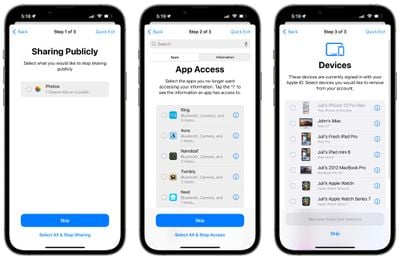
It's a good idea to use the iPhone's Safety Check feature every now and then to see who you're sharing data with and who can track you. Open up the Settings app, go to Privacy and Security, scroll down, and tap on Safety Check.
ios 16 manage sharing 2
In an emergency, you can use the Emergency Reset option, but for a check up, you'll want to tap on Manage Sharing & Access. It will show you who can see your location, which apps have access to your location data, who you share photo albums with, who you share notes with, all devices logged in to your ‌Apple ID‌, and more.

Features to Know About

  • Emergency SOS - If you press and hold on the side button and either volume button on the iPhone, you can call emergency services surreptitiously. There's also an option to press five times on the side button to call, which is an even easier method. Adjust your SOS settings by going to Settings > Emergency SOS.
  • Emergency SOS on Apple Watch - To contact emergency services on the Apple Watch, hold down the side button until the emergency call slider appears, and then drag it to make the call.
  • Crash Detection - Crash Detection contacts local emergency services if a crash is detected. It's on by default, but double check that it's enabled under Settings > Emergency SOS > Call After Severe Crash.
  • Satellite SOS - In a remote area where you don't have signal, you can use satellite connectivity to get help in an emergency. It's a feature available on the iPhone 14 and 15 models, and note that you will need to be outside and have a line of sight to the sky for the best connectivity.
  • Use Siri - You can ask Siri to call 911 (or your local emergency number).
  • Text 911 - Need to get help while staying quiet? You can text 911 in the United States by opening up the Messages app and typing 911 in the "To" field. This works on Apple Watch too.

Other Safety Tips

Know of other safety tips iPhone users should be aware of? Share them in the comments below.

Popular Stories

Home Hub Command Center with Dome Base Feature

Apple Smart Home Hub to Feature iMac G4-Style Design

Wednesday September 30, 2026 4:36 am PDT by
Apple's long-rumored smart home hub will have an iMac G4-style design and a host of unique features, Bloomberg's Mark Gurman reports. The smart home hub is said to feature a square 6-inch display, with variants that can be placed on a countertop or mounted on a wall. It features a single FaceTime camera on the front, with microphones and speakers in its connected base. Gurman described the...

HomePod minis on gradient feature 1 1

Three New Apple Smart Home Products Coming on October 13

Wednesday September 30, 2026 4:04 am PDT by
Apple plans to introduce a series of new smart home products on Tuesday, October 13, according to Bloomberg's Mark Gurman. Apple reportedly plans to debut its long-awaited smart home hub device, a new HomePod mini, and a new Apple TV on the date. The new HomePod mini and Apple TV are set to retain their existing designs, but tout faster chips to support Siri AI. The new HomePod mini will...
Apple TV Sans Remote Feature

New Apple TV 4K Leaked

Friday September 25, 2026 8:16 am PDT by
MacRumors contributor Aaron Perris has uncovered an image file from Apple for an unreleased Apple TV 4K, suggesting that a new model will finally be released soon. The image is specifically for an "Apple TV 4K (4th generation)" model. Apple TV 4K (4th generation) image (on a gradient) The image reveals that the Apple TV will have the same external design as the current model, with all of its...

Top Rated Comments

36 months ago
Please, DO NOT install beta software on an iPhone you need and use daily, especially in a life or death situation. You are just asking for issues. I’m actually kinda shocked macrumors is suggesting it to people like it’s nothing.
Score: 22 Votes (Like | Disagree)
jclo Avatar
36 months ago

Please, DO NOT install beta software on an iPhone you need and use daily, especially in a life or death situation. You are just asking for issues. I’m actually kinda shocked macrumors is suggesting it to people like it’s nothing.
I typically agree with this and do not normally recommend beta software on primary devices, but I wanted to let people know that it's an option. NYE is a major drinking holiday and I do think this is something that should be turned on if you're out in a bar or around unfamiliar people.

I'll add a note to use caution with betas. We have been running this beta since it came out and have not had issues, and I haven't seen reports, but it's true that it's a risk.
Score: 9 Votes (Like | Disagree)
coffeemilktea Avatar
36 months ago

with New Year's Eve parties approaching

Stolen Device Protection is actually an iOS 17.3 feature, so there are some extra steps to use it
Installing beta software to stay safe during a New Year's Eve party is a big-brain 200 IQ move for sure. :p

Personally, my plan is to just eat a big dinner and then go to bed early. :cool:
Score: 8 Votes (Like | Disagree)
podycust Avatar
36 months ago
Why are you even listing Stolen device protection a feature that’s only available on beta version of iOS like it’s available already?

Which you should not be recommended to average user to install beta software!
Score: 6 Votes (Like | Disagree)
36 months ago
Also turn off control center access when locked so they can’t put in it airplane mode.
Score: 5 Votes (Like | Disagree)
Apple_Robert Avatar
36 months ago
I like the features I see listed and plan on using them once 17.3 is officially released. As for New Years Eve, I plan on spend the evening with my fellow MR nerds.
Score: 5 Votes (Like | Disagree)
Latest Stories
MacBook Pro With OLED Touch Screen Rumored to Launch in October or November
14 minutes ago
Apple's All-New Home Hub Rumored to Launch in These Four Colors
50 minutes ago
iPhone 18 Pro Aperture Control Goes Fully Manual in Halide 3.2
2 hours ago
Apple Stores Receive 'Do Not Open' Boxes Ahead of Smart Home Products Launch
3 hours ago
iPhone 18 Pro Sales Jump in China Ahead of iPhone Duo Launch
3 hours ago
Apple TV Still Down for Some Users Following Apple Services Outage
4 hours ago
PSA: Apple Mail on Mac May Stop Syncing Microsoft 365 Accounts Today
4 hours ago
Apple's Smart Home Hub: Everything We Know So Far
15 hours ago
Apple's Home Hub Borrows From the iPhone Duo's StandBy Mode
16 hours ago
Apple Invites App Updated With Three New Features
20 hours ago
Apple Event on October 13?
21 hours ago
Apple Watch SE 3 vs. Series 12 Buyer's Guide: Which Should You Buy?
23 hours ago
iPad Mini 8 to Offer These 10 New Features
23 hours ago
DoorDash Unveils AI Food Ordering Through Apple's Messages App
1 day ago
Amazon Takes Up to $150 Off Select M5 MacBook Air Models
1 day ago
Apple Still Plans to Release a New Full-Sized HomePod
1 day ago
Apple Working to Expand HomeKit
1 day ago
Apple Smart Home Hub to Feature iMac G4-Style Design
1 day ago
Three New Apple Smart Home Products Coming on October 13
1 day ago
Apple Pay Now Available in India With Axis Bank Cards
2 days ago
OpenAI Launches Always-On 'Dots' Agents to Rival Meta's Muse
2 days ago
AirPods 5 Teardown: Batteries Removable, Case Still Tough
2 days ago
iPhone 18 Pro Owners Complain of Speaker Crackling or Popping
2 days ago
You Can 'Get Ready' for iPhone Duo Pre-Orders on October 12
2 days ago
Apple Pay Reportedly Launching in India Today
2 days ago
Apple Releases New AirPods Beta Firmware
2 days ago
Apple Shares New Guide for Using iOS 27 Parental Controls
2 days ago
Apple Creator Studio and Final Cut Camera Get New Features
2 days ago
Apple Explains Why It Removed ICE Tracking Apps Last Year
2 days ago
Amazon Expands $779.99 Apple Watch Ultra 4 Deal to More Models
2 days ago

🔗 Related Apple News & Rumors

Stay updated with the latest Apple ecosystem news and verified rumors










































