

iOS 17.3 Beta Adds New Stolen Device Protection Feature to iPhone - MacRumorsOpen MenuShow RoundupsShow Forums menuVisit ForumsOpen Sidebar
Skip to Content

iOS 17.3 Beta Adds New Stolen Device Protection Feature to iPhone

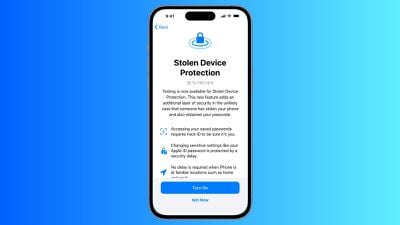
The first iOS 17.3 beta rolling out to developers today includes a new "Stolen Device Protection" feature that is designed to add an additional layer of security in the event someone has stolen your iPhone and also obtained the device's passcode.
ios stolen device protection
Earlier this year, The Wall Street Journal's Joanna Stern and Nicole Nguyen reported about instances of thieves spying on a victim's iPhone passcode before stealing the device, often in public places like bars. The thief can then reset the victim's Apple ID password, turn off Find My, view passwords stored in iCloud Keychain for banking and email accounts, and more. All in all, the report said thieves can essentially "steal your entire digital life."

When Stolen Device Protection is turned on, Face ID or Touch ID authentication is required for additional actions, including viewing passwords or passkeys stored in iCloud Keychain, applying for a new Apple Card, turning off Lost Mode, erasing all content and settings, using payment methods saved in Safari, and more. No passcode fallback is available in the event that the user is unable to complete Face ID or Touch ID authentication.

For especially sensitive actions, including changing the password of the Apple ID account associated with the iPhone, the feature adds a security delay on top of biometric authentication. In these cases, the user must authenticate with Face ID or Touch ID, wait one hour, and authenticate with Face ID or Touch ID again. However, Apple said there will be no delay when the iPhone is in familiar locations, such as at home or work.

The opt-in feature can be found in the Settings app under Face ID & Passcode → Stolen Device Protection. iPhone users who update to the iOS 17.3 beta will be prompted with the option to test a preview of the feature following installation, but Apple said this screen will not be shown to users who install the public version of iOS 17.3 coming later.

Actions that will require Face ID or Touch ID authentication when the feature is turned on:

  • Viewing/using passwords or passkeys saved in iCloud Keychain
  • Applying for a new Apple Card
  • Viewing an Apple Card virtual card
  • Turning off Lost Mode
  • Erasing all content and settings
  • Taking certain Apple Cash and Savings actions in Wallet
  • Using payment methods saved in Safari
  • Using your iPhone to set up a new device

Actions that will require Face ID or Touch ID authentication and have a one-hour security delay when the feature is turned on:

  • Changing your Apple ID password
  • Updating select Apple ID account security settings, including adding or removing a trusted device, trusted phone number, Recovery Key, or Recovery Contact
  • Changing your iPhone passcode
  • Adding or removing Face ID or Touch ID
  • Turning off Find My
  • Turning off Stolen Device Protection

Apple said it plans to share additional documentation about Stolen Device Protection over time to clarify how the feature works. The option will be available on all iPhone models that are compatible with iOS 17, including the iPhone XS and newer. iOS 17.3 will likely be released to the public in January or February.


Related Forums: iOS 17, iPadOS 17

Popular Stories

Apple Event Logo

Apple Working on All-New Operating System

Wednesday July 29, 2026 11:39 am PDT by
Apple is developing an all-new operating system that is essentially a mix of tvOS, watchOS, and iOS, according to Bloomberg's Mark Gurman. In a report this week, he said the operating system will feature a grid of icons, widgets, and apps, along with customizable clock faces. The new software platform is intended for Apple's long-rumored smart home hub. With built-in facial recognition,...

imac video apple feature

Apple Made Its Second-Biggest Acquisition Ever This Year

Wednesday July 29, 2026 12:03 pm PDT by
Apple this year acquired Israeli startup Q.ai for close to $2 billion, according to the Financial Times. That would make this Apple's second-biggest acquisition ever, after it paid $3 billion for the popular headphone maker Beats in 2014. This is also the largest known Apple acquisition since the company purchased Intel's smartphone modem business and patents for $1 billion in 2019. Q.ai...
Dynamic Island iPhone 18 Pro Feature

iPhone 18 Pro: Twelve Changes Coming to Apple's Next Flagship

Thursday July 30, 2026 3:43 am PDT by
We're less than two months out from the launch of Apple's premium next-generation smartphone lineup, and while we're not expecting a dramatic change in terms of functionality, there are still several enhancements rumored to be coming to the iPhone 18 Pro and iPhone 18 Pro Max. One thing worth noting is that Apple is reportedly planning a major change to its iPhone release cycle this year,...

Top Rated Comments

35 months ago
Love this! This is huge! Awesome that Apple keeps looking after our devices and makes sure they don’t get in to the wrong hands.
Score: 35 Votes (Like | Disagree)
Cunir Avatar
35 months ago
good move by apple. i'll be turning it on straight away
Score: 18 Votes (Like | Disagree)
anshuvorty Avatar
35 months ago
This is because of Joanna Stern's awesome reporting! Nice work!

From earlier this year: https://www.wsj.com/video/series/joanna-stern-personal-technology/apples-iphone-passcode-problem-how-thieves-can-take-over-in-minutes/967C3B74-90D3-45EA-BAA4-4ECDBB24715D
Score: 17 Votes (Like | Disagree)
diego.caraballo Avatar
35 months ago
Can we lock ALL SETTINGS behind Face ID?
Score: 17 Votes (Like | Disagree)
Apple_Robert Avatar
35 months ago
This is a solid start in protecting against account take-over. Glad to see Apple finally addressing this aspect.
Score: 15 Votes (Like | Disagree)
34 months ago

Something that is even a bit more morbid is what do you do with someone’s phone after they die or they’re seriously injured. I know of two incidences, where spouses did not share passwords, and after an unexpected death, this sled to major problems.

This new security feature is an important improvement. But the problem of what to do with a deceased property is just going to get worse.
Setting a Legacy Contact ('https://support.apple.com/en-us/HT212360') is the solution.
Score: 12 Votes (Like | Disagree)

🔗 Related Apple News & Rumors

Stay updated with the latest Apple ecosystem news and verified rumors











































