iOS 17 Photos Features: Pet Recognition, Recipe Identification, One-Tap Crop and More

With the iOS 17 Photos and Camera apps, Apple added several features that make the apps more pleasant to use. Visual Look Up can recognize more than ever, including various mystery symbols you see in your daily life, plus the ‌Photos‌ app will detect your pets and put them in their own album.
iOS 17 General Photos App Feature
This guide highlights all of the new iOS 17 ‌Photos‌ and Camera app features.

Pet Recognition

In addition to people, the ‌Photos‌ app can recognize specific animals so you can have your pets automatically sorted into albums. Accordingly, the People album has been renamed the "People & Pets" album.
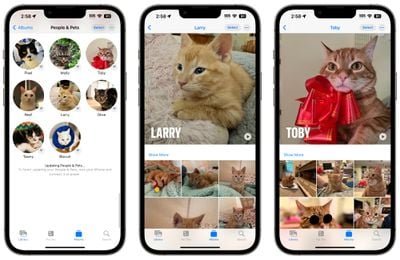
ios 17 pets photos
The pet recognition feature works on cats and dogs, and Apple says that people recognition has also improved.

Visual Look Up

Apple gave Visual Look Up some major updates. For a recap, Visual Look Up is the name of the feature that lets you get more information about the subject of a photo when you tap on the information button in the ‌Photos‌ app.

visual lookup recipes
For images of food, the iPhone will identify what's in the photo and present recipes sourced from the web. A whole range of symbols can now be recognized, from street signs to dashboard icons to the laundry instructions you see on clothing tags. If you take a picture of one of these symbols and then tap for info, the ‌iPhone‌ will be able to tell you what it means.

ios 17 visual lookup laundry symbols close up
You can also use the long press on an image gesture to pull the subject from the background of an image to look up what it is, if it is compatible with Visual Look Up.
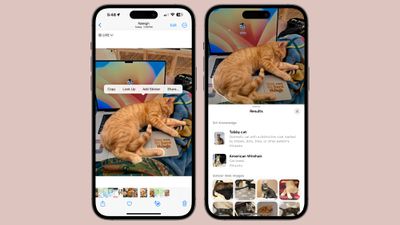
ios 17 visual lookup background subject
Finally, Visual Look Up can be used in videos. You can pause a video on any frame and tap on the info button to look up what's in the video.

One-Tap Crop

When you zoom into an image in the ‌Photos‌ app, you can tap on the "Crop" button in the upper right corner to crop into the zoom without having to open up the photo editing interface.
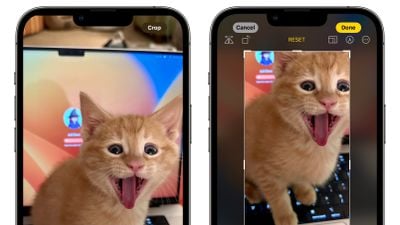
ios 17 crop photos app

Photos Interface Changes

In the photo editing interface, the Cancel and Done buttons have been moved to the top of the display, and all of the tool icons have text descriptions to explain what they do.
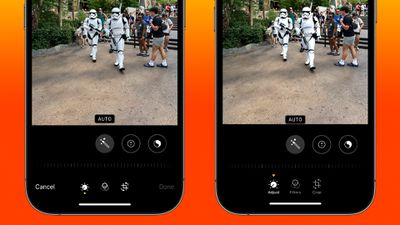
photos ui comparison

iOS 16 on left, iOS 17 on right

Camera Leveling

A new level option in iOS 17 adds a horizontal line to the Camera app so you can make sure that landscape shots are lined up and level before capturing an image.
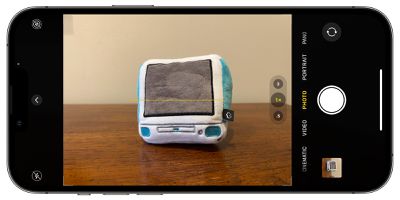
ios 17 camera level

QR Code Updates

While the ‌iPhone‌'s Camera app has been able to read QR codes since iOS 11, iOS 17 fixes an interface that has been irritating for quite some time. Rather than the link for a QR code popping up in the middle of the display, it now shows up at the bottom of the screen so it's easier to tap.
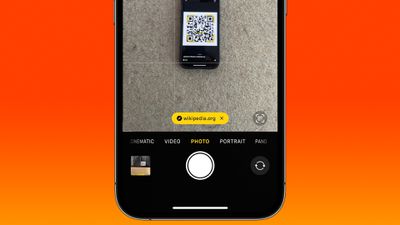
qr code ios 17

Cinematic Mode

Apple added a Cinematic API for third-party apps, which will allow photo and video apps to incorporate Cinematic mode video playback and editing.

Animated Stickers

With the remove subject from background tool, you can turn any Live Photo into an animated sticker that can be used in Messages and other apps.
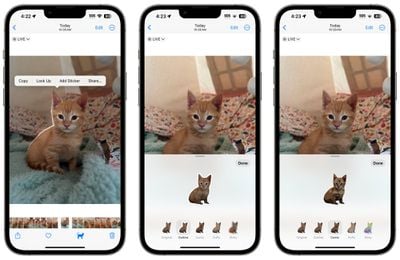
ios 17 stickers create
Just long press on the subject in a photo and then choose the "Add Sticker" option. From there, you can add effects like a white sticker outline, a "puffy" sticker effect, glitter, and more.

This feature also works with any photo if you just want a still image.

Screenshot Updates

If you take a screenshot in iOS 17, you'll see a Save to ‌Photos‌ option that saves the full page of the screenshot as an image. Previously, the feature for capturing a full page screenshot would only save it as a PDF.
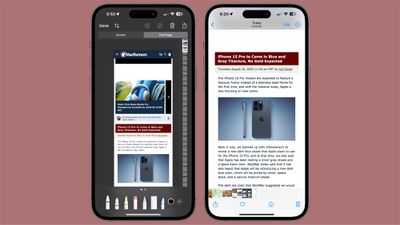
ios 17 screenshot image full

Read More

More information on all of the new features in the iOS 17 update can be found in our iOS 17 roundup.


Related Forums: iOS 17, iPadOS 17

Popular Stories

Aston Martin CarPlay Ultra Screen

Apple's CarPlay Ultra to Expand to These Vehicle Brands Later This Year

Sunday February 1, 2026 10:08 am PST by
Last year, Apple launched CarPlay Ultra, the long-awaited next-generation version of its CarPlay software system for vehicles. Nearly nine months later, CarPlay Ultra is still limited to Aston Martin's latest luxury vehicles, but that should change fairly soon. In May 2025, Apple said many other vehicle brands planned to offer CarPlay Ultra, including Hyundai, Kia, and Genesis. In his Powe...
Apple Logo Black

Apple's Next Launch is 'Imminent'

Sunday February 1, 2026 12:31 pm PST by
The calendar has turned to February, and a new report indicates that Apple's next product launch is "imminent," in the form of new MacBook Pro models. "All signs point to an imminent launch of next-generation MacBook Pros that retain the current form factor but deliver faster chips," Bloomberg's Mark Gurman said on Sunday. "I'm told the new models — code-named J714 and J716 — are slated...
Apple MacBook Pro M4 hero

New MacBook Pros Reportedly Launching Alongside macOS 26.3

Sunday February 1, 2026 5:42 am PST by
Apple is planning to launch new MacBook Pro models with M5 Pro and M5 Max chips alongside macOS 26.3, according to Bloomberg's Mark Gurman. "Apple's faster MacBook Pros are planned for the macOS 26.3 release cycle," wrote Gurman, in his Power On newsletter today. "I'm told the new models — code-named J714 and J716 — are slated for the macOS 26.3 software cycle, which runs from...
iOS 26

iOS 26.3 and iOS 26.4 Will Add These New Features to Your iPhone

Tuesday February 3, 2026 7:47 am PST by
We are still waiting for the iOS 26.3 Release Candidate to come out, so the first iOS 26.4 beta is likely still at least a week or two away. Following beta testing, iOS 26.4 will likely be released to the general public in March or April. Below, we have recapped known or rumored iOS 26.3 and iOS 26.4 features so far. iOS 26.3 iPhone to Android Transfer Tool iOS 26.3 makes it easier...
14 inch MacBook Pro Keyboard

Apple Changes How You Order a Mac

Saturday January 31, 2026 10:51 am PST by
Apple recently updated its online store with a new ordering process for Macs, including the MacBook Air, MacBook Pro, iMac, Mac mini, Mac Studio, and Mac Pro. There used to be a handful of standard configurations available for each Mac, but now you must configure a Mac entirely from scratch on a feature-by-feature basis. In other words, ordering a new Mac now works much like ordering an...

Top Rated Comments

BenGoren Avatar
32 months ago
What I want isn’t just a one-axis level, but two- or even three-axis. This is especially important for architecture; you could have the horizon level, but still be left with “keystone” distortion. (Traditionally, you’d use a view camera or a “tilt / shift” lens on an SLR, but if you have enough pixels, cropping is optically equivalent.)

And with three-axis, you could (for example) take a photo of a painting hanging on the wall perfectly square to the wall, no distortions whatsoever.

For bonus points … offer a mode where you only have to get “close enough,” and the phone uses the gyroscope information (and maybe a bit of AI) to digitally finish the correction. Essentially, a digital gyro-stabilized gimbal locked to square and level. (Yes, with some cropping — not avoidable, and we’ve got megapixels to spare.)

b&
Score: 12 Votes (Like | Disagree)
klasma Avatar
32 months ago
This is a nitpick, but “adjust” isn’t much of an explanation.

Attachment Image
Score: 12 Votes (Like | Disagree)
jz0309 Avatar
32 months ago
I will put pet ecognition to its test on my 2 cats - they're both black ... will report here after release
Score: 7 Votes (Like | Disagree)
Pinkyyy ?? Avatar
32 months ago

I don't know how others feel? Is it just me that feels like the software this year is more intriguing than maybe what the hardware will be?
I feel the same ! iOS 17 seems very promising with all the new features and the improvements. Hopefully it’ll be more stable too. The iPhone 15 rumors on the other hand.. not really. But they’re still rumors after all. I guess we will have to wait and see what it’ll actually be like. Only a few days left from now !
Score: 6 Votes (Like | Disagree)
lazyrighteye Avatar
32 months ago

For bonus points … offer a mode where you only have to get “close enough,” and the phone uses the gyroscope information (and maybe a bit of AI) to digitally finish the correction. Essentially, a digital gyro-stabilized gimbal locked to square and level. (Yes, with some cropping — not avoidable, and we’ve got megapixels to spare.)
This seems not only doable but a feature I, and likely others, would dig. Approved! ?
Score: 6 Votes (Like | Disagree)
deesedani Avatar
32 months ago
I wish they would sort out pictures in recent, so here is my issue/problem I move pictures from recent to Albums so I can organise myself, the problem is they are still in recent, surely recent should ONLY have photos that are NOT in an album, this would be a dream feature for me. I don’t know what is in albums now and what isn’t, I don’t have a huge amount of photos only about 5,000 but like to sort myself out. Even if the picture had a symbol like a STAR to say it’s in an album that would atleast help the matter, come on Apple this is such an easy and simple fix, has no one at the office thought of this fix
Score: 5 Votes (Like | Disagree)