How to Put an AirTag in Lost Mode - MacRumorsOpen MenuShow RoundupsShow Forums menuVisit ForumsOpen Sidebar
Skip to Content

How to Put an AirTag in Lost Mode

by

Apple's AirTags are small, coin-shaped devices that can be attached to items like keys and wallets to allow these accessories to be tracked using Bluetooth right alongside Apple devices in the Find My app.

AirTag Lost Mode Feature
AirTags can be tracked using the Items tab in ‌Find My‌, and just like your Apple devices, if one should become lost, you can put it in Lost Mode to locate it. If an AirTag is nearby, it will connect to an Apple device over Bluetooth to relay its location, and there's even a Precision Finding feature on the iPhone 11 and 12 that uses the U1 chip for finding items that are misplaced close by.

An ‌AirTag‌ that's out of range can still be tracked using the ‌Find My‌ app, but it won't rely on the Bluetooth signals from your own device. Instead, the ‌‌‌Find My‌‌‌ Network takes advantage of nearly a billion Apple devices out in the world to help you locate your ‌AirTag‌.

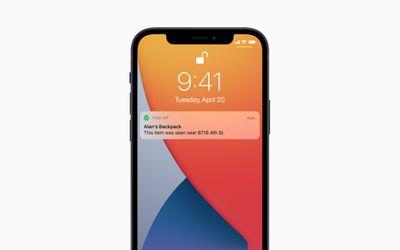
airtag notification
However, if an ‌AirTag‌ isn't nearby and there are no Apple devices in the area in which it's located, ‌‌Find My‌‌ will only be able to tell you where it was last seen on the map. In such cases, you can place the ‌AirTag‌ in Lost Mode. That way, if someone with an iPhone or Android device that has NFC comes across the item, they can help return it to you. Here's how it works.

How to Mark an AirTag as Lost

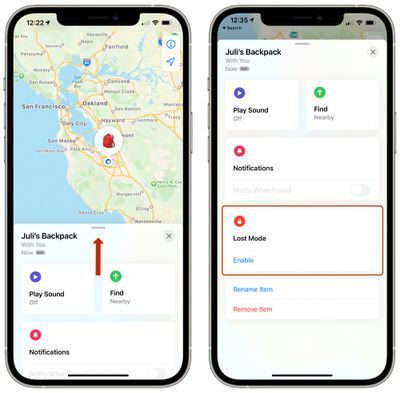
  1. Launch the Find My app on your iPhone.
  2. Tap Items.
  3. Tap the ‌AirTag‌ you want to mark as lost.
  4. Swipe down on the card and under "Lost Mode," tap Enable. airtag lost mode 1
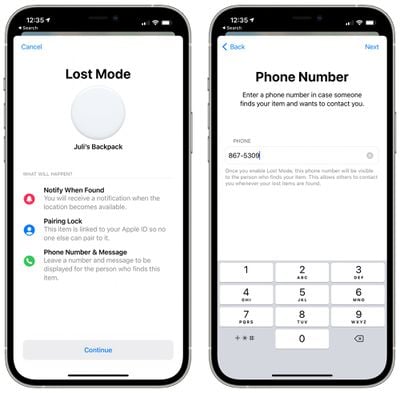
  5. Tap Continue.
  6. Enter your phone number in the input field, then tap Next. airtag lost mode 1 5
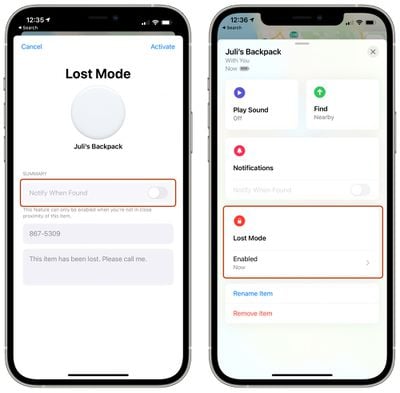
  7. Toggle the switch next to Notify When Found, and optionally customize the lost message that is shown when someone finds the item. Note that you can only customize the message and activate Notify When Found if the ‌AirTag‌ is out of range of your device.airtag lost mode 2
  8. Tap Activate.

airtag
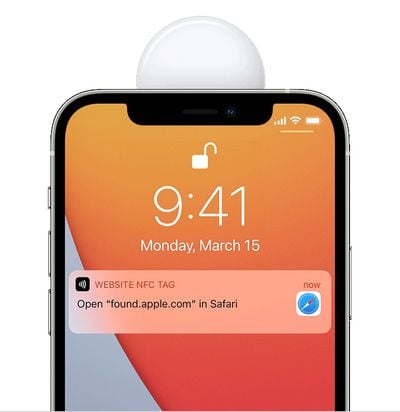
Now that the ‌AirTag‌ is marked as lost, anyone who finds it can bring it close to an NFC-enabled iPhone or Android phone and they will see a notification linking them to a website URL that contains your lost message and phone number. You may also be able to see the location relayed through someone else's device thanks to the ‌Find My‌ network.

Related Roundup: AirTag
Buyer's Guide: AirTag (Buy Now)

Top Rated Comments

Apple_Robert Avatar
69 months ago

If you are too stupid to lose a product you are utilizing to prevent you from losing its parent product, you deserve neither.

A person puts an AirTag in a piece of luggage and the Airline loses said luggage. The owner isn't stupid for attempting to take reasonable care to prevent loss from happening.

You shouldn't make such declarative statements without considering what you are saying.
Score: 7 Votes (Like | Disagree)
69 months ago
I would love to put it in my bike frame and be able to mark it as stolen rather than showing up on the iPhone of the thief’s as lost.
Score: 5 Votes (Like | Disagree)
Apple_Robert Avatar
69 months ago

If the airline... let's say, Southwest... loses the luggage... let's say, the latest Titelist titanium clubs... the person with the lost clubs has no control over said luggage, and the race is on for Southwest to track those golf clubs down, AirTagged or not.

How are AirTags solving a problem from 2020? Duh derrr
I pointed out that your all encompassing declarative statement was a poor statement. And 2020 has nothing to do with your previous statement much less this one.
Score: 2 Votes (Like | Disagree)
69 months ago
Can i disable my phone from being used to locate someones airtags?
Score: 1 Votes (Like | Disagree)
69 months ago

I would love to put it in my bike frame and be able to mark it as stolen rather than showing up on the iPhone of the thief’s as lost.
my thoughts exactly. i thought this would be great for finding my stolen stuff if it didn't alert the robber that it is getting tracked.
Score: 1 Votes (Like | Disagree)

Popular Stories

Apple Event Logo

Apple Working on All-New Operating System

Wednesday July 29, 2026 11:39 am PDT by
Apple is developing an all-new operating system that is essentially a mix of tvOS, watchOS, and iOS, according to Bloomberg's Mark Gurman. In a report this week, he said the operating system will feature a grid of icons, widgets, and apps, along with customizable clock faces. The new software platform is intended for Apple's long-rumored smart home hub. With built-in facial recognition,...
imac video apple feature

Apple Made Its Second-Biggest Acquisition Ever This Year

Wednesday July 29, 2026 12:03 pm PDT by
Apple this year acquired Israeli startup Q.ai for close to $2 billion, according to the Financial Times. That would make this Apple's second-biggest acquisition ever, after it paid $3 billion for the popular headphone maker Beats in 2014. This is also the largest known Apple acquisition since the company purchased Intel's smartphone modem business and patents for $1 billion in 2019. Q.ai...
Dynamic Island iPhone 18 Pro Feature

iPhone 18 Pro: Twelve Changes Coming to Apple's Next Flagship

Thursday July 30, 2026 3:43 am PDT by
We're less than two months out from the launch of Apple's premium next-generation smartphone lineup, and while we're not expecting a dramatic change in terms of functionality, there are still several enhancements rumored to be coming to the iPhone 18 Pro and iPhone 18 Pro Max. One thing worth noting is that Apple is reportedly planning a major change to its iPhone release cycle this year,...

🔗 Related Apple News & Rumors

Stay updated with the latest Apple ecosystem news and verified rumors