

iOS 17: How to Straighten Your Shooting Angle With the New Camera Level Feature - MacRumorsOpen MenuShow RoundupsShow Forums menuVisit ForumsOpen Sidebar
Skip to Content

iOS 17: How to Straighten Your Shooting Angle With the New Camera Level Feature

by

Apple in iOS 17 has introduced a handy new camera feature that helps to straighten up your shooting angle before you even hit the shutter. Running the iOS 17 beta? Then keep reading to learn how to take advantage of the new Level option.

iPhone 14 Pro Rear Camera
For a while now, Apple's Camera app has included a few optional settings that can help you line up your shots. There's a Grid that can be overlaid on the viewfinder to help apply the rule of thirds, and a somewhat-hidden leveling feature for top-down photos that displays a floating crosshair to help you line up your subject properly.

With iOS 17, Apple has further enhanced the camera leveling functionality by separating it out from the Grid mode. By making it an individual option, Apple has also included an additional horizontal level for more traditional straight-on photos.

ios 17 camera level no
Turning the Level option on will pop up a broken horizontal line on the screen when your iPhone senses you're lining up for a straight-on shot and you tilt your device slightly out of horizontal. The line appears white while your phone is out of level and then turns yellow once you achieve a level orientation to indicate success.

ios 17 camera level

How to Enable the Camera Level

The new Level option is off by default if you don't have Grid mode enabled. You can turn it on manually by following these steps.

  1. Open the Settings app on your iPhone.
  2. Scroll down and select Camera.
  3. Under the "Composition" section, toggle on the switch next to Level.
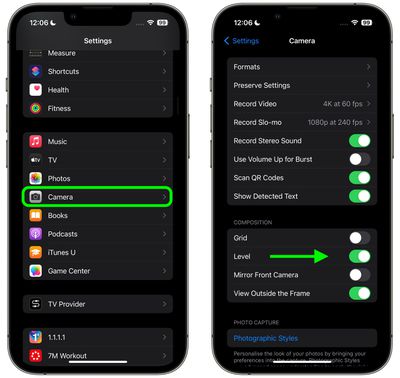
settings

Now open the Camera app and try shooting a subject at a straight angle, and you should see the broken horizontal lines in the center of the viewfinder. Straighten your angle up to connect the lines and make a single yellow line.

The leveling pop-up only appears briefly and only within a narrow range of angles close to horizontal (in either portrait or landscape orientation), so it won't intrusively pop up when you're intentionally trying to take a photo at an angle.


Related Forums: iOS 17, iPadOS 17

Top Rated Comments

Solomani Avatar
43 months ago
I like it, and will likely use the feature once I update to iOS 17. However... according to article, the feature is toggled/enabled in the iPhone Camera Settings section.

IMHO, it could be better if they let us toggle it ON/OFF within the camera app itself.
Score: 4 Votes (Like | Disagree)
43 months ago
Good article. Useful feature of camera app.

Score: 2 Votes (Like | Disagree)
yaxomoxay Avatar
43 months ago

I don't have the level tick box in my camera settings app. am I missing something? 14 pro max latest iOS
Do you have iOS17 beta?
Score: 2 Votes (Like | Disagree)
Solomani Avatar
43 months ago

I'm not sure. Seems to me the vast majority of typical users would not use this if it existed, or even understand the point of it. And lots of people would accidentally turn it on, then start complaining to Support that their camera "has these weird lines all over the picture."


Burying it in Settings probably stops millions of Apple Support and cluttering Apple Store visits from happening.

ETA: I could even see myself accidentally turning it on and being perplexed.
OK that's fair enough.

Although.... to put into perspective, I too personally find several "features" within the camera app as clutter, things I would never use, things that get me thinking "What the hell is this? And why is it there for me to accidentally press toggle ON? Do pro photographers even use this? Or is this something for the Snapchat kids? All I wanna do is shoot right away (spontaneous shot, not a second to waste)...and these things just get in the way."


So yes, I do get your point. One man's "necessary feature" is another man's clutter.

I guess we leave it to Apple to decide (based on their research?) as to which features are absolutely necessary for the majority of users, so that it gets to be available within the camera app itself.
Score: 2 Votes (Like | Disagree)
43 months ago
This will be very useful. I can’t believe that this wasn’t already a thing.
Score: 1 Votes (Like | Disagree)
43 months ago
That's an excellent feature.

MUCH better than dealing with that in post, and potentially suffering a crop as a result.
Score: 1 Votes (Like | Disagree)

Popular Stories

iPhone Duo Display Cracking

Apple Alerts Stores to iPhone Duo's Display Cracking Issue

Friday October 30, 2026 3:20 pm PDT by
In a memo shared with Apple Stores and Apple Authorized Service Providers this week, and later obtained by MacRumors, Apple provided technicians with guidance on how to diagnose and address the iPhone Duo's inner display cracking issue. If a customer reports the issue, Apple advised technicians to inspect the iPhone Duo and repair or replace it in accordance with their standard procedures....
iPad mini OLED feature 1

Apple Executive Comments on New iPad Mini Lacking 120Hz Display

Thursday October 29, 2026 1:47 pm PDT by
While the new iPad mini has an OLED display, the device does not support ProMotion, meaning the display's refresh rate is limited to 60Hz instead of 120Hz. ProMotion support would have allowed for the iPad mini's refresh rate to automatically adjust from 10Hz to 120Hz depending on the content being displayed, but evidently Apple has kept the feature exclusive to the iPad Pro among iPad...
Pinched iPad Mini

Apple Avoids Showing Pinched Fingers on iPad Mini Page in South Korea

Thursday October 29, 2026 11:52 am PDT by
In the U.S. and most other countries, Apple's website shows the new iPad mini being held by pinched fingers, but this is not the case in South Korea. The new iPad mini shown with pinched fingers on Apple's website in the U.S. On its South Korean website, Apple simply shows an image of the iPad mini on its own. The new iPad mini shown without pinched fingers on Apple's website in South Korea ...
Latest Stories
Apple Offers Steps to Fix Daylight Saving Time Bug on Apple Watch
50 minutes ago
Apple Watch Ultra 4 Hits All-Time Low Price With Amazon's $99 Discount
20 hours ago
Reminder: Apple's Big Discount on Beats 360 Ear Cushions Ends Today
20 hours ago
Here's a New Tour of Apple's HomeView Software
20 hours ago
Apple Reveals New iPad Mini's Battery Capacity
21 hours ago
Top Stories: Apple's Big MacBook Pro, iPad mini and iMac Updates
22 hours ago
'Pluribus' Season 2 Reportedly Starts Production Today
1 day ago
iPhone 18 Pro Sales Surge in China, Offsetting Decline in U.S. and Japan
1 day ago
HomeView Software 27.2: Wallpapers, Control Center, and More
2 days ago
Apple Alerts Stores to iPhone Duo's Display Cracking Issue
2 days ago
iOS 27.3 Will Enable These Apple Intelligence Features in China
2 days ago
Apple Says iOS 27.3 Beta Coming Next Week
2 days ago
Apple's Flash Storage Suppliers Are Finally 'Getting Their Revenge'
2 days ago
14 New Things Your iPhone Can Do in iOS 27.2
2 days ago
iPhone Duo Review: One Week Later
2 days ago
Samsung Mocks iPhone Duo Display Cracks in New Ad Campaign
2 days ago
The MacRumors Show: OLED MacBook Pro, iPad Mini 8, and More
2 days ago
MacBook Pro With Touch Display: 15 More Details Revealed
2 days ago
Russia Places Apple on State Surveillance Registry
2 days ago
Halloween Weekend Brings Discounts on Apple Accessories and Pre-Orders
2 days ago
Apple Has Released More Than 25 New Products in the Past Two Months
2 days ago
Local Code Launches as Free, Private AI Assistant Tool for Mac
2 days ago
Apple Acquires Ascend.io
2 days ago
HomePod Mini 2 Launches Today: All the New Features
2 days ago
AirTag 2 4-Pack Drops to New Low Price of $69.99
2 days ago
Rian Johnson's iPhone Camera App Goes Viral
2 days ago
Where Did All the iPhone Duos Go? Mostly to Apple's Stores
2 days ago
Apple's Touchscreen MacBook Pro Could Ship 1.5M Units in 2027
2 days ago
New Apple TV 4K and iPad Mini: RAM Amounts Revealed
2 days ago
Apple Executive Comments on New iPad Mini Lacking 120Hz Display
3 days ago

🔗 Related Apple News & Rumors

Stay updated with the latest Apple ecosystem news and verified rumors









































