

iOS 15 Messages Guide: New Features, Photos, Updates - MacRumorsOpen MenuShow RoundupsShow Forums menuVisit ForumsOpen Sidebar
Skip to Content

iOS 15 Messages Guide: New Features, Photos, Updates

Apple's FaceTime app was the main focus for many of the iOS 15 updates that were introduced, but the Messages app wasn't entirely forgotten. Apple introduced a new Shared with You feature and streamlined several interface elements to make the Messages experience more pleasant.

iOS 15 Messages Guide Feature
This guide outlines all of the new features that Apple added to the Messages app in iOS 15 and iPadOS 15.

Shared with You

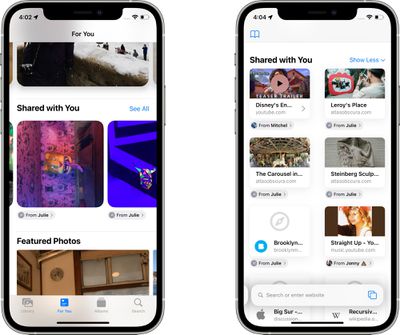
The main new feature in the iOS 15 Messages app is Shared with You, which aggregates content that people share with you in Messages into the proper apps. So if someone sends a photo, it shows up in a Shared with You section in the Photos app.
messages app shared with you
This isn't strictly a Messages addition because it's actually other apps that have this new section, but it does make Messages content much more accessible and less likely to be forgotten. There are multiple Shared with You integrations, as outlined below.

  • Photos - When someone sends you a photo in Messages, it automatically appears in the Shared with You section of the ‌Photos‌ app, which is located in "For You." Tapping on an image lets you save it to the photo library, and it has a record of who sent it. If you tap on the name of the person that sent it, it automatically opens up the Messages app so you can have a conversation.
  • Safari - Any link sent to you in Safari is stored in the Shared with You section of the main start page that's opened when you open up a new tab. Safari shows a preview of the link so you can see what it's about, and tapping the link opens up the website.
  • Apple News - A link to an Apple News story that's sent to you will be stored in the Shared with You section that's located in the Today and Following tabs in ‌Apple News‌. Stories that are found in News and Safari show up in Shared with You in both apps.
  • Apple Music - Music links sent in Messages are shown in the Shared with You section of Apple Music, which is located under Listen Now.
  • Apple Podcasts - If you're sent an episode of a Podcast or a link to a show, it's listed in the Shared with You section of Listen Now in the Apple Podcasts app.
  • Apple TV App - When a friend sends a movie or a TV show link over Messages, the TV show or movie will appear in the Shared with You section of Watch Now so you can find it quickly.

Shared With You is an optional feature and for those who do not want to use it, it can be disabled. Just go to Settings > Messages and tap on "Shared With You." From there, you can turn off Shared With You entirely or choose the specific categories where you want to see Shared With You content. Options include Music, TV, Safari, ‌Photos‌, Podcasts, and News. Any category toggled off will prevent the accompanying app from featuring a Shared With You section that includes content from the Messages app.

Shared With You - Continue Conversations

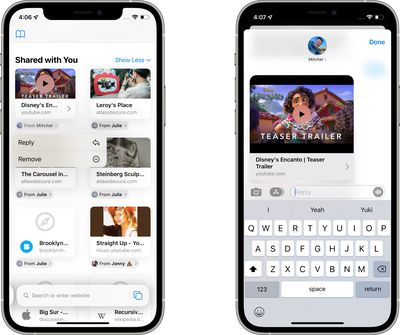
In all apps that have a Shared with You section, content in these sections makes it clear who sent it to you. There are name labels that you can tap to go right to the Messages app so you can have a conversation about what was shared. Tapping the name label on an item shared with you also opens right up to the associated message so you can see the original conversation.
messages shared with you conversation

Shared With You - Pinning Content

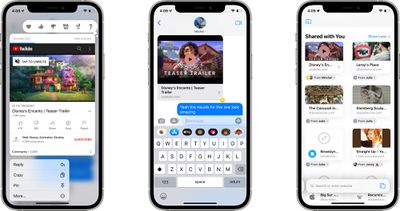
If someone shares something with you that you definitely don't want to forget about, such as a photo or a link, you can long press on it and choose the "Pin" option. Pinned items are shown first in Shared with You, in Messages search, and the Details view of a Messages conversation.
messages app shared with you pin

Photo Collages

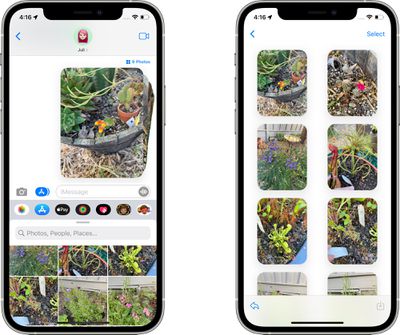
Multiple images sent in the Messages app now show up as a little photo collage of images stacked on top of one another. You can tap the collage and swipe through it to see each image in the stack. At the top left of the full screen interface, you can tap to see all of the images in a grid view, and there are also quick access tools for replying, adding a tapback response, downloading an image, or sharing it.
messages photo stack grid

Improved Photo Saving

All images you're sent in the Messages app have a little download icon next to them that can be tapped to save them, which makes it much easier to save a photo that you're sent to the photo library on your device.

Updated Photos Image Picker

The ‌Photos‌ image picker, including in the Messages app, now allows you to select photos in a specific order for sharing.
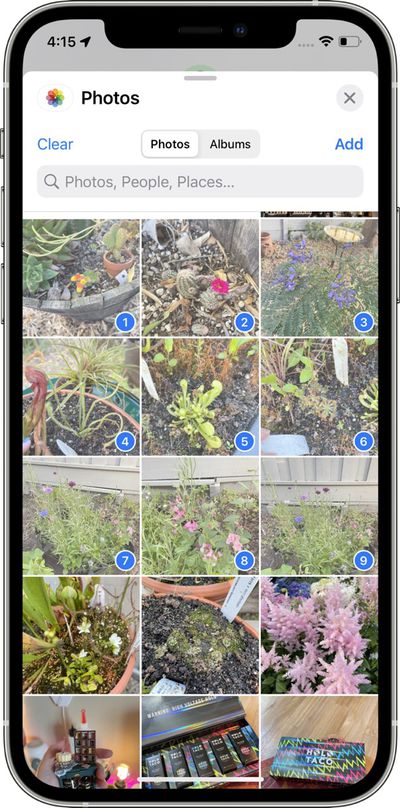
messages photo view select order

International Updates

Apple added a few country specific features to address issues with spam. In Brazil, on-device intelligence filters out unwanted SMS messages and organizes them into Promotional, Transactional, and Junk folders to keep clutter out of the main Messages inbox.

In India and China, there are options to turn notifications on or off for unknown senders, transactions, and promotions so users have more control over which types of messages are able to send notifications.

New Memoji and Memoji Stickers

Memoji, which are used in the Messages and ‌FaceTime‌ app, have been updated in iOS 15 with 40 new outfit choices, an option to choose two different eye colors, new glasses options, new headwear options, and new accessibility options that include cochlear implants, oxygen tubes, and soft helmet.
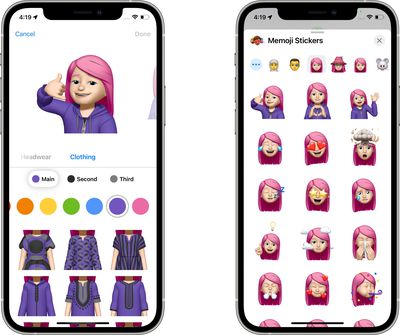
messages app memoji
Apple has also added nine new Memoji stickers like hand wave and lightbulb moment, heart hands, and more.

Other Messages Tweaks

  • Group Message Access in FaceTime - In ‌FaceTime‌, there's an option to access a group Messages thread with the people you're chatting with.
  • Focus Message Status - If you have Focus mode on and someone tries to send you an iMessage, they'll see a status update letting them know that you're in Focus mode. Friends and family can break through the Focus mode message with an urgent message.
  • Messages Photo Search - If you do a search with a contact name included, you can use Spotlight to find photos that person has sent you.
  • Announce Messages in CarPlay - Siri can now announce your incoming messages in CarPlay.

Guide Feedback

Have questions about Messages in iOS 15, know of a feature we left out, or want to offer feedback on this guide? Send us an email here.


Related Forum: iOS 15

Popular Stories

Apple TV 4K HomeView HomePod Mini tweaked

New Apple TV 4K, HomeView, and HomePod Mini: 16 Details Just Leaked

Sunday October 11, 2026 12:56 pm PDT by
Just two days before Apple's "Welcome home" experience in New York, Bloomberg's Mark Gurman has leaked several details about the new products set to be unveiled, including an all-new smart home hub, a HomePod mini 2, and a new Apple TV 4K. Here is an all-in-one summary of the details shared by Gurman:Apple's home hub with a touch-enabled display will be named HomeView, seemingly confirming a ...
Apple HomeView lineup feature1

Apple Announces 'HomeView' Smart Home Hub

Tuesday October 13, 2026 6:00 am PDT by
Apple today announced the "HomeView," an all-new kind of smart home hub featuring a 7-inch Liquid Retina display and Siri AI. Apple's senior vice president of Worldwide Marketing Greg Joswiak said: Apple HomeView is designed to be shared by everyone in the home yet feel completely personal to each user. It recognizes your face to shift from a household screen to your own experience,...
Apple TV 4K 4th Generation feature4

New Apple TV 4K Announced With A19 Chip, Updated Siri Remote, More

Tuesday October 13, 2026 6:08 am PDT by
Apple today announced the fourth-generation Apple TV 4K, with key features including an A19 chip, Siri AI support, an updated Siri Remote that has Find My support with Precision Finding, built in far-field microphones, support for surround sound with four HomePods in front and rear pairs, and more. The A19 chip in the new Apple TV 4K delivers up to 50% faster CPU performance and up to twice...

Top Rated Comments

zorinlynx Avatar
69 months ago
I have to wonder, are there really that many people who are able to use iMessage with every single friend and family member they have?

I have a mix of Android and iOS users in my friends and family circle, and thus can't invest myself too much in fun silly iMessage stuff because I can't use it with over half of my contacts. I wish Apple would put together an iMessage app for Android, much like Google has equivalents to their Android apps on iOS.
Score: 13 Votes (Like | Disagree)
x86dude Avatar
69 months ago
Teams of people having so much fun creating new features.

You would think they could spare just one person to move the “send” icon away from the text entry box.
Score: 5 Votes (Like | Disagree)
69 months ago
Sounds like a bunch of (mostly) useless bloat
Score: 5 Votes (Like | Disagree)
CarlJ Avatar
69 months ago

Shared With You has got to be one of those features I really don't want. Luckily I don't use some of the apps like News, but I really don't want to go into an app and see it cluttered with stuff people shared with me that I wasn't interested in to begin with and likely already ignored.....
Funny, I'm looking forward to the Shared With You features - occasionally, I find myself scrolling back a week in messages to find a URL that a friend/relative sent me - having a separate section in Safari that I can get into with a single tap that has all these links will be quite helpful. It sounds like, in each case, it'll be behind a "Shared With You" button, not cluttering up your main display. (I'm not at all sure that I'll like all the other UI rearrangement they're doing in Safari.)

I'm also looking forward to being able to control the order of pictures when sending several to someone in Messages - that has annoyed me multiple times, sending "here's, uh, steps 3, 1, and 2 of the process". And Group Message Access in FaceTime sounds handy (I often find myself flipping back and forth between Messages and FaceTime).

My niece will love the additional Memoji features to play with, though I know everyone here will hate them.
Score: 5 Votes (Like | Disagree)
69 months ago
Shared With You has got to be one of those features I really don't want. Luckily I don't use some of the apps like News, but I really don't want to go into an app and see it cluttered with stuff people shared with me that I wasn't interested in to begin with and likely already ignored.....
Score: 5 Votes (Like | Disagree)
69 months ago

I have to wonder, are there really that many people who are able to use iMessage with every single friend and family member they have?

I have a mix of Android and iOS users in my friends and family circle, and thus can't invest myself too much in fun silly iMessage stuff because I can't use it with over half of my contacts. I wish Apple would put together an iMessage app for Android, much like Google has equivalents to their Android apps on iOS.
Exactly. Even most of my friends who do have iPhones don’t use iMessage because it has fallen so far behind the competition (and ironically these so-called “features” don’t do much to bridge the gap).

I’ve been saying it for years but the killer feature for iMessage is to integrate APIs for ALL messaging platforms so the app is a one-stop shop and I can integrate all of my threads from across iMessage, Signal, Telegram, etc. into one app, one interface.

Score: 4 Votes (Like | Disagree)
Latest Stories
Apple Pledged $25 Million to Trump's White House Ballroom
22 minutes ago
Touchscreen MacBook Pro Could Launch on November 6
2 hours ago
New Withings Users Must Pay $99/Year for Apple Health Syncing
2 hours ago
Meta and Apple Bring Muse Spark Open AI Model to Mac Studio
3 hours ago
iPad Mini 8: Apple Has Tested Both 60Hz and 120Hz ProMotion Displays
4 hours ago
Apple TV 4K 2022 vs. 2026 Buyer's Guide: All Differences Compared

5 hours ago
Apple CEO John Ternus on Early Foldables: 'Kind of Cheap and Crappy'
6 hours ago
Greg Joswiak Says Apple Isn't Focused on Making AI for 'Lunatic Fringe'
6 hours ago
Amazon Offers $120 Discount on AirPods Max 2, $50 Off AirPods Pro 3
7 hours ago
Apple CEO John Ternus Featured on Cover of TIME Magazine: 'New Era'
8 hours ago
Apple Announces Deadline to 'Get Ready' to Pre-Order the iPhone Duo
8 hours ago
MKBHD is 'Not Convinced' About Apple's New HomeView, Here's Why
8 hours ago
Apple's Wall-Mounted HomeView Ships Without a Power Adapter
9 hours ago
Rare Apple-1 With Steve Jobs Letter Sells for $1.15 Million
9 hours ago
Apple Now Inviting Media to October 28 'Launch Experience'
10 hours ago
iPhone Duo's A20 Pro Chip Benchmarked Ahead of Launch
21 hours ago
10 HomeView Features You Might Have Missed
22 hours ago
Apple Becomes Second Company to Close Above $5 Trillion
23 hours ago
Which Apple Home Devices Get Siri AI, and When
1 day ago
Apple's Long-Delayed HomeView Was Already Being Tested in 2024
1 day ago
Apple Intelligence Coming to China in December With iOS 27.3
1 day ago
Apple Invites App Updated With Two New Features
1 day ago
OpenAI Says Ex-Employee Showed Its Device Plans to Apple
1 day ago
Discover the Best Cases and Screen Protectors for Your New iPhone Duo
1 day ago
Apple Store Near Los Angeles Closed Due to 'Events Beyond Our Control'
1 day ago
No, HomePod Mini 1 Won't Support Siri AI as CNET Reported
1 day ago
iPhone Duo Compromises: Everything You Have to Give Up
1 day ago
Apple HomeView Has These 15 Apps, Some CarPlay Apps and Widgets Also Supported
1 day ago
iPhone Duo: Apple Charging $49 for New Cover Layer, $229 for Battery
1 day ago
iPhone Duo: Skipping AppleCare+ Could Be $1,499 Mistake
1 day ago

🔗 Related Apple News & Rumors

Stay updated with the latest Apple ecosystem news and verified rumors






































