iOS 15.2 Beta: How to Use Find My to Locate Items That Can Track You - MacRumorsOpen MenuShow RoundupsShow Forums menuVisit ForumsOpen Sidebar
Skip to Content

iOS 15.2 Beta: How to Use Find My to Locate Items That Can Track You

by

Update December 13: This change did not make it into the final release of iOS 15.2, but may reappear in a future update.


In iOS 15.2, which is available in beta right now, Apple introduced new features for the Find My app, including a way to search for items that might be used to track your location.

FindMy Feature
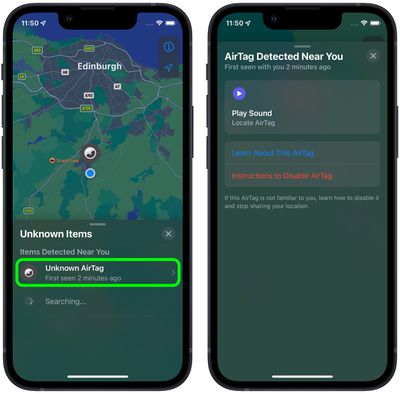
The new Unknown Items feature is called "Items That Can Track Me," and when activated, it will scan for anything that's nearby that belongs to someone else and let you know about it.

If anything is detected, such as an AirTag or other Find My-enabled item, Apple will provide you with more details on the item and instructions on how to disable it so that it can no longer be used for tracking purposes.

The following steps show you how to activate the feature in iOS 15.2. Note that items can only be found if they are not in range of their owner's device, up to 50 meters.

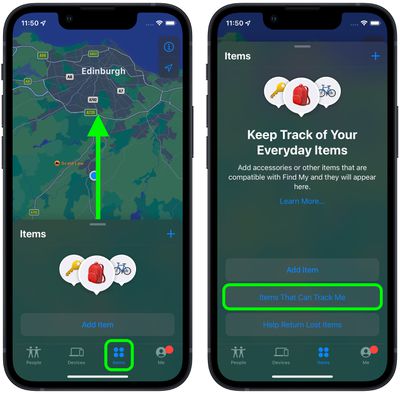
  1. Launch the Find My app on your iPhone.
  2. Tap the Items tab at the bottom of the screen.
  3. Drag the items card further up onto the screen using the small pill-shaped handle to reveal more options.
  4. Tap Items That Can Track Me.
    find my

  5. Tap the Search button.
  6. Look at the list titled "Items Detected Near You." If a device is discovered, tap it for more information.

  7. If it's an ‌AirTag‌, you can tap Play Sound to more exactly locate it. You can also tap Learn More About This AirTag to see if its owner has added contact details in case the item is lost. If you want to disable the ‌AirTag‌ to prevent it from potentially tracking you, tap Instructions to Disable AirTag and follow the instructions to remove the battery.
    find my

‌AirTags‌ and items with ‌‌Find My‌‌ integration are meant to allow users to track their lost devices, but there have been concerns that ‌AirTags‌ can be planted on people for stalking purposes. To prevent stalking with ‌AirTags‌ and other devices, Apple has implemented several safety measures.

‌AirTags‌ are designed to start playing a sound between eight and 24 hours after being separated from their owner, and iPhone users are alerted if an ‌AirTag‌ is traveling with them. Apple is also working on an Android app that will let Android users detect an unknown ‌AirTag‌ or ‌‌Find My‌‌ network-enabled item to prevent ‌AirTags‌ from being used to stalk Android users.

Related Roundup: AirTag
Buyer's Guide: AirTag (Buy Now)

Top Rated Comments

62 months ago
Hmm, this basically means airtags are no good for securing items - they're only going to be good for "lost" things.

For example, if someone steals my bike which has an airtag attached to it - all they need to do is go 50m scan for tracking devices and disable it - not cool.
Score: 9 Votes (Like | Disagree)
XNorth Avatar
62 months ago
This article has a poor explanation, missing some crucial information. So if I can disable someone’s AirTag near me and away from the owner, does that mean the owner cant find it anymore? Explain that. Surely that’s not how it would work.
Score: 6 Votes (Like | Disagree)
62 months ago
As the article says, you only see AirTags near you that are not near their owners.

Score: 5 Votes (Like | Disagree)
Robin Bonathan Avatar
62 months ago
Anyone want to buy a pack of AirTags ?
Score: 4 Votes (Like | Disagree)
62 months ago

Hmm, this basically means airtags are no good for securing items - they're only going to be good for "lost" things.

For example, if someone steals my bike which has an airtag attached to it - all they need to do is go 50m scan for tracking devices and disable it - not cool.

Exactly. Not a good look. I’m not happy that Apple is actively removing utility from these devices after I’ve purchased them.

Before with the “traveling with you” warnings, at least then the owner of a stolen item would have 1-2 hours to discover it was stolen before the tracker was disabled. Now a thief can actively target valuables and disable a tracker before the theft has even occurred. Apple definitely taking its “tracking/stalking” paranoia about 5 steps too far.
Score: 3 Votes (Like | Disagree)
jlc1978 Avatar
62 months ago

I’d like to know how this is going to work when travelling on a plane, train, bus. In theory you’ll be able to play a sound from any AirTag near you, as well as see the contact info of the owner if they’ve enabled it?
It should still be close enough to not respond.


When in a plane and in airplane mode, the AirTag does not know it is near its owner.
If airplane mode is properly enabled, it would not receive or send a signal. Not sure how AirTags use it.


This article has a poor explanation, missing some crucial information. So if I can disable someone’s AirTag near me and away from the owner, does that mean the owner cant find it anymore? Explain that. Surely that’s not how it would work.
You can't disable the AirTag, only it's ability to use your phone to report location. If you are the only phone close enough to respond then yes, you disable teh Find Me feature until another phone gets close enough.


So all a thief needs to do is use this feature and they can prevent the owner from finding the stolen goods?

Kinda lame if so. I hope apple gets this figured out.
That was my thought as well. Not only can a their check for trackers, but disable them from using their phone to track it.


Hmm, this basically means airtags are no good for securing items - they're only going to be good for "lost" things.

For example, if someone steals my bike which has an airtag attached to it - all they need to do is go 50m scan for tracking devices and disable it - not cool.
Better yet - go 50 meters, have it play a sound so if it is hidden it can be located. Toss teh AirTag in the trash, stick it on a car or bus, etc. Even if someone isn't interested in stealing it it opens up a new pranking scenario.

I think Apple clearly does not care about the ability to use AirTags to recover stolen property over their potential use for stalking and the negative publicity it would generate if someone used them for tat and harmed someone.

On a separate note? Why just AirTags? How about beacons used to track movement?
Score: 3 Votes (Like | Disagree)

Popular Stories

Apple Event Logo

Apple Working on All-New Operating System

Wednesday July 29, 2026 11:39 am PDT by
Apple is developing an all-new operating system that is essentially a mix of tvOS, watchOS, and iOS, according to Bloomberg's Mark Gurman. In a report this week, he said the operating system will feature a grid of icons, widgets, and apps, along with customizable clock faces. The new software platform is intended for Apple's long-rumored smart home hub. With built-in facial recognition,...
imac video apple feature

Apple Made Its Second-Biggest Acquisition Ever This Year

Wednesday July 29, 2026 12:03 pm PDT by
Apple this year acquired Israeli startup Q.ai for close to $2 billion, according to the Financial Times. That would make this Apple's second-biggest acquisition ever, after it paid $3 billion for the popular headphone maker Beats in 2014. This is also the largest known Apple acquisition since the company purchased Intel's smartphone modem business and patents for $1 billion in 2019. Q.ai...
Dynamic Island iPhone 18 Pro Feature

iPhone 18 Pro: Twelve Changes Coming to Apple's Next Flagship

Thursday July 30, 2026 3:43 am PDT by
We're less than two months out from the launch of Apple's premium next-generation smartphone lineup, and while we're not expecting a dramatic change in terms of functionality, there are still several enhancements rumored to be coming to the iPhone 18 Pro and iPhone 18 Pro Max. One thing worth noting is that Apple is reportedly planning a major change to its iPhone release cycle this year,...

🔗 Related Apple News & Rumors

Stay updated with the latest Apple ecosystem news and verified rumors