

How to Use Instant Tuning in iOS 12 and Change Notification Behavior on the Fly - MacRumorsOpen MenuShow RoundupsShow Forums menuVisit ForumsOpen Sidebar
Skip to Content

How to Use Instant Tuning in iOS 12 and Change Notification Behavior on the Fly

by

As part of its digital health initiative in iOS 12, Apple has introduced some improvements to the way app notifications can be managed, enabling users to more easily reduce the number of daily distractions their iPhone or iPad throws their way.

One of these new features is called Instant Tuning, which allows you to quickly adjust the future behavior of app notifications whenever they appear in the Lock Screen or the Notifications Center. Here's how to make the most of it.

How to Use Instant Tuning in iOS 12

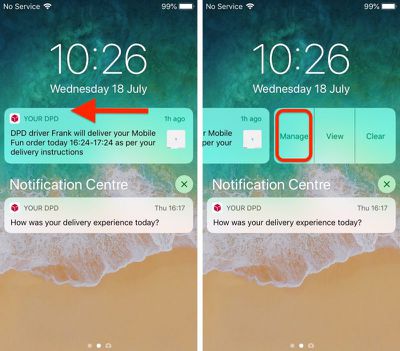
Next time an alert appears in your device's Notifications Center or on the Lock Screen, swipe left on it, then tap Manage. Alternatively, if your device supports 3D Touch, hard press on the alert and then tap the three dots in the upper right corner of the expanded notification.
ios 12 notifications instant tuning 1
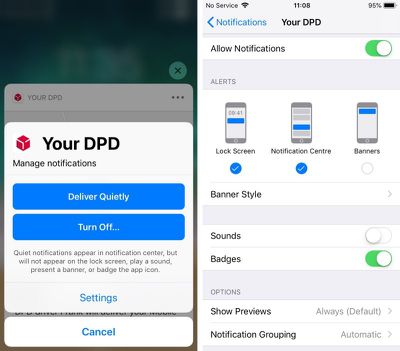
A Manage Notifications pop-up will appear on the screen featuring two blue button options. Deliver Quietly ensures future alerts from this app only appear in the Notification Center (accessed by swiping down from the top of your device's screen).

Note that selecting this option means alerts will no longer show in the Lock Screen and you won't see any banner notifications on any other screens. Deliver Quietly also turns off any sound or vibration alerts set for the associated app.

If you tap Deliver Quietly and then decide you'd rather not stick with the setting, open the Manage Notifications pop-up again in the same way and tap the Deliver Prominently button to reinstate the previous settings.
ios 12 fine tuning notifications 2
The second option, Turn Off..., completely disables all notifications for the related app. Tap this button and you will be prompted to confirm it's what you want.

Below the two large blue buttons is a less prominent Settings button that takes you to the individual app's various notification options, usually accessed via the main Settings app.

From here you can adjust where alerts should appear (if at all), enable or disable sounds and badges, select alert preview options (Always, When Unlocked, Never) and choose how notifications should be grouped (Automatic, By App, Off).


Related Forum: iOS 12

Top Rated Comments

mdelvecchio Avatar
108 months ago
Why on earth would you want quiet notifications?

The only difference between quiet notifications and no notifications is that quiet notifications adds them to a hidden app with no proper UI. The only time I ever open notification center is if I saw a banner that I was reading that hid itself too quickly. Without having it appear on the lock screen or as a banner, I'd never even know to open notification center to look for anything.

Is it really so hard to imagine? There are plenty of things that I'd like to know about but are not time sensitive and therefore do not wish to bother me with a chime or alert.
Score: 6 Votes (Like | Disagree)
jonnysods Avatar
108 months ago
I'm wondering when they are going to redesign iOS. Look at the DPD buttons. Two blue, two plain at the bottom. So much text. Sometimes it strikes me as odd.
Score: 5 Votes (Like | Disagree)
Mr Lizard Avatar
108 months ago
Why on earth would you want quiet notifications?

The only difference between quiet notifications and no notifications is that quiet notifications adds them to a hidden app with no proper UI. The only time I ever open notification center is if I saw a banner that I was reading that hid itself too quickly. Without having it appear on the lock screen or as a banner, I'd never even know to open notification center to look for anything.
Surprise! Different people use their phones in different ways.

I’m loving this feature in the beta. I’ve changed most of my notifications to Deliver Quietly. I’m definately less distracted as a result, and when I want to catch up on what I’ve missed I just swipe down to reveal Notification Center and everything is there in one place. I can then either tap to open the relevant app or just dismiss the notifications if they’re not worthy of my time.
Score: 3 Votes (Like | Disagree)
108 months ago
Yes, I get that you don't want to be bombarded with banners and sounds. In that case, you set the app to only display the badge on its icon, which Quiet Notifications disables.

With the badge, you know how many notifications you have waiting for you in the app, plus that little reminder that the app exists and has useful data. And then you launch it and it has a nice UI for showing you whatever it has.

With Notification Center, you don't know what's in there until you open it. You have no reminders that it exists or that it needs to be checked. And should you open it, the UI is garbage. Checking your email from a command line has a better UI than Notification Center.
So... don't use Quiet Notifications. Problem solved. I myself will probably for some things, but you are definitely not being forced to.
Score: 3 Votes (Like | Disagree)
JohnnyW2K1 Avatar
108 months ago
Nifty feature. Agree about the redesign. I’ve never liked the look of Jony Ive’s iOS, although it’s improved as time has passed.
Score: 3 Votes (Like | Disagree)
ArtOfWarfare Avatar
106 months ago
I agree, I think that the iOS settings need to have a UX makeover as they’re getting complicated and confusing regarding where everything is, as you mentioned.


Ie another case in point is that bedtime is in iOS settings but it’s also in the clock. Makes sense I guess but...

Also, for a few years now, it’s not been obvious if an app’s settings are in the app itself or in iOS settings.

Commonly system wide settings for the app are in iOS settings (notifications and privacy etc) whereas app specific settings are in the app itself - but sometimes they are all in iOS settings, depending on what the dev decides.

You try and explain all of that to your parents!
My parents aren't a problem. My dad is as up on this as I am, and my mom refuses to ever upgrade anything or use it to it's full potential.

It's my in-laws that are a problem. They want to upgrade and keep up with everything, but they don't do it on their own, so they ask me for assistance.
Score: 1 Votes (Like | Disagree)

Popular Stories

iPhone Duo Display Cracking

Apple Alerts Stores to iPhone Duo's Display Cracking Issue

Friday October 30, 2026 3:20 pm PDT by
In a memo shared with Apple Stores and Apple Authorized Service Providers this week, and later obtained by MacRumors, Apple provided technicians with guidance on how to diagnose and address the iPhone Duo's inner display cracking issue. If a customer reports the issue, Apple advised technicians to inspect the iPhone Duo and repair or replace it in accordance with their standard procedures....
iPad mini OLED feature 1

Apple Executive Comments on New iPad Mini Lacking 120Hz Display

Thursday October 29, 2026 1:47 pm PDT by
While the new iPad mini has an OLED display, the device does not support ProMotion, meaning the display's refresh rate is limited to 60Hz instead of 120Hz. ProMotion support would have allowed for the iPad mini's refresh rate to automatically adjust from 10Hz to 120Hz depending on the content being displayed, but evidently Apple has kept the feature exclusive to the iPad Pro among iPad...
Pinched iPad Mini

Apple Avoids Showing Pinched Fingers on iPad Mini Page in South Korea

Thursday October 29, 2026 11:52 am PDT by
In the U.S. and most other countries, Apple's website shows the new iPad mini being held by pinched fingers, but this is not the case in South Korea. The new iPad mini shown with pinched fingers on Apple's website in the U.S. On its South Korean website, Apple simply shows an image of the iPad mini on its own. The new iPad mini shown without pinched fingers on Apple's website in South Korea ...
Latest Stories
Apple Watch Ultra 4 Hits All-Time Low Price With Amazon's $99 Discount
14 hours ago
Reminder: Apple's Big Discount on Beats 360 Ear Cushions Ends Today
14 hours ago
Here's a New Tour of Apple's HomeView Software
14 hours ago
Apple Reveals New iPad Mini's Battery Capacity
15 hours ago
Top Stories: Apple's Big MacBook Pro, iPad mini and iMac Updates
17 hours ago
'Pluribus' Season 2 Reportedly Starts Production Today
23 hours ago
iPhone 18 Pro Sales Surge in China, Offsetting Decline in U.S. and Japan
1 day ago
HomeView Software 27.2: Wallpapers, Control Center, and More
1 day ago
Apple Alerts Stores to iPhone Duo's Display Cracking Issue
1 day ago
iOS 27.3 Will Enable These Apple Intelligence Features in China
1 day ago
Apple Says iOS 27.3 Beta Coming Next Week
1 day ago
Apple's Flash Storage Suppliers Are Finally 'Getting Their Revenge'
1 day ago
14 New Things Your iPhone Can Do in iOS 27.2
1 day ago
iPhone Duo Review: One Week Later
1 day ago
Samsung Mocks iPhone Duo Display Cracks in New Ad Campaign
2 days ago
The MacRumors Show: OLED MacBook Pro, iPad Mini 8, and More
2 days ago
MacBook Pro With Touch Display: 15 More Details Revealed
2 days ago
Russia Places Apple on State Surveillance Registry
2 days ago
Halloween Weekend Brings Discounts on Apple Accessories and Pre-Orders
2 days ago
Apple Has Released More Than 25 New Products in the Past Two Months
2 days ago
Local Code Launches as Free, Private AI Assistant Tool for Mac
2 days ago
Apple Acquires Ascend.io
2 days ago
HomePod Mini 2 Launches Today: All the New Features
2 days ago
AirTag 2 4-Pack Drops to New Low Price of $69.99
2 days ago
Rian Johnson's iPhone Camera App Goes Viral
2 days ago
Where Did All the iPhone Duos Go? Mostly to Apple's Stores
2 days ago
Apple's Touchscreen MacBook Pro Could Ship 1.5M Units in 2027
2 days ago
New Apple TV 4K and iPad Mini: RAM Amounts Revealed
2 days ago
Apple Executive Comments on New iPad Mini Lacking 120Hz Display
2 days ago
Here's a Hands-On Look at HomePod Mini 2's New Two-Tone Colors
2 days ago

🔗 Related Apple News & Rumors

Stay updated with the latest Apple ecosystem news and verified rumors











































