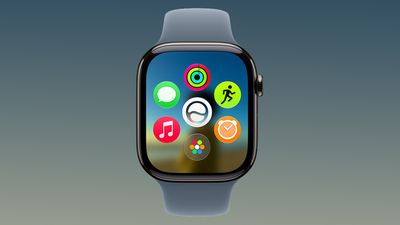
Apple today released watchOS 27.2, the first major update to the watchOS 27 operating system.
watchOS 27.2 can be downloaded through the Settings app on the watch or the Apple Watch app on a connected iPhone. Software can only be installed when the Apple Watch is on the charger and has over 50 percent battery.
According to Apple's release notes, watchOS 27.2 introduces new Siri AI features and extends Siri AI to new languages.
This update provides enhancements to Siri AI, including the ability to retain useful context from previous Siri interactions, draw from a wider range of personal context, and deliver faster responses on your watch. This update also includes other features, bug fixes, and security updates for your Apple Watch.
- Siri AI can recall your past conversations, so you can ask Siri about something it told you before, like the restaurants it recommended last week - Siri AI can draw from more sources to give you a great answer, including photos attached in Messages, Calendar event attendees, your voicemails, and better results from Safari history and Reading List from your phone - Excluded Apps lets you choose which apps Siri, Search, and suggestions can access, all from one setting on your phone - Siri AI now provides faster responses on Apple Watch - Siri AI is available in more languages, with support for French, Japanese, Korean, Portuguese, and Spanish. Siri AI is not available in the EU or mainland China
Siri AI is also faster than before, and can draw on more sources when offering up answers.
Apple today released new HomePod 27.2 software for the HomePod and HomePod mini.
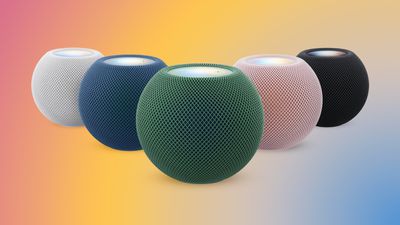
HomePod Software 27.2 brings a new Sound Glow option to the HomePod, HomePod mini, and upcoming HomePod mini 2. Sound Glow causes the top of a HomePod or HomePod mini to light up with color that pulses in sync with the music that's playing. The feature draws colors from album artwork, and it works with songs, podcasts, and Apple's ambient music feature.
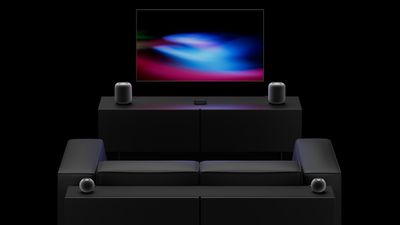
The update also adds support for using HomePods as the default speaker for a Mac, plus it allows four HomePods or HomePod mini 2 speakers to be used as surround sound for the new Apple TV. A new Lock Controls option disables tough interactions with the top of the HomePod. Apple's release notes are below.
HomePod software version 27.2 brings the new Sound Glow visual experience, home theater surround sound with Apple TV 4K (4th generation), and support for using HomePod speakers with your Mac, along with bug fixes and security updates for your HomePod.
- Sound Glow on HomePod mini, HomePod mini 2, and HomePod (2nd generation) turns the top of HomePod into a visual display that pulses and glows in sync with your media and shows matching light animations for soundscapes - Home theater surround sound supports connecting four HomePod speakers to Apple TV 4K (4th generation) for an immersive listening experience. Requires matching front and rear pairs of HomePod mini 2 or HomePod (2nd generation) - HomePod speakers with your Mac lets you set HomePod as the audio output for everything you do on your Mac, with a responsive and persistent AirPlay connection - Lock controls let you disable the touch controls on top of HomePod to prevent accidental taps from pausing music, skipping songs, or changing the volume
This update brings enhancements to the Apple Music, Podcasts, and AirPlay experiences on tvOS. It also brings captions to more content, adds the ability to block individual apps, and provides bug fixes and security updates for your Apple TV 4K.
HomePod software can be installed on the Home app on the iPhone, iPad, or Mac by tapping on the More button, choosing Home Settings, and then using the Software Update option. If automatic updates are turned on, the new HomePod software will be installed automatically.
The HomePod mini 2 is launching on Friday, October 30, while the new Apple TV 4K is coming out on November 13.
Apple today released tvOS 27.2, the first major update to the tvOS 27 operating system that runs on the Apple TV 4K.
tvOS 27.2 can be downloaded using the Settings app on the Apple TV. Open up Settings and go to System > Software Update to get the new software. Apple TV owners who have automatic software updates activated will be upgraded to tvOS 27.2 automatically.
Today's update adds support for four-speaker surround sound, a feature that works with the HomePod, HomePod mini 2, and the upcoming Apple TV 4K.
It allows the Apple TV 4K to be used with four HomePod mini 2 speakers, four second-generation HomePods, or two HomePods and two HomePod mini 2 speakers to get surround sound.
The HomePod mini 2 launches on October 30, while the fourth-generation Apple TV 4K will come out on November 13.
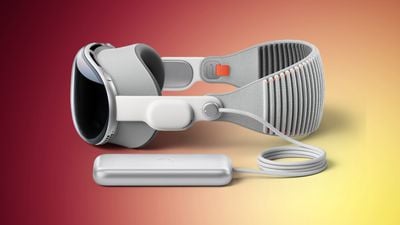
Apple today released visionOS 27.2, the first big update for the visionOS 27 operating system that runs on the Apple Vision Pro.
visionOS 27.2 can be downloaded by opening the Settings app, selecting the General section, and choosing Software Update. Installing the update requires the headset to be removed, and a progress bar appears on the EyeSight display.
The visionOS 27.2 update provides bug fixes and security updates, per Apple's release notes.
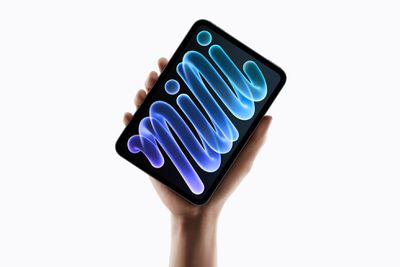
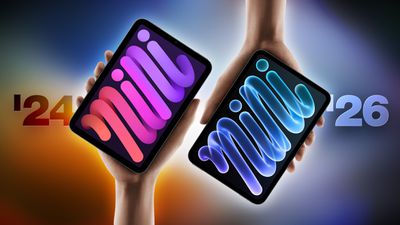
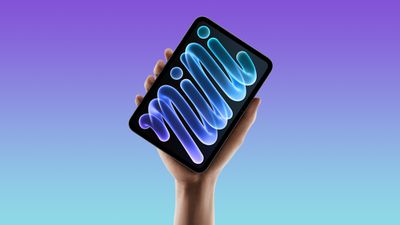
Apple today announced the eighth-generation iPad mini, introducing a larger OLED display, a thinner and lighter design, the A20 Pro chip, and water and dust resistance, but how much does it differ from the previous model?
The new iPad mini starts at $699 for the 128GB Wi-Fi model and $849 with cellular connectivity. With the prior generation now discontinued, buyers also face a choice between paying for the new features and finding a cheaper A17 Pro model. Both offer the same storage capacities, advertised battery life, Touch ID authentication, and USB-C transfer speeds, so the new model does not improve every aspect of the experience.
Here are the key differences between the iPad mini with the A17 Pro chip from 2024 and the iPad mini with the A20 Pro chip from 2026:
iPad mini (seventh generation, 2024)
iPad mini (eighth generation, 2026)
8.3-inch display
8.5-inch display
Liquid Retina display with LED backlighting and IPS technology
Super Retina XDR OLED display with 1-nit minimum brightness and 2,000,000:1 contrast ratio
2266-by-1488 resolution
2316-by-1512 resolution
Wider display borders
24% thinner display borders
500 nits maximum brightness
600 nits maximum SDR and full-screen HDR brightness; 1,200 nits peak HDR brightness
Optional nano-texture display glass on 256GB and 512GB models for an additional $100, supplied with a polishing cloth
Extended external display mode with iPadOS 27.2
IP67 water and dust resistance, rated for a maximum depth of 1 meter for up to 30 minutes
A17 Pro chip
A20 Pro chip, with CPU and Neural Engine configurations varying by storage capacity
Portrait front camera
Landscape front camera
Center Stage front camera with ƒ/2.4 aperture
Center Stage front camera with ƒ/2.0 aperture
True Tone rear flash
Adaptive True Tone rear flash
Landscape stereo speakers with external speaker holes
Acoustic Display with display-coupled woofers and concealed tweeters, without external speaker holes
Increased capacity, according to Apple; exact amount not yet known
Unified memory bandwidth
51.2 GB/s
115.2 GB/s
Apple also claims that the new model has the following maximum improvements over the previous model with the A17 Pro chip:
Up to 60% faster multithreaded CPU performance.
Up to 2.7 times faster graphics performance.
Up to 4.5 times faster AI performance.
Dimensions and Weight
iPad mini (seventh generation, 2024)
iPad mini (eighth generation, 2026)
Height
7.69 inches (195.4 mm)
7.69 inches (195.3 mm)
Width
5.3 inches (134.8 mm)
5.22 inches (132.6 mm)
Thickness
0.25 inch (6.3 mm)
0.21 inch (5.4 mm)
Weight (Wi-Fi)
0.65 pound (293 grams)
0.56 pound (255 grams)
Weight (Wi-Fi + Cellular)
0.66 pound (297 grams)
0.58 pound (263 grams)
The new model is approximately 14% thinner, with the Wi-Fi model approximately 13% lighter and the cellular model approximately 11% lighter.
Should You Upgrade?
Most A17 Pro iPad mini owners can comfortably keep their current device. The new model offers the same advertised battery life, storage capacities, Apple Pencil support, and USB-C transfer speeds. If your iPad mini still meets your needs, there is little reason to upgrade for everyday performance alone.
The slightly larger display now with OLED technology may be the strongest reason to consider replacing it, particularly if you frequently use your iPad mini for watching videos or reading. The thinner and lighter design may also make a worthwhile difference if you spend long periods holding it.
For users who regularly encounter distracting reflections or enjoy reading on their device, nano-texture glass could provide a more specific reason to upgrade. It does raise the cost considerably, since it requires at least 256GB of storage as well as the additional $100 display option.
The landscape camera, water resistance, and fast charging are useful additions, but are highly unlikely to justify replacing a A17 Pro model on their own. An upgrade makes more sense when several of these changes address things you find limiting about your current device.
Which Model Should You Buy?
For most new buyers, the A20 Pro model should be the starting point. The OLED display and new design are its main advantages, and both largely matter more to the everyday experience than the chip.
The A17 Pro model may still be worth considering when it offers substantial savings. It retains many of the same capabilities and remains a sensible choice for reading, browsing, taking notes, and watching videos, even if it uses the design of an older device.
For the A20 Pro model, it is important to remember that the 256GB version makes nano-texture glass available, while the 512GB version adds a CPU core and a second Neural Engine.
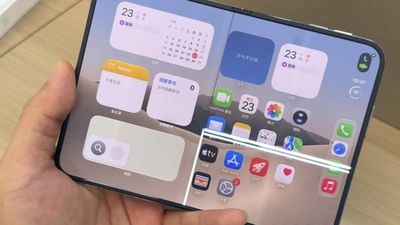
Shortly after the iPhone Duo launched, a few users reported hinge issues that were causing cracks in the inner display. Apple has now responded to the reports in a statement to MacRumors, saying a small number of units are affected.
The response to iPhone Duo from early users has been incredibly positive, and we are seeing exciting things from developers who are rapidly updating their apps to take advantage of its unique form factor. We are aware of an issue impacting the inner display on a small number of iPhone Duo units. If users experience issues with their iPhone Duo display, they should contact AppleCare for a replacement.
Apple did not say what causes the cracking, or if a fix is planned. Affected users have been able to get in-store replacements, though with limited stock available, some are having to wait.
According to Apple, the problem is limited in scope. Most users are not going to see an issue with their iPhone Duo display, and it's not a defect people have to worry about showing up over time. On affected units, the crack seems to show up shortly after purchase.
It is our understanding that some of the images of alleged cracking are AI-generated, which makes it harder to determine the actual scope of the problem.
Many of the iPhone Duos experiencing issues cracked in the same place on the lower half of the inner display. The crack is along the hinge, and users say there is a stuck feeling and sometimes a popping noise just before the damage appears.
iFixit took apart the iPhone Duo and found several possible causes for the hinge failure. The site said multiple components converge in that location, and it's possible a center support bar in the hinge that's supposed to retract isn't doing so, leading to damage.
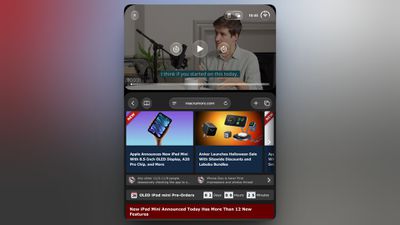
The iPhone Duo's two-app multitasking feature works side by side in landscape, but rotating the inner display to portrait usually drops you back to a single app. However, there is a workaround to keep a video playing above an open app in portrait, and it involves Picture in Picture.
Both the inner and outer displays on the iPhone Duo share the same 1:1.4 aspect ratio, and each half of the inner display works out to roughly the same size and shape as the outer screen. That even split gives each app a canvas it already has to support, with the divider sitting neatly on the fold. The only apparent exception to this is when watching a TV show or movie above another app in portrait mode – but there's a trick to getting it working.
With your iPhone Duo unfolded in portrait orientation, follow these steps:
Start playing a video in an app that supports Picture in Picture, such as Apple TV or Apple Podcasts.
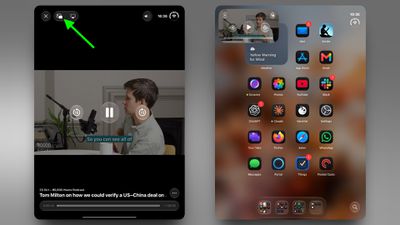
Tap the Picture in Picture icon to shrink the video into a floating window.
Swipe up to return to the Home Screen, then open the app you want to use (note: it can't be another video app).
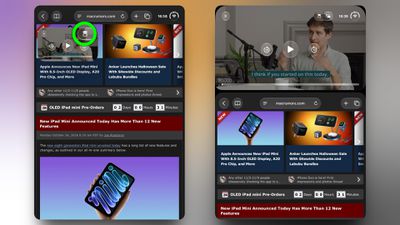
Tap the icon that appears in the PiP window to stack the video above the open app.
It's a bit of a fiddle, but it works for most apps that support PiP. Whether Apple makes it a little easier to do in a future update remains to be seen.
iOS 27.2 and iPadOS 27.2 enable Apple's clinical-grade Hearing Aid feature on the AirPods Pro 2 and AirPods Pro 3 in five Canadian provinces: Alberta, British Columbia, New Brunswick, Prince Edward Island, and Saskatchewan. The feature is still not available in any other provinces, but Ontario is reportedly set to hold a meeting to change a law that will pave the way for it to launch there, hopefully in the near future.
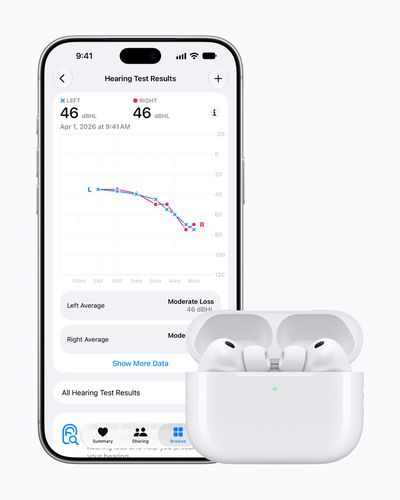
With the Hearing Aid feature, AirPods Pro 2 and later can amplify the sound around you. Available at no additional cost, Apple says the feature is intended for adults with perceived mild to moderate hearing loss. Apple said it is "working with" additional provinces to receive approval to offer this feature "as soon as possible."
Nearly one in five Canadians report hearing difficulties, according to Statistics Canada.
In its announcement, Apple said a related Hearing Test feature is available across Canada on AirPods Pro 2 and AirPods Pro 3 starting today. The five-minute test allows adults to identify if they have hearing loss by measuring their ability to hear different frequencies of sound, and it then provides recommended next steps if necessary.
The two features first launched in the U.S. and select other countries in October 2024.
A third Hearing Protection feature on AirPods Pro 2 and later was already available in Canada.
Larger, brighter, and more vivid 8.5-inch OLED display, up from 8.3-inch LCD display
↳ Up to 600 nits of SDR brightness, up from 500 nits ↳ Up to 1,200 nits of peak HDR brightness ↳ 60Hz still, no ProMotion
Anti-glare nano-texture display option for 256GB and 512GB models (+$100 upgrade)
Extended display mode support on external display (requires iPadOS 27.2)
Approximately 15% thinner and lighter
↳ 5.4mm thickness, down from 6.3mm ↳ 0.56-pound weight, down from 0.65 pounds (Wi-Fi-only model)
A20 Pro chip built with TSMC's 2nm process
↳ Up to 60% faster CPU performance ↳ Up to 2.7× faster GPU performance ↳ Up to 4.5× faster AI performance ↳ 5-core CPU, 7-core GPU, and 16-core Neural Engine (128GB and 256GB models) ↳ 6-core CPU, 7-core GPU, and dual 16-core Neural Engine (512GB model) ↳ Neural Accelerators in each GPU core
New Acoustic Display speaker system with no speaker holes
↳ This contributes to IP67-rated water and dust resistance
12-megapixel Center Stage is now positioned for landscape video calls, rather than usage in portrait orientation
Adaptive True Tone flash for improved photos and document scanning
Fast charging support: up to 50% in 30 minutes with a 35W or higher adapter
Apple's N1 chip with Wi-Fi 7 and Bluetooth 6, up from Wi-Fi 6E and Bluetooth 5.3
↳ N1 chip improves AirDrop and AirPlay performance and reliability
Apple's C2 modem with up to 50% faster cellular data speeds (cellular models)
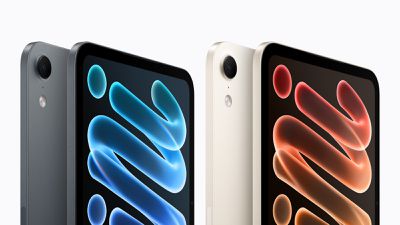
Two color options: Midnight and Starlight
$699 starting price in the U.S., up from $599
The new iPad mini has a similar overall design as the previous model. It retains a Touch ID button on the top edge of the device, a USB-C port, a 12-megapixel rear Wide camera, two microphones, and the same advertised battery life.
The new iPad mini can be pre-ordered starting Wednesday, October 28 at the very precise time of 10:10 a.m. Pacific Time, and it will begin arriving to customers and launch in Apple Stores and at select other retailers on Friday, November 6.
Every iPad category has gained value, although the increases are relatively modest. The iPad mini and standard iPad both rise by $20, while the iPad Air gains $15 and the iPad Pro increases by $10. The revised maximum estimates are as follows:
iPad Pro: $905 to $915
iPad Air: $510 to $525
iPad mini: $320 to $340
iPad: $280 to $300
The Mac sees substantially larger increases, led by the Mac Pro, which gains $365 after holding at $2,195 in the previous update. The Mac Studio rises by $240, while the MacBook Pro and MacBook Air gain $120 and $90, respectively:
MacBook Pro: $1,315 to $1,435
MacBook Air: $705 to $795
Mac mini: $620 to $645
Mac Studio: $1,460 to $1,700
iMac: $385 to $440
Mac Pro: $2,195 to $2,560
The iMac Pro is the only listed Mac category left unchanged, remaining at up to $340. All listed iPhone and Apple Watch trade-in estimates also remain at the values from September.
The increases continue a run of higher Mac trade-in estimates this year. The MacBook Pro's maximum value has more than doubled from $690 in May to $1,435, while the MacBook Air has risen from $520 to $795 over the same period.
Apple's listed values are maximum estimates, with final offers depending on a device's condition, year, and configuration. Trade-in credit can be applied toward a qualifying new purchase or added to an Apple Gift Card.
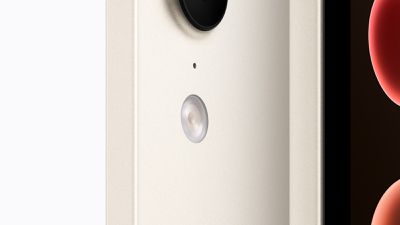
Apple's new iPad mini features an Adaptive True Tone flash, bringing an iPad Pro feature to Apple's smallest tablet for the first time.
Unlike the iPad Air, the previous-generation iPad mini already featured a True Tone flash. Apple says the new Adaptive True Tone flash on the iPad mini improves photography and document scanning. It sits alongside a 12-megapixel Wide rear camera with Smart HDR 4 and support for recording 4K video at up to 60 frames per second.
The Adaptive True Tone flash debuted on the iPhone 14 Pro and iPhone 14 Pro Max in 2022. It features an array of nine LEDs that adjust its lighting pattern and intensity according to the selected focal length, allowing illumination to better match the camera's field of view.
The technology subsequently came to the M4 iPad Pro in 2024, where Apple highlighted its ability to improve document scans. When the camera detects a document obscured by a shadow, the iPad Pro captures multiple images using the Adaptive Flash and combines them into a clearer scan.
The new iPad mini starts at $699. Pre-orders begin on Wednesday, October 28, with availability starting on Friday, November 6.
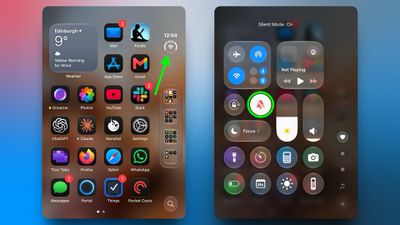
The new iPhone Duo drops both the classic Ring/Silent switch as well as the newer Action button, so there is no physical mute control on the device, and no way to assign the Silent Mode control to another button. That said, you can still silence the device pretty quickly – you just do it on-screen instead using a new way to invoke Control Center.
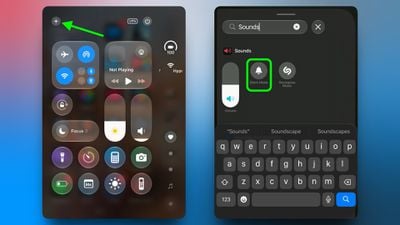
With your device unlocked, open Control Center by tapping the circular "status bar" icon, then tap the Silent Mode button (the bell icon). That's all there is to it.
A Silent mode indicator appears in the status bar while it's on, but you can hide this by toggling on the switch next to Settings ➝ Sounds & Haptics ➝ Show in Status Bar.
How to Add Silent Mode to Control Center
Silent Mode is included in the default set of controls at the top of the Control Center, but if you don't see it, you can add it manually by following these steps:
Tap the circular status bar icon to open Control Center.
Tap the plus (+) icon in the top-left corner, then tap Add a Control at the bottom of the screen.
Scroll down to the Sounds section or use the search bar to find it, then select Silent Mode.
Keep in mind that Silent Mode mutes calls and alerts, but alarms and media audio still play. For scheduled quiet time, you can always set up a Focus instead.
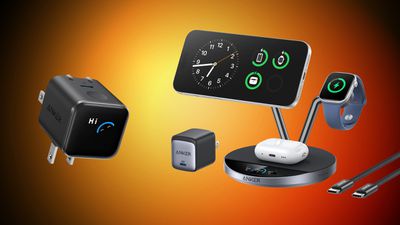
Anker today kicked off its annual Halloween sale, with big savings on the brand's most popular wireless chargers, docks, portable batteries, and more. This year, there's also a Labubu collab, where you can get a bundle of Anker accessories plus a Labubu blind box.
Note: MacRumors is an affiliate partner with some of these vendors. When you click a link and make a purchase, we may receive a small payment, which helps us keep the site running.
Anker has discounted a huge variety of accessories during this event, which is set to run through this Sunday, November 1. You can add an additional 20 percent off your order with the code HALLOWEEN20, which gets applied automatically to your cart.
Regarding the blind boxes, Anker is offering four boxes with various Anker accessories alongside Labubu blind boxes. This includes portable batteries, USB-C chargers, and MagSafe-compatible chargers, plus one Labubu blind box.
Shoppers should also remember that all of the prices below will be reflected once you add each item to your cart. Anker will apply the HALLOWEEN20 discount code automatically to your order, and you are able to purchase multiple accessories at once with this code.
If you're on the hunt for more discounts, be sure to visit our Apple Deals roundup where we recap the best Apple-related bargains of the past week.
Deals Newsletter
Interested in hearing more about the best deals you can find as we head into the holidays? You can sign up for our Deals Newsletter and we'll keep you updated so you don't miss the biggest deals of the season!
Apple's new iPad mini is fast-charge capable, but not with the adapter in the box. Apple's specifications say the device can reach up to a 50% charge in around 30 minutes when used with a USB-C power adapter capable of providing 35W or higher, but they are sold separately ($59) – the iPad mini comes with a 20W USB-C power adapter.
The new OLED-equipped iPad mini features an 18.9-watt-hour battery rated for up to 10 hours of web browsing or video. The new iPad mini starts at $699 for the Wi-Fi model, with pre-orders opening Wednesday, October 28, ahead of availability on Friday, November 6.
Apple today announced a TechWoven Smart Folio for the new iPad mini bringing its woven fabric to an iPad cover for the first time and replacing the previous, long-standing polyurethane design.
With no polyurethane alternative announced, the new iPad mini looks set to become the first iPad since the original model in 2010 to launch without an Apple polyurethane cover option. Apple introduced the material with the iPad 2's Smart Cover in 2011, continuing through subsequent iPad Smart Covers and Smart Folios until today.
The new accessory comes in Navy Blue and Taupe, complementing the iPad mini's Midnight and Starlight finishes. It costs $79 in the U.S., a $20 increase over the previous-generation Smart Folio.
Alongside the material change, Apple has redesigned the cover with a two-panel construction. It attaches magnetically to the iPad mini and offers an adjustable range of viewing angles, which Apple says provides a greater range of motion and new viewing angles, for enhanced versatility.
Pre-orders for the new Smart Folio begin on Wednesday, October 28, alongside the iPad mini, with availability starting on Friday, November 6.
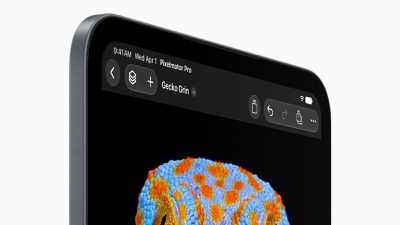
With the introduction of the new iPad mini, every model in Apple's current iPad lineup now features a landscape front-facing camera. The transition began with the 10th-generation iPad in 2022, followed by the M2iPad Air and M4 iPad Pro in 2024.
The iPad mini was the last remaining model with its front camera on the portrait edge. Situating the new 12-megapixel Center Stage camera along the landscape edge provides a more natural perspective for video calls when holding the device horizontally.
Apple today announced the first OLED iPad mini, and it carries a pretty hefty price increase compared to just a few years ago. The new model starts at $699, up $100 (or 17%) from the $599 starting price of the previous generation model.
It's hard to believe now, but the previous-generation iPad mini kept its $499 price in 2024 even when Apple doubled base storage to 128GB. But then earlier this year, Apple increased the starting price to $599 as part of sweeping price increases across its product line owing to memory and chip shortages.
The new model starts with the same 128GB of storage, so the $100 increase since June isn't offset by a capacity bump – but you do get an OLED display instead of LCD. Wi-Fi + Cellular models rise by the same $100, from $749 to $849, and education pricing starts at $649.
All that being said, the price hike is less than expectations from earlier this month, when the OLED iPad mini was rumored to cost $200 more than the current model.
The higher price accompanies the mini's biggest update in years, featuring that 8.5-inch OLED display, an A20 Pro chip, IP67 water and dust resistance, a new Acoustic Display speaker system, Apple's N1 wireless chip, as well as the C2 modem on cellular models. The color range though has narrowed from four finishes to two: Midnight and Starlight.
There's also a new TechWoven Smart Folio that costs $79, up from $59 for the previous Smart Folio. Pre-orders for the new iPad mini open Wednesday, October 28, with availability starting Friday, November 6.
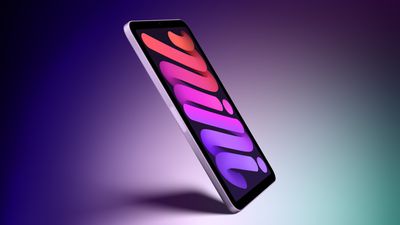
Apple's new iPad mini comes in just Midnight and Starlight, cutting the number of available finishes in half compared with the previous two generations.
The outgoing A17 Pro model, introduced in 2024, offered Blue, Purple, Starlight, and Space Gray. The new model drops both Blue and Purple, while Midnight replaces Space Gray as the darker option. Starlight is the only finish carried over. This marks the smallest selection of iPad mini color options since the second generation.
The change also marks a departure from the sixth-generation iPad mini, which launched in 2021 in Pink, Purple, Starlight, and Space Gray. That redesign introduced more colorful finishes to the lineup, with the 2024 refresh replacing Pink with Blue while retaining four choices.
The new TechWoven Smart Folio offers two additional color choices for the cover: Navy Blue and Taupe. Priced at $79, it features a two-panel design with adjustable viewing angles.
The new iPad mini starts at $699 for Wi-Fi models and $849 for Wi-Fi and Cellular models. Pre-orders begin on Wednesday, October 28, with availability starting on Friday, November 6.



 Note: MacRumors is an affiliate partner with some of these vendors. When you click a link and make a purchase, we may receive a small payment, which helps us keep the site running.
 Apple's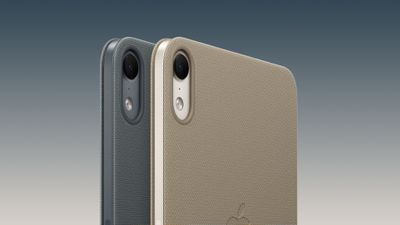
 With the introduction of the