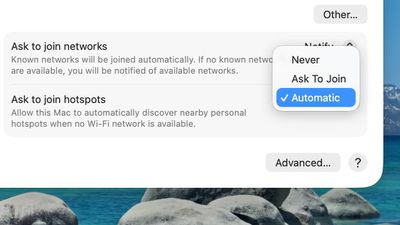
macOS Tahoe 26 includes support for automatically joining your iPhone's Personal Hotspot when no Wi-Fi network is available, so you no longer need to manually connect.
To set up automatic joining in macOS Tahoe, you can click on the Wi-Fi button in the menu bar or Control Center to open up Wi-Fi Settings. From there, scroll down to the bottom where it says "Ask to join hotspots" and click to select the Automatic option.
With Auto-Join Hotspot turned on, when your Mac doesn't have Wi-Fi available and is near an iPhone or iPad providing a Personal Hotspot, it will automatically attempt to join it.
Auto-Join works with Family Sharing, so you can set up your Mac to automatically connect to a family member's Personal Hotspot, or allow their Mac to automatically connect to yours.
Apple's long-rumored smart home hub will have an iMac G4-style design and a host of unique features, Bloomberg's Mark Gurman reports.
The smart home hub is said to feature a square 6-inch display, with variants that can be placed on a countertop or mounted on a wall. It features a single FaceTime camera on the front, with microphones and speakers in its connected base. Gurman described the...
Apple plans to introduce a series of new smart home products on Tuesday, October 13, according to Bloomberg's Mark Gurman.
Apple reportedly plans to debut its long-awaited smart home hub device, a new HomePod mini, and a new Apple TV on the date. The new HomePod mini and Apple TV are set to retain their existing designs, but tout faster chips to support Siri AI. The new HomePod mini will...
The iPhone Duo is reportedly facing production difficulties ahead of its October launch, with early output expected to be limited.
A person said to be close to Foxconn's supply chain told China's Jiemian News that final assembly yields for Apple's first foldable iPhone were only slightly above 60% as of September 17. The source said that, under Apple's current quality standards, it could...
Since my cell carrier has a strong signal, blazing fast speeds, and cheap prices, I no longer have a WiFi at home and exclusively use my hotspot.
It has been quite annoying to have to turn it on on the phone so frequently, so this is a much asked feature from me (via feedback app) (and no doubt many in my situation).
One question that I haven’t tested yet is that frequently I see my neighbor’s iPhone hotspot.
Does auto join any hotspot or only those it has been authenticated to like during manual join?
I think it must be the latter but ask out of an abundance of caution as I’m not keen (spoof hotspot for MIM attack?) on just attaching to any hotspot in the neighborhood, train or plane.
Since my cell carrier has a strong signal, blazing fast speeds, and cheap prices, I no longer have a WiFi at home and exclusively use my hotspot.
It has been quite annoying to have to turn it on on the phone so frequently, so this is a much asked feature from me (via feedback app) (and no doubt many in my situation).
One question that I haven’t tested yet is that frequently I see my neighbor’s iPhone hotspot.
Does auto join any hotspot or only those it has been authenticated to like during manual join?
I think it must be the latter but ask out of an abundance of caution as I’m not keen (spoof hotspot for MIM attack?) on just attaching to any hotspot in the neighborhood, train or plane.
I did the same and haven’t had a Wi-Fi router for a few years so this is welcome as I feel your pain in manually connecting.
You can forget networks so can set your neighbours phone to ignore. Also your Mac would need to know their hotspot password anyway which I assume you don’t have?
All kinds of useless stuff and you still can't resize the finder window and let it stay like that after a reboot. Simple, useful, and something that should be "allowed". But no, Apple knows best. Still can't do a basic click-through. Have to go and activate the window then you can start clicking. Still the "End" button on the keyboard won't take a blinking cursor to the end of a line. It scrolls down a full page as if that's even related when you're in the middle of typing anyway. Apple loves adding useless features to their os systems. Beyond crazy.
Apple's first foldable iPhone, with a book-style design featuring a 5.4-inch outer display and a 7.6-inch inner display with a minimal crease down the middle.