

Vivaldi 6.0 Web Browser Introduces Tab Workspaces and Custom Icons - MacRumorsOpen MenuShow RoundupsShow Forums menuVisit ForumsOpen Sidebar
Skip to Content

Vivaldi 6.0 Web Browser Introduces Tab Workspaces and Custom Icons

Vivaldi web browser this week pushed out its sixth major release, bringing a new Workspaces feature and custom icons and themes to the highly configurable Mac app.

vivaldi workspaces
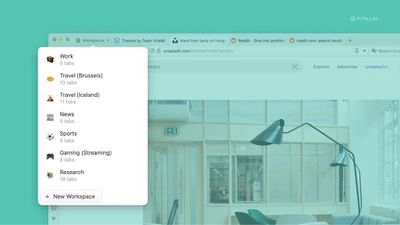
Similar in functionality to virtual desktops, the new Workspaces feature is designed to further enhance the browser's powerful tab management by letting users organize tabs by category into separate workspaces and switch easily between them.

For example, users can create Workspaces for productivity, social media, news, and shopping, and then open related tabs within those Workspaces, making it possible to flip between different sets of tabs and keep workflows organized.
vivaldi 6
Workspaces can also be used in conjunction with Tab Stacks (similar to Safari's Tab Groups). Vivaldi offers the example of maintaining a Sports workspace and having stacks for "Football," "Cricket," "Racing," and "Tennis" to sub-organize your tabs.

In addition, Workspaces support Vivaldi's Tab Tiling feature, allowing users to view multiple tabs in a split-screen or grid within workspace groups.


Elsewhere in Vivaldi 6.0, the browser's built-in theming tools have been upgraded to include new Custom Icons, which can be found in the Themes Gallery. With different icon packs now supported, users can create anything from a Windows 95-inspired look, complete with the familiar buttons and colors, to something more artistic with the Hand Drawn style.

Users can head to Settings -> Themes -> Create more Themes to get started, or use the new filter on the Themes page to see only themes with new custom icons.

Vivaldi browser 6 is a free download for Mac available directly from the Vivaldi website. The browser includes built-in tracking protection, innumerable tab tools, a translation feature, Chrome extensions support, and much more.


Tag: Vivaldi

Popular Stories

Four iPhone 18 Pro Colors Mock Feature

iPhone 18 Pro and iPhone Ultra: Pre-Orders and Release Date

Thursday July 30, 2026 6:12 am PDT by
Apple has yet to reveal when the iPhone 18 Pro and iPhone Ultra will be announced and released, but the dates usually follow a familiar pattern. Labor Day is September 7 this year. The last time the holiday fell on that day was in 2020, but the iPhone event that year was delayed until October due to the COVID-19 pandemic. So, the last time Labor Day was on September 7 in a normal year was in ...
Apple Event Logo

Apple Working on All-New Operating System

Wednesday July 29, 2026 11:39 am PDT by
Apple is developing an all-new operating system that is essentially a mix of tvOS, watchOS, and iOS, according to Bloomberg's Mark Gurman. In a report this week, he said the operating system will feature a grid of icons, widgets, and apps, along with customizable clock faces. The new software platform is intended for Apple's long-rumored smart home hub. With built-in facial recognition,...
Dynamic Island iPhone 18 Pro Feature

iPhone 18 Pro: Twelve Changes Coming to Apple's Next Flagship

Thursday July 30, 2026 3:43 am PDT by
We're less than two months out from the launch of Apple's premium next-generation smartphone lineup, and while we're not expecting a dramatic change in terms of functionality, there are still several enhancements rumored to be coming to the iPhone 18 Pro and iPhone 18 Pro Max. One thing worth noting is that Apple is reportedly planning a major change to its iPhone release cycle this year,...

Top Rated Comments

43 months ago
Been using Vivaldi as my work browser for a couple of years now. The tab stacking and tiling is perfect for working across many web pages at once (I need to have easy access to about 30-50 tabs split out into stacks according to projects and functions).

The degree to which you can customise the UI and it’s functionality is incredible. Nothing else comes close.


I don’t use it for my personal browser, but if it ever gets an iOS app release I’d definitely try it out to see if it could replace Safari.
Score: 2 Votes (Like | Disagree)
florida man Avatar
43 months ago
It’s already a great chrome replacement on Mac, but can’t quit chrome completely until it finally comes out for iOS. Wonder if they’re waiting for the WebKit requirement to go away.
Score: 2 Votes (Like | Disagree)
43 months ago
I prefer Arc's implementation of spaces and profiles, but this is a good alternative.


I report annoying CleanmyMac ads as spam.
Now all you need is a good adblocker!
Score: 1 Votes (Like | Disagree)
Verified Whiskey Avatar
43 months ago
Hmm. Maybe I need to try this out. My work requires me to have about 20+ tabs open at once, it would be nice to try out different tab management.
Score: 1 Votes (Like | Disagree)
43 months ago

Too janky for me.

I want to open browser, go to website, maybe 4 tabs at a time, close tabs when I am done, don’t want to waste CPU cycles.

I like clean UI but even more I like to use my systems cleanly.

That’s why my systems don’t slow down and I report annoying CleanmyMac ads as spam.
Congrats on your computing discipline.
Score: 1 Votes (Like | Disagree)

🔗 Related Apple News & Rumors

Stay updated with the latest Apple ecosystem news and verified rumors






































