

10 Settings to Check Out on Your New iPhone 14 Pro - MacRumorsOpen MenuShow RoundupsShow Forums menuVisit ForumsOpen Sidebar
Skip to Content

10 Settings to Check Out on Your New iPhone 14 Pro

If you were lucky enough to be gifted an iPhone 14 Pro or iPhone 14 Pro Max during the holidays, check out our list of 10 useful settings below. Even if you've already owned an iPhone 14 Pro for a few months, some of the settings may be new to you.
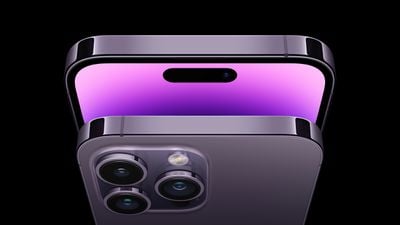
iphone 14 pro max deep purple
While some of the settings are exclusive to the iPhone 14 Pro models, others were introduced in iOS 16 for a wider range of iPhones.

New Settings for iPhone 14 Pro Models

Enable 48MP ProRAW Photos
iPhone 14 Pro Settings ProRAW
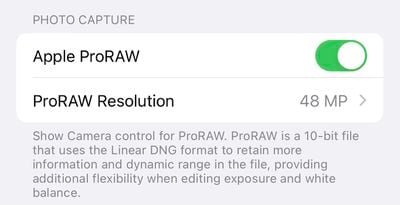
iPhone 14 Pro models feature an upgraded rear camera system that can shoot 48-megapixel photos, but only in ProRAW mode, which can be enabled in the Settings app under Camera → Formats → Apple ProRAW with the resolution set to 48MP. In the Camera app, a button labeled RAW will appear in the top-right corner to easily turn ProRAW on or off.

ProRAW photos retain more detail in the image file for more editing flexibility. 48-megapixel ProRAW photos are very large files that clock in at around 75MB each or higher, so be mindful of your iPhone's storage space if shooting photos in this mode.

Enable 4K Cinematic Mode
iPhone 14 Pro Settings 4K Cinematic Mode
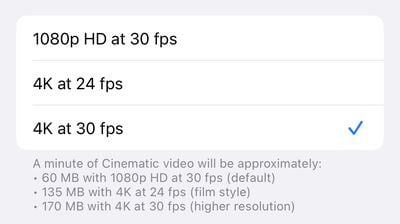
On all four iPhone 14 models, Cinematic mode videos can now be recorded in 4K. To enable the higher resolution in the Settings app, tap Camera → Record Cinematic and choose 4K at 24 frames per second or 4K at 30 frames per second.

Introduced with the iPhone 13 lineup, Cinematic mode features a depth effect with automatic focus changes for "cinema-style" videos.

Optimize Action Mode for Lower Light
iPhone 14 Pro Settings Action Mode Lower Light
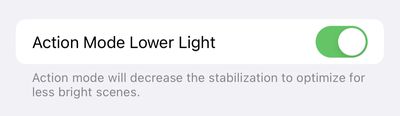
All four iPhone 14 models feature a new Action mode that adjusts to significant shakes, motion, and vibrations for smoother-looking video. Apple says the feature can be used to record video while off-roading in a vehicle, filming a runner, and more.

A button for Action mode can be found in the top-left corner of the Camera app for video. In the Settings app, Action mode can be optimized for lower-light conditions by navigating to Camera → Record Video → Action Mode Lower Light.

Turn On a Startup Sound


An optional new accessibility feature allows all iPhone 14 models to play a sound when powered on and powered off. The feature can be enabled in the Settings app under Accessibility → Audio/Visual → Power On & Off Sounds.

Turn Off the Always-On Display
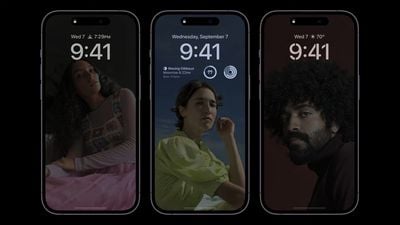
iphone 14 pro always on display
iPhone 14 Pro's new always-on display mode is enabled by default. It can be turned off in the Settings app under Display & Brightness → Always On.

Always-on display mode dims the entire Lock Screen, but still shows the time, date, widgets, wallpaper, and unread notifications. Once you raise the iPhone, tap or swipe up on the bottom of the screen, or press the side button, the display returns to normal brightness.

Starting with iOS 16.2, there are options to turn off the wallpaper and notifications for the always-on display.

New Settings in iOS 16

Turn On Haptic Feedback for Keyboard
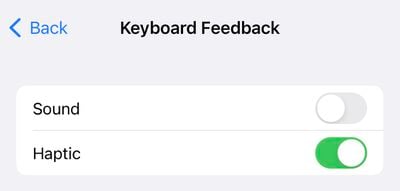
iPhone 14 Pro Settings Haptic Keyboard
iOS 16 added a new haptic feedback option for the iPhone's stock keyboard. Similar to many Android smartphones, the iPhone can make a slight vibration after each key that you press while typing, providing physical confirmation that the key was tapped.

In the Settings app, the feature is under Sounds & Haptics → Keyboard Feedback → Haptic.

Add a Battery Percentage Icon to Status Bar
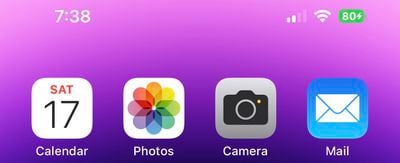
iPhone 14 Pro Settings Battery Icon
iOS 16 finally reintroduced the option to view a battery percentage icon in the status bar on the iPhone X and newer, eliminating the need to swipe down to open Control Center to see the percentage. To enable the new icon on iPhone 14 Pro models, open the Settings app and navigate to Battery → Battery Percentage.

Automatically Send Messages With Siri
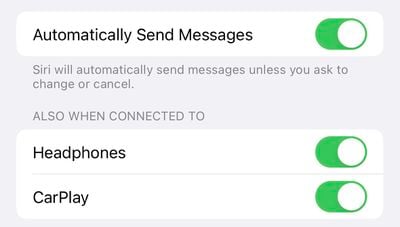
iPhone 14 Pro Settings Automatic Siri Messages
Siri normally asks for confirmation before sending a message to someone, but in iOS 16, there is a new option to skip the confirmation step. To enable this in the Settings app, tap Siri & Search → Automatically Send Messages.

The feature can also be enabled when an iPhone is connected to headphones or CarPlay.

Ask Siri to Hang Up a Phone Call
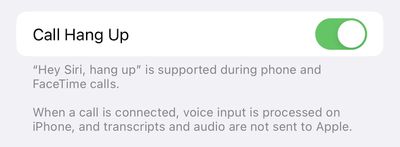
iPhone 14 Pro Siri Call Hang Up
With iOS 16, you can say "Hey Siri, hang up" during a phone call to end the call in a hands-free manner, but note that the command can be heard by others on the call. In the Settings app, this feature can be enabled under Siri & Search → Call Hang Up.

View Wi-Fi Passwords
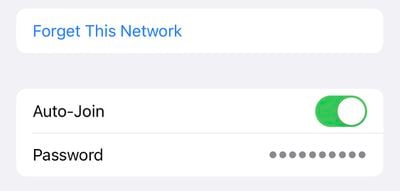
iPhone 14 Pro Settings Wi Fi Password
You can finally view the password of a Wi-Fi network that you have previously connected to on iOS 16. In the Settings app, tap Wi-Fi → tap a network → tap the password field and authenticate with Face ID to view the password.


Related Forums: iOS 16, iPhone

Popular Stories

Home Hub Command Center with Dome Base Feature

Apple Smart Home Hub to Feature iMac G4-Style Design

Wednesday September 30, 2026 4:36 am PDT by
Apple's long-rumored smart home hub will have an iMac G4-style design and a host of unique features, Bloomberg's Mark Gurman reports. The smart home hub is said to feature a square 6-inch display, with variants that can be placed on a countertop or mounted on a wall. It features a single FaceTime camera on the front, with microphones and speakers in its connected base. Gurman described the...
HomePod minis on gradient feature 1 1

Three New Apple Smart Home Products Coming on October 13

Wednesday September 30, 2026 4:04 am PDT by
Apple plans to introduce a series of new smart home products on Tuesday, October 13, according to Bloomberg's Mark Gurman. Apple reportedly plans to debut its long-awaited smart home hub device, a new HomePod mini, and a new Apple TV on the date. The new HomePod mini and Apple TV are set to retain their existing designs, but tout faster chips to support Siri AI. The new HomePod mini will...
iPhone Duo Open

iPhone Duo Reportedly Facing Production Problems Ahead of Launch

Tuesday September 29, 2026 6:16 am PDT by
The iPhone Duo is reportedly facing production difficulties ahead of its October launch, with early output expected to be limited. A person said to be close to Foxconn's supply chain told China's Jiemian News that final assembly yields for Apple's first foldable iPhone were only slightly above 60% as of September 17. The source said that, under Apple's current quality standards, it could...


Top Rated Comments

Runs For Fun Avatar
53 months ago

Ask Siri to Hang Up a Phone Call
Is this the new equivalent of slamming the phone on the receiver?
Score: 23 Votes (Like | Disagree)
antiprotest Avatar
53 months ago
Me: Hey Siri, hang up!

Mother-in-law: What? Who is Si-

Click
Score: 16 Votes (Like | Disagree)
Blowback Avatar
53 months ago


Before you buy your iPhone 14 Pro or iPhone 14 Pro Max, make sure you understand this deal breaker setting for the Pro model.
If I knew this I would've not purchased the iPhone 14 Pro.


Before you buy your iPhone 14 Pro or iPhone 14 Pro Max, make sure you understand this deal breaker setting for the Pro model.
If I knew this I would've not purchased the iPhone 14 Pro.
Can you be more explicit? Don’t understand the purpose of your screen shots….
Score: 14 Votes (Like | Disagree)
Small White Car Avatar
53 months ago

Not only do the 48 mega pixels ONLY work in Raw but they also ONLY work on ONE of the lenses.
Utterly lame.
Instead of giving us 48 mpx on all lenses and in JPEG....nope...Apple did it this way.
What a sorry bunch.
Wealthiest company in the world....

Would be nice to have the option for the camera save a regular auto processed 48 MP image as well. So you would have the choice of the regular 12 MP image, 48 MP and 48 MP ProRAW.
You are missing what apple is doing.

They are using 4 pixels to simulate a single pixel and use a bunch of computational math on them to eliminate noise and make the camera perform better than the hardware itself would allow.

You are basically asking for a mode to “make the camera worse” because you’d be turning off a lot of the algorithms that make the photos look the way they do.

No way Apple gives you a button to make the camera look worse.

The deal with RAW photos is there is the expectation that they’ll be processed in post, with a human being making decisions about to deal with noise and other settings on a manual case by case basis.

Giving full data to manipulate in post or algorithm-enhanced photos are both good options. A “middle” option would only serve to be the worst of both worlds.
Score: 10 Votes (Like | Disagree)
53 months ago

Is this the new equivalent of slamming the phone on the receiver?
Yeah, can you imagine the ego blow from hearing someone tell their digital assistant to hang up on you?

I would only use this in the case of being on hold for a long time “due to unusually high call volume”.
Score: 10 Votes (Like | Disagree)
Radeon85 Avatar
53 months ago
Would be nice to have the option for the camera save a regular auto processed 48 MP image as well. So you would have the choice of the regular 12 MP image, 48 MP and 48 MP ProRAW.
Score: 6 Votes (Like | Disagree)
Latest Stories
AT&T Acknowledges iPhone 18 Pro Max Issues: 'Update Immediately'
4 hours ago
New 'AirFly Drive' Accessory Turns Wired CarPlay Into Wireless CarPlay
10 hours ago
Apple Shares Photos Shot on iPhone Duo
11 hours ago
Apple Says iPhone Duo Has Replaceable 'Cover Layer'
12 hours ago
Apple's Smart Home Camera Will Apparently Have 'No Video Recording'
14 hours ago
Apple TV Just Updated Its Selection of 'Bonus' Movies
16 hours ago
iPhone 18 Pro Colors Buyer's Guide: Which Should You Choose?
16 hours ago
Early Prime Big Deal Days: Best Discounts on Accessories, TVs, and More at Amazon
16 hours ago
MacBook Pro With OLED Touch Screen Rumored to Launch in October or November
17 hours ago
Apple's All-New Home Hub Rumored to Launch in These Four Colors
18 hours ago
iPhone 18 Pro Aperture Control Goes Fully Manual in Halide 3.2
19 hours ago
Apple Stores Receive 'Do Not Open' Boxes Ahead of Smart Home Products Launch
20 hours ago
iPhone 18 Pro Sales Jump in China Ahead of iPhone Duo Launch
20 hours ago
Apple TV Still Down for Some Users Following Apple Services Outage
21 hours ago
PSA: Apple Mail on Mac May Stop Syncing Microsoft 365 Accounts Today
21 hours ago
Apple's Smart Home Hub: Everything We Know So Far
1 day ago
Apple's Home Hub Borrows From the iPhone Duo's StandBy Mode
1 day ago
Apple Invites App Updated With Three New Features
2 days ago
Apple Event on October 13?
2 days ago
Apple Watch SE 3 vs. Series 12 Buyer's Guide: Which Should You Buy?
2 days ago
iPad Mini 8 to Offer These 10 New Features
2 days ago
DoorDash Unveils AI Food Ordering Through Apple's Messages App
2 days ago
Amazon Takes Up to $150 Off Select M5 MacBook Air Models
2 days ago
Apple Still Plans to Release a New Full-Sized HomePod
2 days ago
Apple Working to Expand HomeKit
2 days ago
Apple Smart Home Hub to Feature iMac G4-Style Design
2 days ago
Three New Apple Smart Home Products Coming on October 13
2 days ago
Apple Pay Now Available in India With Axis Bank Cards
2 days ago
OpenAI Launches Always-On 'Dots' Agents to Rival Meta's Muse
2 days ago
AirPods 5 Teardown: Batteries Removable, Case Still Tough
2 days ago

🔗 Related Apple News & Rumors

Stay updated with the latest Apple ecosystem news and verified rumors






































